

Opis
Photo gallery and portfolio plugin for WordPress
★★★★★
Visual Portfolio is a WordPress gallery plugin built around gallery and portfolio blocks. Use it for photo galleries, image galleries, video galleries, and albums. Pick masonry, justified, tiles, grid, slider, or carousel layouts.
Zobacz demo na żywo | Dokumentacja | GitHub
Keep it simple with a basic image gallery, or go further with nested galleries, filterable portfolio grids, post grids, and taxonomy grids. Add images, choose a layout, then tweak skins and the lightbox. You do not need to write code.
🏆 Kreator galerii wizualnej
Build gallery and portfolio blocks without coding. Customize layouts visually with live preview in the editor.
Supported layouts: Masonry, Justified, Tiles, Grid, Slider, and Carousel. You get skins and the usual gallery controls in one place.
🚀 Zoptymalizowany, aby działać szybko jak natywnie
Mimo bogatej funkcjonalności, Wizualne portfolio jest zoptymalizowane tak, aby działało szybko i lekko.
Dzięki modułowej strukturze kodu, wszystkie skrypty i style są wczytywane tylko wtedy, gdy są potrzebne na bieżącej stronie wyświetlającej galerię. Dzięki temu Twoje strony nigdy nie wczytają nieużywanych funkcji.
Zdjęcia nie wczytują się w wątku głównym z powodu leniwego wczytywania. Co więcej, nasza wtyczka jest kompatybilna z zewnętrznymi dostawcami WebP i wtyczkami do optymalizacji obrazków.
Inteligentne, adaptacyjne rozmiary obrazków w pełni obsługiwane w dowolnej galerii, utworzonej za pomocą wtyczki Wizualnego portfolio.
📱 Układy
Nasza wtyczka do galerii jest dostarczana z popularnymi układami, takimi jak cegiełki i wyjustowany (Flickr). Każda funkcja jest zoptymalizowana i bezproblemowo współpracuje ze wszystkimi tymi układami – wystarczy ją skonfigurować i gotowe. Zobacz w akcji:
- Galeria cegiełkowa
- Galeria wyjustowana (Flickr)
- Galeria kafelków
- Galeria siatki
- Galeria pokazów slajdów (zanikanie, karuzela, przepływ okładki)
🎨 Gotowe skórki
Showcase your projects and gallery images with clean and beautiful skins. See it in action:
⚙️ Łatwa do dostosowania
Blok galerii z podglądem na żywo zawiera wiele ustawień projektowych, które działają w trybie „wskaż i kliknij”, bez konieczności znajomości kodowania. Jeśli masz ochotę na więcej, możesz skorzystać z własnego modułu CSS i filtrów PHP, które są skonfigurowane tak, aby były łatwe w użyciu dla programistów.
📁 Typ treści portfolio
Opcjonalny, własny typ treści portfolio zapewni, że wszystkie Twoje portfolio będą przechowywane w jednym typie treści. W ten sposób możesz odróżnić swoje portfolio od innych typów treści. Taksonomie służą do kategoryzowania typów portfolio, co ułatwia grupowanie i sortowanie. Co więcej, możesz wykorzystać te portfolio jako źródło dla swojej galerii prezentacji, korzystając z bloku Wizualnego portfolio.
Customize and rename Portfolio archive templates using the gallery block and page builders: https://www.visualportfolio.com/docs/portfolio-archive/
Jeśli chcesz używać wtyczki Wizualne portfolio wyłącznie do galerii zdjęć, możesz wyłączyć rejestrację własnego typu treści.
💎 Kreator zapytań wpisów
Fine-tune the source of your galleries. Display posts, portfolios, taxonomies, and any other post types, filter by taxonomies, author, and date ranges, include or exclude specific posts, and build post grids or taxonomy grids from the same workflow.
🖼️ Galerie zdjęć
Create galleries from image sets right inside the gallery block: drop your images in and the gallery is ready. You can create unlimited image galleries with different styles, build album galleries with nested galleries in Pro, and combine images with video items for richer visual storytelling.
⚡ Potężny Lightbox
Wziualne portfolio korzysta wyłącznie z nowoczesnych rozwiązań, a lightboxy nie są tu wyjątkiem. Wysoka wydajność, optymalizacja mobilna, obsługa wyświetlaczy Retina i szeroki wachlarz funkcji dostępnych we wtyczkach Fancybox i PhotoSwipe, które możesz wybrać do swoich lightboxów galerii.
Mobile Optimized
Looks great on every device. Swipe to navigate, spread/pinch to zoom in/out supported on touch devices.
GPU Accelerated
Hardware accelerated animations for better performance and seamless user experience.
Smart Loading
Gallery images are responsive and loaded progressively using lazy loading on demand.
Social Sharing
You can allow users to share photos on Facebook, X, and Pinterest with social sharing buttons.
📹 Wsparcie filmowe i 🎵 audio
Visual Portfolio plugin allows you to work with audios and videos within a single gallery. You can paste a supported video or audio URL and it will work automatically in the popup gallery. In Pro, you can also add dedicated video items directly to image galleries and post grids, including autoplay on open or playback on hover. The full list with supported vendors see below.
Obsługiwani dostawcy filmu:
- Youtube
- Vimeo
- Instagram (Reels, video posts and IGTV links)
- TikTok
- Twitch
- Film na Facebooku
- DailyMotion
- Wistia
- VideoPress
- TED
- Rutube
- Metacafe
- Coub
- Samodzielnie hostowany film
Obsługiwani dostawcy audio:
- Spotify
- SoundCloud
- Mixcloud
- Beatport
- Samodzielnie hostowane audio
📈 Przyjazna dla SEO
Wtyczka Wizualne portfolio została stworzona z myślą o SEO i wydajności poprzez zdefiniowanie odpowiedniej struktury i znaczników. Co więcej, dzięki optymalizacji, jest lekka i szybko wczytuje się na stronie.
Ponadto nasza wtyczka dodaje obrazki do mapy witryny dla wtyczek All In One SEO, Rank Math i Yoast SEO
🏳️ Wielojęzyczna i gotowa do tłumaczenia
Wizualne portfolio dodaje nową warstwę kompatybilności z WPML. Wszystkie bloki są z nim kompatybilne i gotowe do tłumaczenia. https://www.visualportfolio.com/docs/multilingual/
🛠 Stworzona dla programistów
Wizualne portfolio oferuje szeroki wachlarz filtrów i akcji, które pozwalają dostosować każdą część galerii. Umożliwia również nadpisywanie szablonów i ich modyfikację w katalogu motywów. Co więcej, możesz dostosować osobne listy portfolio za pomocą własnego CSS i zmiennych CSS.
Wizualne portfolio Pro
Wtyczka Wizualne portfolio jest również dostępna w wersji profesjonalnej, która oferuje więcej funkcji i lepszą wydajność! Dowiedz się więcej o Wizualnym portfolio Pro
Aby stale utrzymywać darmową wersję wtyczki i zapewniać szybkie i skuteczne wsparcie techniczne, oferujemy wersję Pro wtyczki. Wersja Pro umożliwia:
-
Video Items in Galleries and Post Grids
Add video items directly into image galleries and post grids, with autoplay on open or play on hover. -
Gallery Format and Albums
Display nested galleries and album-style content in image galleries, posts, and taxonomy grids. -
Taxonomies as Gallery Source
Build galleries directly from taxonomy terms, not only from posts or images. -
Zaawansowane ustawienia skórki
- Filtry obrazka i tryb mieszania – stosuj filtry podobne do tych z Instagrama na obrazkach w stanach Normalny i Najechanie
- Transformacje – kontroluj transformację obrazka i promień obramowania dla stanów Normalny i Najechanie
- Typografia – kontroluj każdą część tekstową podpisów i nakładek galerii
- Wymiary – kontroluje wypełnienia, marginesy i promień obramowania napisów i nakładek
-
Stylowe efekty interakcji
- Efekt najechania na obiekt
- Własny obrazek po najechaniu – przydatny w przypadku animowanych plików GIF
- Skórka przenoszenia podpisu
-
Kanały społecznościowe
Automatycznie pobieraj wpisy z sieci społecznościowych i wyświetlaj je w galerii na swojej stronie. -
- Watermarks – add your logo or text on top of your images, once or tiled across them, to make them harder to steal
- Formularz hasła – dodaj hasło do bloków galerii i wyślij je swoim klientom
- Brama wieku – Chroń odwiedzających przed oglądaniem treści dla dorosłych
-
Korekcja zdjęć
Komunikuj się z klientami w nowoczesny sposób:- Utwórz galerię próbną – Łatwo stwórz galerię ze zdjęciami, tak jak wcześniej. Zmień styl, układ itp., jeśli chcesz.
- Send to Clients – Share one gallery with one client or a hundred. Each client gets a personal link, their own selection and private notes on photos.
- Get Approval – Once a client sends their selection, you will be able to compare the picks of all clients and copy filenames for Lightroom or Capture One.
-
Zaawansowane akcje kliknięcia
Ręcznie skonfiguruj sposób otwierania określonych rodzajów elementów i filtruj kliknięcia według tytułu lub obrazka. -
Ustawienia punktów przerwania responsywności
Ręcznie kontroluj rozmiary ekranu, które są wykorzystywane przez funkcję automatycznej responsywności do dostosowywania układów galerii. -
Ulepszenia AJAX
Żądania są poprawnie buforowane, a odnośniki wstępnie wczytywane przed kliknięciem. -
Zaawansowane ustawienia zapytania
Filtruj według autora, zakresu dat, ignoruj wpisy przypięte, wykluczaj wpisy bez obrazka wyróżniającego i wiele więcej… -
Albums, Gallery Format, and Taxonomy Grids
Build nested gallery structures, output gallery format content, and create visual taxonomy grids from the same workflow. See the Taxonomies demo. -
Szybki podgląd wpisów i stron
Wyświetlaj wpisy i strony w wyskakującym okienku iframe, nie tylko galerie obrazków i filmów. To jak podgląd prac w Dribbble i Behance, ale na Twojej własnej stronie. -
Głębokie linkowanie do galerii wyskakującego okienka
Automatycznie zmienia adres URL po otwarciu wyskakującego okienka, dzięki czemu możesz łatwo połączyć się z konkretnym obrazkiem w wyskakującym okienku. -
White Label
Możliwość wykorzystania nazwy i logo Twojej marki zamiast naszego „Wizualnego portfolio”.
Odkryj jeszcze więcej funkcji portfolio i galerii w Wizualnym portfolio Pro już dziś!
🌟 Więcej funkcji
-
Lightboxy dla standardowych obrazków WordPress
Lightboxy dostępne są dla galerii Wizualnego portfolio, a także dla standardowych obrazków i galerii WordPress w Twoich treściach. -
Wczytywanie AJAX i stronicowanie
Każda dynamiczna część wtyczki Wizualnego portfolio wykorzystuje AJAX do aktualizacji treści galerii w trybie na żywo.
Uporządkowane galerie i listy portfolio sprawią, że Twoja witryna będzie wyglądać bardziej profesjonalnie, będzie łatwiejsza w nawigacji i zapewni lepsze wrażenia użytkownika. Przygotowaliśmy dla Ciebie 3 rodzaje stronicowania:- Nieskończone przewijanie
- Przycisk Wczytaj więcej
- Paginacja stronicowana
-
Filtruj
Filtruj swoją galerię i portfolio według taksonomii (głównie kategorii i znaczników). Pozwól użytkownikom wybrać kategorię i wyświetlić odpowiednie elementy. -
Sortuj elementy galerii według daty i tytułu
Użytkownicy mogą sortować elementy galerii według daty i tytułu. -
Obsługa plików GIF
Nasza wtyczka automatycznie wyświetla animowane pliki GIF w galeriach zdjęć. Możesz również wyświetlać animowane pliki GIF po najechaniu kursorem myszy, korzystając z wtyczki Pro. -
Elementy rynny
Ręcznie dostosuj odstępy między obrazkami w galerii a projektami. -
Leniwe wczytywanie obrazka
Leniwe wczytywanie obrazka przyspieszają wczytywanie strony. Nie musisz się tym martwić, po prostu użyj swoich pięknych obrazków w galerii, a Wizualne portfolio wykona całą pracę za Ciebie. -
Proporcje obrazu
Wszystkie wbudowane układy galerii obsługują własne proporcje obrazu. Nie musisz przycinać obrazka ręcznie. -
Punkt centralny obrazków
Czasami bardzo ważne jest określenie punktu centralnego, aby własny współczynnik proporcji nie ucinał ważnych części zdjęć, na przykład twarzy osób na zdjęciach portretowych. -
Własne odnośniki do obrazów w galerii
Domyślnie obrazki w galerii będą zawierać odnośniki do oryginalnych obrazków. Możesz ręcznie ustawić własne odnośniki, na przykład do strony internetowej lub filmu w serwisie YouTube. -
Obsługa RTL
Wizualne portfolio natywnie obsługuje języki RTL, a odpowiednie style są wczytywane automatycznie, bez konieczności interakcji z użytkownikiem. -
Wsparcie dla Elementora i WPBakery Page Builder
Dostępny jest przydatny widżet dla Elementora i krótki kod dla WPBakery Page Builder, które umożliwiają wybranie jednego z dostępnych zapisanych układów i wygenerowanie go. -
Responsywne i dostosowane do urządzeń mobilnych
Wizualne portfolio i galerie są w pełni responsywne i dostosowane do urządzeń mobilnych – układy automatycznie dostosowują się do rozmiaru ekranu. -
Niestandardowy CSS
Dokładnie dostosuj wygląd swojej galerii, korzystając z własnego CSS i zmiennych CSS. -
… I wiele więcej
Wszystkie dostępne funkcje znajdziesz na stronie wtyczki oraz w dokumentacji.
Zrzuty ekranu
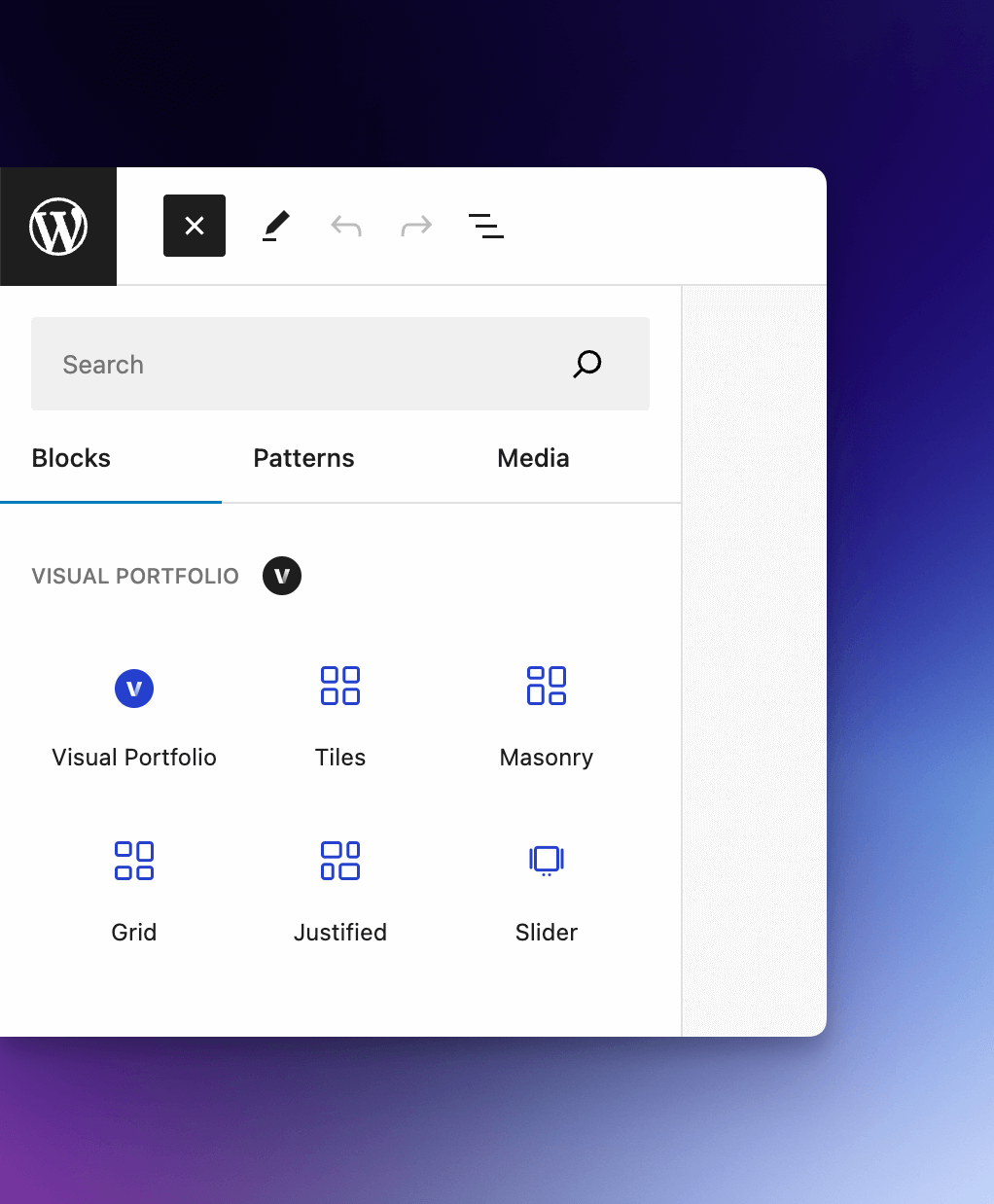
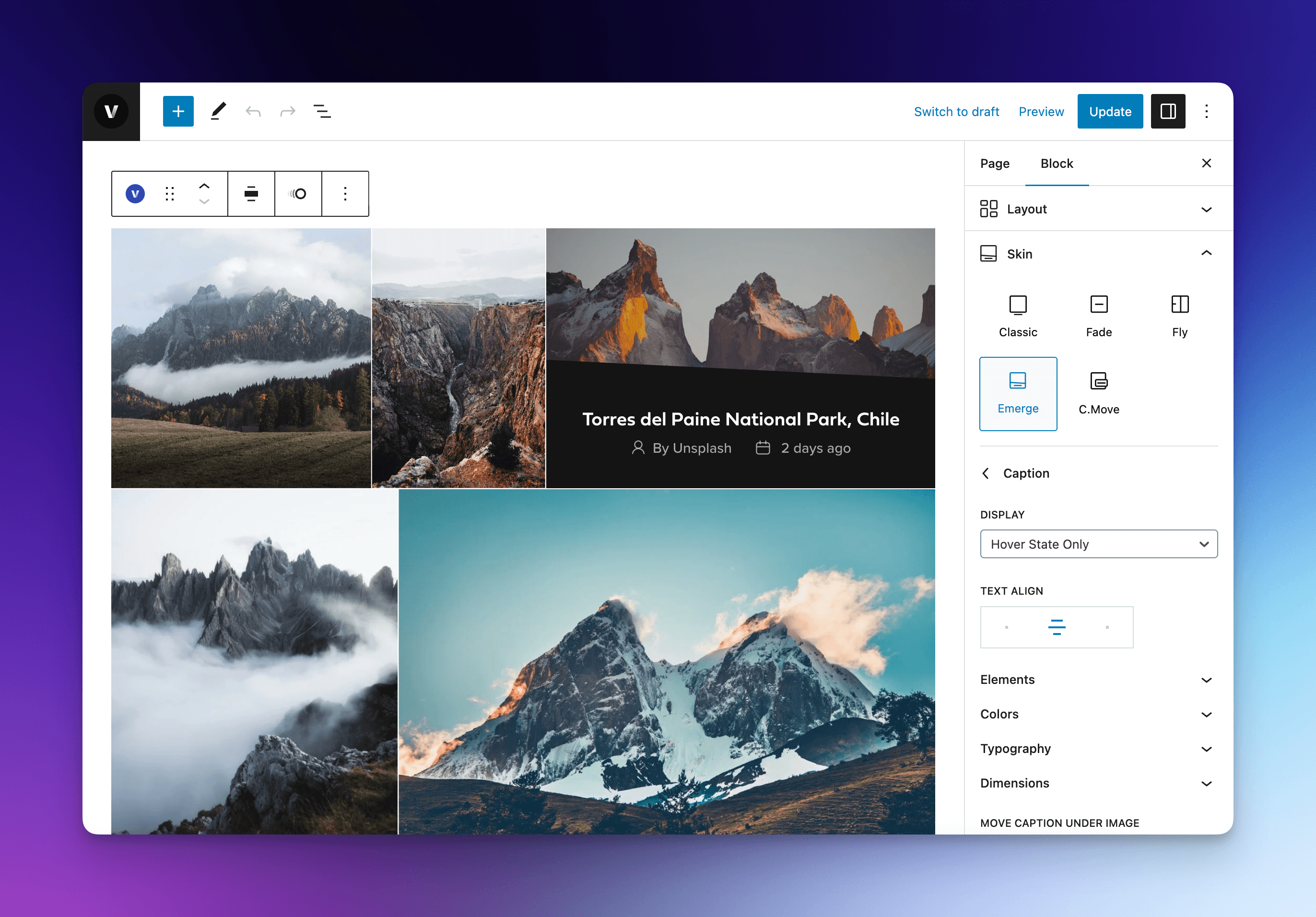

Instalacja
Instalacja automatyczna
Automatyczna instalacja to najłatwiejsza opcja, ponieważ WordPress sam obsługuje przesyłanie plików i nie musisz opuszczać przeglądarki internetowej. Aby przeprowadzić automatyczną instalację Wizualnego portfolio, zaloguj się do kokpitu WordPress, przejdź do menu Wtyczki i kliknij Dodaj nową.
W polu wyszukiwania wpisz „Visual Portfolio” i kliknij „Szukaj wtyczek”. Po znalezieniu naszej wtyczki możesz wyświetlić jej szczegółowe informacje, takie jak data wydania, ocena i opis. Co najważniejsze, możesz ją zainstalować, klikając „Zainstaluj teraz”.
Instalacja ręczna
Metoda instalacji ręcznej polega na pobraniu naszej wtyczki Wizualnego portfolio i przesłaniu jej na serwer WWW za pomocą ulubionej aplikacji FTP. Instrukcje, jak to zrobić, znajdziesz w kodeksie WordPressa tutaj.
Najczęściej zadawane pytania
-
Czy Wizualne portfolio ma dokumentację?
-
Tak, nasza wtyczka zawiera dokumentację, która ułatwia rozpoczęcie pracy z galeriami. Przeczytaj ją tutaj – Dokumentacja Wizualne portfolio
-
Jakie motywy obsługuje Wizualne portfolio?
-
Wizualne portfolio zostało przetestowane z wieloma motywami WordPress i obsługuje wszystkie najpopularniejsze motywy WordPress. Ponieważ postępujemy zgodnie z wytycznymi WordPress dotyczącymi tworzenia wtyczek, możesz mieć pewność, że galerie Wizualnego portfolio będą działać idealnie, niezależnie od używanego motywu. Jeśli zainstalowałeś Wizualne portfolio i napotykasz problemy, mogą one nie być spowodowane niezgodnością motywu. Skontaktuj się z zespołem wsparcia, otwierając zgłoszenie na naszym forum, a my rozwiążemy Twój problem.
-
Czy muszę usunąć inne wtyczki Galerii i Portfolio, jeśli zainstaluję Wizualne portfolio?
-
To jest zalecane. Wizualne portfolio zostało zaprojektowane jako wtyczka łącząca w sobie funkcje Galerii i Portfolio. Jeśli używasz innych wtyczek Galerii z Wizualnym portfolio na swojej witrynie internetowej, nie tylko negatywnie wpłynie to na wydajność witryny, ale obie wtyczki działające razem mogą powodować nieoczekiwane konflikty lub błędy.
-
Czy galerie są dostosowane do urządzeń mobilnych?
-
Tak, Wizualne portfolio zostało stworzone z myślą o optymalizacji urządzeń mobilnych. Automatycznie dopasuje się do rozmiaru Twojego ekranu, więc nie musisz się o to martwić. Co więcej, przygotowaliśmy funkcję leniwego wczytywania, która znacznie przyspiesza wczytywanie strony. Zanim podejmiesz decyzję, sprawdź sam, jak Wizualne portfolio działa na urządzeniach mobilnych.
-
Czy mogę przesłać wiele obrazków jednocześnie?
-
Tak, dzięki funkcjonalności multimedialnej WordPressa możesz przesyłać partiami całe galerie zdjęć na raz.
-
Czy galerie zdjęć mają podział na strony?
-
Tak, możesz użyć 3 typów stronicowania podczas wyświetlania galerii zdjęć lub wpisów. Wybierz liczbę wyświetlanych zdjęć i wybierz opcję „Strona”, „Wczytaj więcej” lub „Wczytywanie nieskończone”. Przykłady wszystkich typów stronicowania galerii są dostępne na stronie internetowej Wizualne portfolio.
-
Czy mogę filtrować obrazki i projekty według kategorii?
-
Tak, nasza wtyczka obsługuje filtrowanie AJAX według kategorii elementów. Zobacz kilka przykładów:
-
Czy mogę dodać odnośniki zewnętrzne do galerii?
-
Tak, możesz dodawać odnośniki zewnętrzne do elementów swojej galerii.
-
Czy programiści Wizualnego portfolio są przyjaźnie nastawieni?
-
Tak, przygotowaliśmy wiele filtrów i akcji dla programistów, dzięki czemu możesz łatwo rozszerzyć domyślną funkcjonalność, dostosowując ją do swoich potrzeb. Więcej informacji dla programistów znajdziesz tutaj.
-
Czy tłumaczenie Wizualnego portfolio jest gotowe?
-
Tak, Wizualne portfolio oferuje pełne wsparcie tłumaczeń i lokalizacji za pośrednictwem domeny tekstowej
visual-portfolio. Aby przesłać tłumaczenie, przejdź na stronę https://translate.wordpress.org/projects/wp-plugins/visual-portfolio/. -
Więcej informacji
-
Więcej informacji znajdziesz na oficjalnej stronie internetowej Wizualnego portfolio.
Recenzje


Kontrybutorzy i deweloperzy
„Gallery by Visual Portfolio” jest oprogramowaniem open source. Poniższe osoby miały wkład w rozwój wtyczki.
Zaangażowani

Wtyczka „Gallery by Visual Portfolio” została przetłumaczona na 4 języki. Podziękuj tłumaczom za ich wkład.
Przetłumacz wtyczkę “Gallery by Visual Portfolio” na swój język.
Interesuje cię rozwój wtyczki?
Przeglądaj kod, sprawdź repozytorium SVN lub czytaj dziennik rozwoju przez RSS.
Rejestr zmian
3.10.1 – Nov 10, 2026
- changed the WordPress.org changelog to show recent releases with a link to the full history
- Pro:
- fixed a critical error that could stop the plugin from loading when other plugins are active
- fixed text watermark previews having different dimensions from saved copies in some browsers
- fixed galleries added after page load not preloading their next page
3.10.0 – Nov 9, 2026
- improved the experimental Gallery Loop blocks:
- changed the start of a new gallery: add its images first, by upload, Media Library or a drop, then pick a layout from previews drawn with those images. Posts, Taxonomies and Social sit in an „Other sources” menu
- changed a new image gallery to show all its images on one page and open a picture larger
- changed „Change layout” in the toolbar to show on every loop with blocks. Picking a layout replaces the blocks, and undo works
- fixed a picked layout being locked behind „Edit pattern”
- fixed Item Cover leaving a gap on tall tiles
- fixed Query Total and the Carousel Indicator counter showing sample numbers in the editor
- fixed layout previews showing the No Results text, and nearly empty thumbnails in the inserter
- fixed Carousel Thumbnails ignoring a centered row on the page
- fixed an empty carousel showing its controls on the page
- fixed Infinite Scroll reloading without end and never adding a page, and a Load More beside it adding items already shown
- changed the General, Images and Popup & Lightbox settings to WordPress controls, with rarely changed settings in collapsed groups
- fixed Load More doing nothing after one failed request until the page was reloaded
- fixed the Fade, Fly and Emerge item styles taking two taps to open an item on iPhone and iPad
- fixed a custom portfolio base replaced with the site’s post name structure, which returned 404 on ordinary pages. The first request after the update corrects a saved base
- Pro:
- added a separate selection for each client to Photo Proofing:
- one gallery gives every client a personal link, their own selection, private notes on photos and a status
- new galleries start in this mode, and existing galleries keep one shared selection
- clients register with a name on the shared link, or you add them and send invitations
- a review window shows clients by status, one client’s picks, notes and history, and the votes of all who sent
- comments are hidden on these galleries, and notes replace them
- added filename copying for Lightroom, Capture One or one per line, and a CSV download, to Photo Proofing
- added an email for each submission or a daily digest, a copy for the client, and reminders that are each sent once, to Photo Proofing
- added an expiry date to proofing galleries
- changed the default of Copy Filenames on shared proofing galleries to the Lightroom format
- changed a new proofing gallery to ask for photos first, and for the selection mode before publishing
- removed the Activity tab from proofing galleries. Each client shows the moments that matter in one line
- fixed Copy Filenames copying only part of a selection when clicked before every photo had loaded
- fixed saving a proofing gallery from an editor opened earlier bringing back the client’s previous selection and status
- improved Watermarks:
- added the Text source, for a watermark made of your own text in the color you pick
- added the Tiled layout, which repeats the watermark over the whole image with an angle and gaps
- added a preview on photos from your Media Library that follows every change before you save
- added the progress of watermark generation to Settings, with Pause and Resume, and the status of each image to the Media Library and the gallery editor
- fixed watermarks not being generated in the background, including on hosts that block requests a site makes to itself
- fixed galleries showing incomplete watermarked copies while images were regenerated or after a failed run
- fixed the Opacity setting being ignored for a JPEG logo
- fixed watermarked copies saved in the wrong format on sites where WordPress converts image sizes to WebP
- fixed Remove Watermark in the Media Library reporting success while the copies stayed, and the Media Library buttons staying stuck after an error
- added the sync status of each social feed, with its item count and last sync, to the gallery editor and to the account cards in Settings
- changed the White Label, Updates and Social Feeds settings to WordPress controls, matching the free settings
- fixed Sync Now reporting success when a feed failed
- fixed social feeds syncing every 4 hours instead of every 2
- fixed Reconnect on Instagram filling a different account, and added Reconnect to Unsplash and Dribbble
- fixed classic Social galleries showing no items in the block editor
- fixed a deep link to a lightbox slide on a later page of a classic gallery opening the first slide or nothing
- fixed pagination refusing every later page after one page failed to preload, and a login or error page loading in place of gallery items
- fixed the Pause every setting of Infinite Scroll in the Gallery Loop counting pages loaded by a Load More beside it
- fixed the license link on the Updates page and other Pro settings links on sites with the Portfolio post type turned off
- fixed tilt, image effects and other Pro hover effects taking two taps to open an item on iPhone and iPad
3.9.0 – Oct 24, 2026
- added WordPress 7.2 compatibility
- raised the minimum PHP requirement to 8.3
- improved the experimental Gallery Loop blocks:
- added Carousel Navigation, Previous, Next, Indicator, Autoplay and Thumbnails blocks, placed anywhere inside the loop
- added Query Total and End of List blocks, and a Gallery Search block whose search comes with Pro
- added the Fade carousel effect, and carousel effects in browsers without scroll-driven animations
- added a pattern editor for the Tiles layout, with the old patterns kept as presets
- added Sticky posts, Authors, Formats and excluded terms to the Posts source
- added images by URL from outside the Media Library, and Crop and Replace in the image toolbar, to the Media source
- added the filter as a dropdown, the sort as links, row gaps, grid alignment, and tablet and phone column counts
- added the lightbox chosen in Settings, with its caption sources
- added transforms from the Gallery, Latest Posts and Query Loop blocks
- changed the blocks to print nothing below WordPress 7.1
- security fix: a custom query saved by a contributor could show other authors’ drafts
- improved block editor loading: the Custom CSS code editor loads only when it is opened, so the editor starts with about half the JavaScript
- changed the image picking buttons and the chosen image card to the WordPress 7.2 featured image style
- security fix: logged-in users without the needed role could search draft and private post titles, open the gallery preview, or run admin-only plugin requests
- security fix: custom CSS could close the tag it is printed in
- fixed custom CSS losing
&nesting,>selectors, rules wrapped in<style>tags and rules written after a closing style tag - fixed styles and carousels on right-to-left sites
- fixed the Media Settings panel showing empty thumbnails for galleries saved with image IDs only
- fixed the focal point control overlapping the image
- fixed the block editor preview breaking on galleries with a few hundred images
- fixed the welcome screen being skipped right after activation
- Pro:
- improved the experimental Gallery Loop blocks:
- added albums, image effects, tilt, caption move, hover media, video thumbnails, deep links, right-click protection, watermarks and Quick View
- added a marquee mode to the carousel autoplay
- added the Cover, Reveal, Warp, Drop and Stack carousel effects, with more transitions and rows
- added a tiles pattern of its own for tablets and phones
- added mixed social feeds
- fixed every page of a social or taxonomy loop showing the first page
- added a feed source picked in each social gallery, so one connection serves several galleries
- changed „Sync All Accounts” to „Sync Now”, which syncs the feeds galleries show
- added a link on the Updates page to where the license key is
- security fix: users without the needed role could activate the license, change watermark settings, list Facebook pages, search users by email, read album images of non-public content, rewrite an approved proofing selection, or use proofing on a password-protected gallery without its password
- fixed a deep link to a lightbox slide added by Load More opening nothing
- fixed a local video without a cover image showing as an empty item with a PHP warning
- fixed browsers keeping old Pro styles after an update
- fixed Facebook watch links, Instagram links without a trailing slash or with
_or-in their ID, and Twitch videos on sites with a port in the address not opening in the popup
3.8.2 – Sep 10, 2026
- fixed images with empty alt text being written with a valueless attribute, which SEO crawlers counted as missing alt text
- Pro:
- fixed Click Action set to Disabled still linking gallery items that carry an audio or a local video URL
- fixed one failed plugin update leaving the rest of the queue stalled until the page was reloaded
3.8.1 – Aug 31, 2026
- changed Visual Portfolio to stay active next to Visual Portfolio Pro instead of being deactivated
- fixed Pro gallery templates and styles being ignored on networks where Visual Portfolio and Visual Portfolio Pro are activated at different scopes
3.8.0 – Aug 26, 2026
- added Gallery Item blocks for building the item template inside the experimental Gallery Loop: Image, Title, Description, Date, Author, Categories, Read More, Cover and Meta
- added WordPress 7.1 compatibility
- improved gallery loading speed on portfolios with many images
- fixed Load More fetching the next page and adding nothing, on sites whose markup contains
<bodyinside inline CSS or JavaScript - fixed the block editor preview jumping while it resized
- fixed the Elementor widget preview rendering without its styles
- raised the minimum PHP requirement to 7.4
- Pro:
- added Gallery Loop support to every Pro source, so social streams, protected galleries and Pro layouts work inside the new blocks
- fixed YouTube video backgrounds asking some visitors to sign in before playing
3.7.1 – Jul 21, 2026
- fixed Fancybox afterShow callback arguments so popup listeners receive the gallery instance correctly
- Pro:
- fixed Load Next Pages not running in Fancybox lightbox
- fixed popup freeze when deep linking to slides loaded via Load Next Pages
- fixed N+ images counter flashing when navigating Fancybox slides
- fixed stale same-version Pro update notice after upgrade
3.7.0 – Jul 21, 2026
- added Item Excerpt as a popup title/description source
- added admin dashboard widgets — Portfolio Activity widget and portfolio count in At a Glance
- fixed editor preview under Cloudflare Rocket Loader (inline VPData marked as cfasync-safe)
- fixed block editor script loading when mod_substitute line limits truncated large scripts
- fixed asset enqueue errors when layout or items click action options are missing
- Pro:
- added Load Next Pages for popup galleries — automatically load the next page while browsing lightbox when Load More or Infinite pagination is used
- improved social video reliability — cache social videos locally and refresh expired Instagram CDN URLs
- fixed Item Excerpt popup caption source for album images
3.6.2 – Jun 9, 2026
- added custom alt text support for gallery items — override alt text per image in the editor
- updated popup share buttons: Twitter renamed to X, added LinkedIn
- show Saved Layouts shortcuts in the frontend admin bar for Portfolio Manager and other roles with Saved Layouts access
- fixed welcome screen redirect when Portfolio CPT is disabled
- fixed portfolio roles not being removed during plugin cleanup
- Pro:
- added configurable proofing labels (id/filename/title/description)
- improved Instagram business profile sync and cache profile avatars locally
- improved self-hosted video support for MOV and other formats
- use video featured image as gallery cover when no custom cover is set
- fixed video thumbnails disappearing after AJAX pagination
- fixed popup share buttons when deep linking is enabled
3.6.1 – May 5, 2026
- compatibility fixes for WordPress 6.9 and 7.0; tested up to 7.0
- improved drag-and-drop reordering in the editor (modernized implementation)
- refined editor and settings controls (fields aligned with WordPress components)
- fixed fatal error in the block editor when word count ran alongside certain content pagination plugins
- minor fixes and improvements
- Pro:
- improved PHP 8.4 compatibility
- fixed proofing gallery selection not persisting reliably
- fixed proofing status not updating correctly after the editor autosaves post meta
3.6.0 – Mar 23, 2026
- refined image settings in popup in image galleries – better fields and overall ux
- refined welcome screen
- improved featured image focal point on posts – setting hidden by default in collapse
- improve settings page: disable the Save Changes button when no changes are made
- fixed missing aria-label on overlay/item links with empty
<a>tags - fixed slider gap on RTL sites
- minor fixes and improvements
- Pro:
- added support for video items in image gallery and in post grids. Autoplay video on gallery item automatically or on hover https://www.visualportfolio.com/video-gallery/
- added Gallery format and albums (nested gallery) support for image galleries, posts and taxonomy grids https://www.visualportfolio.com/album-gallery/
- added support for displaying Taxonomies as gallery content source https://www.visualportfolio.com/taxonomies/
- improved social feeds fetching queue startup condition: start immediately when a new social integration is added
- fixed broken preview images in setup wizard skin examples
- fixed proofing gallery permalink 404 by deferred rewrite self-healing
- fixed the social feeds start queue trigger. Feeds now begin fetching as soon as the integration is added, and no longer depend on the block being added to the page
- fixed search feature does not work correctly with paginated pages
- fixed Social Items and Social Profiles menu items from displaying when no integrations are enabled
3.5.2 – Feb 18, 2026
- security: fixed local file inclusion via path traversal
3.5.1 – Feb 12, 2026
- updated supported WP version to 6.9
- added support for Blocksy settings in our Portfolio CPT
- drobne zmiany
3.5.0 – Feb 6, 2026
- improved performance by reducing database queries
- drobne zmiany
- Pro:
- !IMPORTANT: Google Photos integration completely removed
- !IMPORTANT: social integration migrated to custom post type. The system will automatically migrate your old social posts to the new system. This will take time because migration occurs in small portions.
- added ability to manage downloaded social posts in custom post type and images in Media library
- improved proofing feature:
- added possibility to reset proofing status
- added possibility to save selection before submitting
- added filter by selected/unselected
- added possibility to require minimum and maximum number of images for submission
- improve proofing actions bar – added number of selected and total number of images, added Save button, changed select/deselect links to checkbox
- improved performance in image galleries by removing redundant full option calls
3.4.1 – Nov 11, 2025
- fixed sticky posts appearing in Manual Selection posts source
- Pro:
- fixed option Ignore Sticky Posts incorrectly change output for Current Query and Custom Query posts sources
- fixed option Ignore Sticky Posts appear when Manual Selection posts source selected
3.4.0 – Nov 5, 2025
- added custom lightbox gallery support using
.vp-lightbox-galleryclass - added lightbox event support for third-party galleries. For example, JS events like
initFancyboxandbeforeInitPhotoSwipenow also fire on non-portfolio galleries - added SEO optimizations
- fixed register_script to use in_footer true by default, which we changed in recent plugin updates and broke some features, for example – iframe preview resizer
- fixed lazy loading conflict with WordPress Lightbox block
- fixed pattern context bug and posts query type handling (fixed issue with displaying block when WooCommerce installed)
- fixed RSS feed generation for portfolio archives
- fixed controls persistence and rendering in Saved Layouts
- fixed taxonomy filter counts to use actual query results
- fixed experimental filter block to work with nested loop blocks
- skip lazy loading from applying to images with fetchpriority=”high” attribute
- Pro:
- migrated VK to new api domain
- deprecated Google Photos integration
- fixed click action for custom image
- fixed updater api
3.3.16 – Jun 26, 2025
- started our way to transition to modern blocks. Added new experimental blocks:
- DON’T USE THESE BLOCKS ON PRODUCTION! Development is still in progress and we may break these blocks.
- Gallery Loop
- Filter by Category
- Pagination Wrapper
- Infinite
- Wczytaj więcej
- Next
- Previous
- Numbers
- Sort
- Pro:
- fixed proofing gallery hash links in comments
- drobne poprawki
3.3.15 – Jun 4, 2025
- fixed broken css and js urls for lazyload fallback (used in legacy browsers only)
- Pro:
- updated used X API to v2
- fixed Google Photos integration API errors
- fixed X integration caching issue
- fixed social integration download image resolution conversion during compression
- fixed click action for item with custom popup image
- fixed updater caching issue that sometimes caused Forbidden errors
3.3.14 – May 25, 2025
- przetestowane z WordPress 6.8
- fixed WPML error in Saved Layouts
- changed links from visualportfolio.co to www.visualportfolio.com
- rename Twitter to X
- Pro:
- migrate Pro plugin from Paddle to LemonSqueezy
- added support for affiliate links
- fixed _load_textdomain_just_in_time notice
3.3.13 – Mar 25, 2025
- fixed broken Swiper when installed Elementor 3.28
- fixed rare bug with displaying category links on archive pages
- Pro:
- added support for more Audio formats in popup Audio links (https://www.visualportfolio.com/docs/projects/project-formats/#supported-audio-platforms)
- added support for more Video formats in popup Video links (https://www.visualportfolio.com/docs/projects/project-formats/#supported-video-platforms)
- fixed wrong infinity scroll loading when permalinks set to Plain
- fixed GIF hover image reset when hovering on inner overlay elements
3.3.12 – Dec 20, 2024
- fixed order by Image Title when both Title Source and Description Source is set to None
- fixed Portfolio Manager role editing Saved Layouts when Project custom post type disabled
- fixed image selection popup in block editor JS error
3.3.11 – Dec 15, 2024
- added WP 6.7 compatibility
- fixed id attribute rendering
- fixed some styles in editor
- Pro:
- fixed Advanced Click Actions sometimes not properly displaying a Popup
- fixed title display error in popup caption
- fixed Instagram integration – you must reconnect to use the Instagram API instead of deprecated Instagram Basic Display API. Learn more: https://www.visualportfolio.com/docs/social-feeds/instagram/
3.3.10 – Sep 30, 2024
- fixed possible XSS via stored HTML and Fancybox script
3.3.9 – Jul 17, 2024
- fixed Sort by Date option not working correctly
- fixed PHP warning when image was removed from Media library but still exists in the gallery
- fixed WPRocket delay JS conflict with lazyloading
3.3.8 – May 29, 2024
- Pro:
- fixed click action on gallery items with a custom URL in saved layouts
3.3.7 – May 27, 2024
- fixed displaying date on gallery items
- fixed gallery images resets data in saved layouts
3.3.6 – May 16, 2024
- fixed DESC order for „Manual” and „Rand” image orders
- rename „Default” order to „Manual”
- Pro:
- fixed Hover CSS Filter styles loading if there is no Default CSS Filter provided
- fixed custom image URL in the gallery, applied from the first item to all other items
3.3.5 – May 15, 2024
- fixed PHP warning from
array_key_existsfunction - fixed wrong attribute output for select control with bool value
- fixed gallery sorting algorithm, now it should work correctly
3.3.4 – May 11, 2024
- fixed dynamic selector block options rendering on the frontend.
3.3.3 – May 11, 2024
- fixed custom title tag XSS vulnerability (properly escape the custom tag and prevent using non-predefined values)
3.3.2 – Apr 30, 2024
- add more sort options in image galleries: Item Title, Item Description, Image Title, Image Description, Image Caption, Image Alt
- improved image gallery sort code – images with empty field will be always placed after items with non-empty field
- fixed the behavior of the „All” filters link when the portfolio archive page set as the home page
- Pro:
- fixed Skin typography settings error in WP 6.5
- fixed image gallery non-working Hover and Custom Popup settings when you change it
- fixed horizontal thumbnails displaying in Fancybox
- fixed displaying Pro plugin settings opacity
3.3.1 – Mar 13, 2024
- added support for Download button in PhotoSwipe
- added Horizontal Order option to Masonry layout
- added support for lazy loading inside AJAX callbacks
- added support for WooCommerce images lazy loading
- improved block gallery images in editor – allow selecting images with shift key pressed
- changed Justified Row Height option minimum threshold to 20
- fixed gallery images in block editor Uncategorized filter
- fixed image blinking after filter in Masonry, Tiles and Grid layouts
- removed stagger delay from Masonry, Tiles and Grid layouts because it is not working properly in large galleries
- minor improvements
- Pro:
- fixed Overlay Under Image option in Emerge and Caption Move styles
3.2.4 – Feb 26, 2024
- added stagger delay for Masonry, Grid and Tiles layouts
- added proper horizontal order for Masonry layout
- added possibility to edit gallery images in bulk
- added gallery images filter by category in editor
- fixed Portfolio menu item name change when on Taxonomy archive page
- fixed duplicating Portfolio page after WordPress XML file import
- Pro:
- added Twitch avatar caching to fix missing link
- added possibility to add any block on Proofing pages
- fixed Grid vertical align option
- drobne poprawki
3.2.3 – Dec 12, 2023
- fixed displaying editor block when creating new Saved Layout
3.2.2 – Nov 29, 2023
- added support for asset file change time when enqueue without .asset.php – better support for caching plugins
- fixed Elementor preview stopped working
3.2.1 – Nov 29, 2023
- fixed Pro plugin path and url detection – now it should work correctly when Free plugin is removed
- fixed sitemap fatal error
Further changelog entries can be found in the CHANGELOG.md file.