

Opis
Twórz piękne i wciągające kursy online, lekcje i testy.
Sensei LMS to potężna wtyczka do zarządzania nauczaniem od Automattic, firmy stojącej za WordPress.com, WooCommerce i Jetpack. W Automattic używamy Sensei LMS do obsługi wszystkich naszych szkoleń dla pracowników.
Dziel się swoją wiedzą i ucz swobodnie z Sensei LMS!
Zaawansowane funkcje systemu LMS
- Zintegruj Sensei LMS z witryną WordPress bez żadnych problemów. Sensei LMS świetnie wygląda z każdym motywem i może być dostosowany do twojej marki i stylu.
- Twórz angażujące kursy za pomocą edytora bloków WordPress, w pełni wykorzystywanego przez darmowy motyw Course Sensei.
- Włącz Tryb nauki, aby cieszyć się wciągającą nauką bez rozpraszających czynników.
- Śledź postępy i wyniki uczniów za pomocą szczegółowych raportów.
- Osadzaj filmy z serwisów YouTube, Vimeo i VideoPress w kursach opartych na materiałach wideo.
- Dodaj blok „Lista kursów” do dowolnej strony lub wpisu, aby wyświetlić dostępne kursy.
Twórz skuteczne testy
Testy to świetny sposób na pogłębienie zrozumienia kluczowych pojęć przez uczniów i śledzenie ich postępów. Wybieraj spośród różnych rodzajów pytań i opcji testów, takich jak pytania wielokrotnego wyboru, pytania z lukami do wypełnienia, pytania typu prawda/fałsz, pytania otwarte, przesyłanie plików i wiele innych.
Zaprezentuj swoje kursy
Prześlij swój kurs do publicznej galerii kursów Sensei LMS pod adresem https://senseilms.com/showcase/. Galeria kursów Sensei LMS pozwala dotrzeć do nowych odbiorców i zwiększyć rozpoznawalność twojego kursu.
Odkryj możliwości Sensei Pro
Wykorzystaj w pełni potencjał swoich kursów dzięki Sensei Pro.
Integracja z WooCommerce: Ustal cenę i sprzedawaj kursy bez wysiłku, za pomocą zaledwie kilku kliknięć. Sensei Pro płynnie integruje się z rozszerzeniami WooCommerce Subscriptions, Payments, Memberships oraz Affiliates.
Planowane udostępnianie treści: Kontroluj tempo lekcji w swoich kursach, określając, kiedy uczniowie będą mieli dostęp do treści lekcji – w stałych odstępach czasu od rozpoczęcia kursu lub w określonym dniu.
Bloki interaktywne: Wzbogać swoje lekcje, strony lub wpisy o wciągające filmy, fiszki, aktywne obszary na obrazkach i listy zadań.
Rozszerzone funkcje testu: Ustaw licznik czasu testu i dodaj pytania testu z układaniem w kolejności. Dzięki Sensei LMS Pro możesz umieścić pojedyncze pytania testu w dowolnej treści WordPress, nie tylko dodawać je do testów.
Łatwe tworzenie grup i kohort: Podziel uczniów na grupy i kohorty, żeby zarządzać dostępem i dostosowywać proces nauczania.
Okresy dostępu do kursów: Określ datę rozpoczęcia, datę zakończenia lub czas, przez jaki kursy będą dostępne dla uczniów.
Treści warunkowe: Spersonalizuj ścieżkę nauki, ukrywając lub wyświetlając lekcje i treści w zależności od grup, statusu zapisów i daty.
Pomoc techniczna z priorytetową obsługą: Nasz zespół doświadczonych i przyjaznych inżynierów jest zawsze gotowy służyć pomocą i zadbać o twój sukces!
Fiszki: Dodaj tekst, filmy, obrazki, elementy osadzone i nie tylko po obu stronach bloku „Fiszki”.
Współprowadzący: Udostępnij uprawnienia do kursu współprowadzącym, którzy będą mogli edytować ustawienia kursu, lekcje i testy.
Dowiedz się więcej o Sensei Pro.
Bezpłatne rozszerzenia
Certyfikaty: Automatycznie generuj ładne certyfikaty w formacie PDF, które uczniowie mogą pobrać po ukończeniu kursu.
Dowiedz się więcej o Sensei LMS Certificates.
Post To Course Creator: Twórz kursy błyskawicznie, przekształcając istniejące wpisy na blogu w lekcje kursu za pomocą zaledwie kilku kliknięć.
Zrzuty ekranu
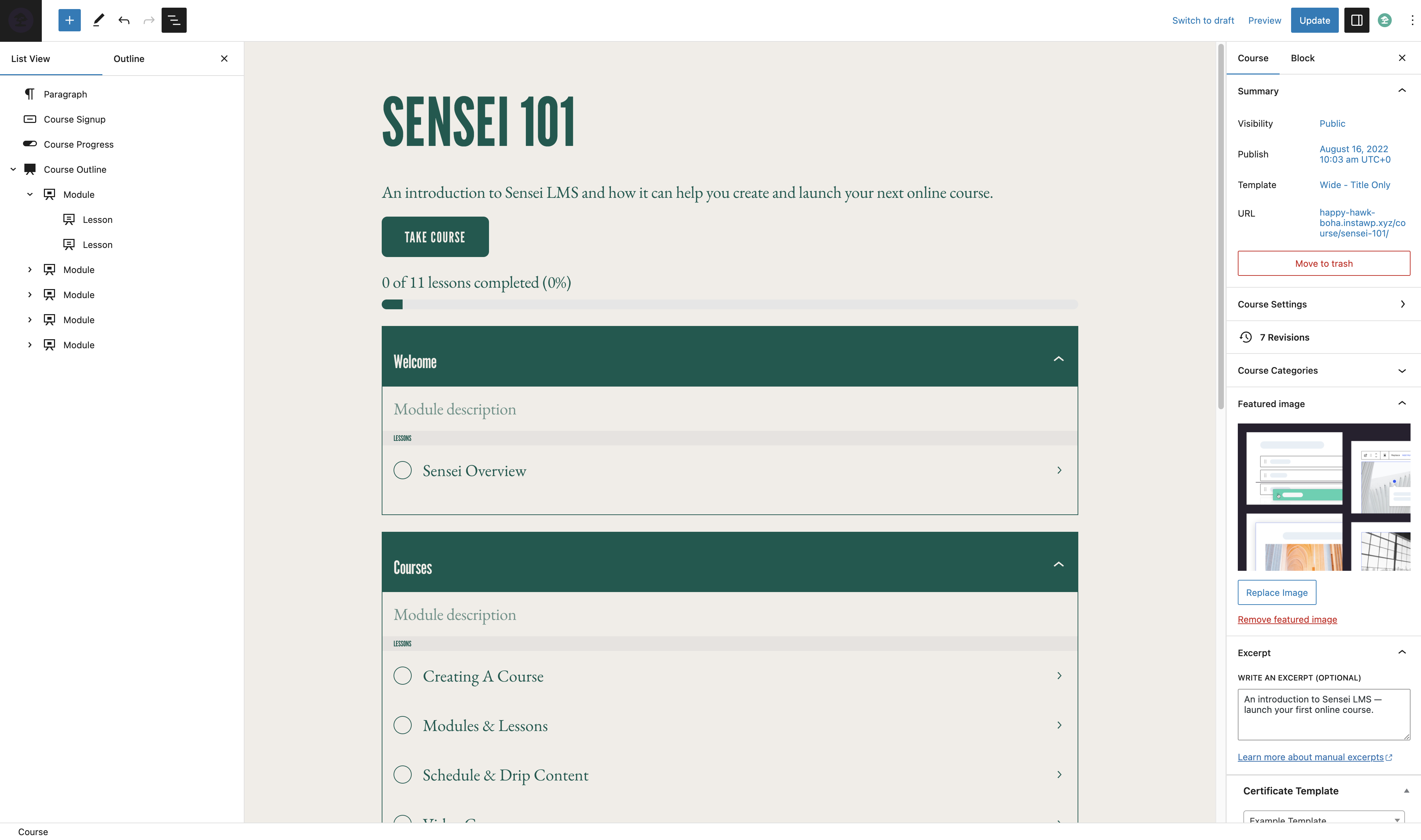
Edytor kursu 
Edytor lekcji 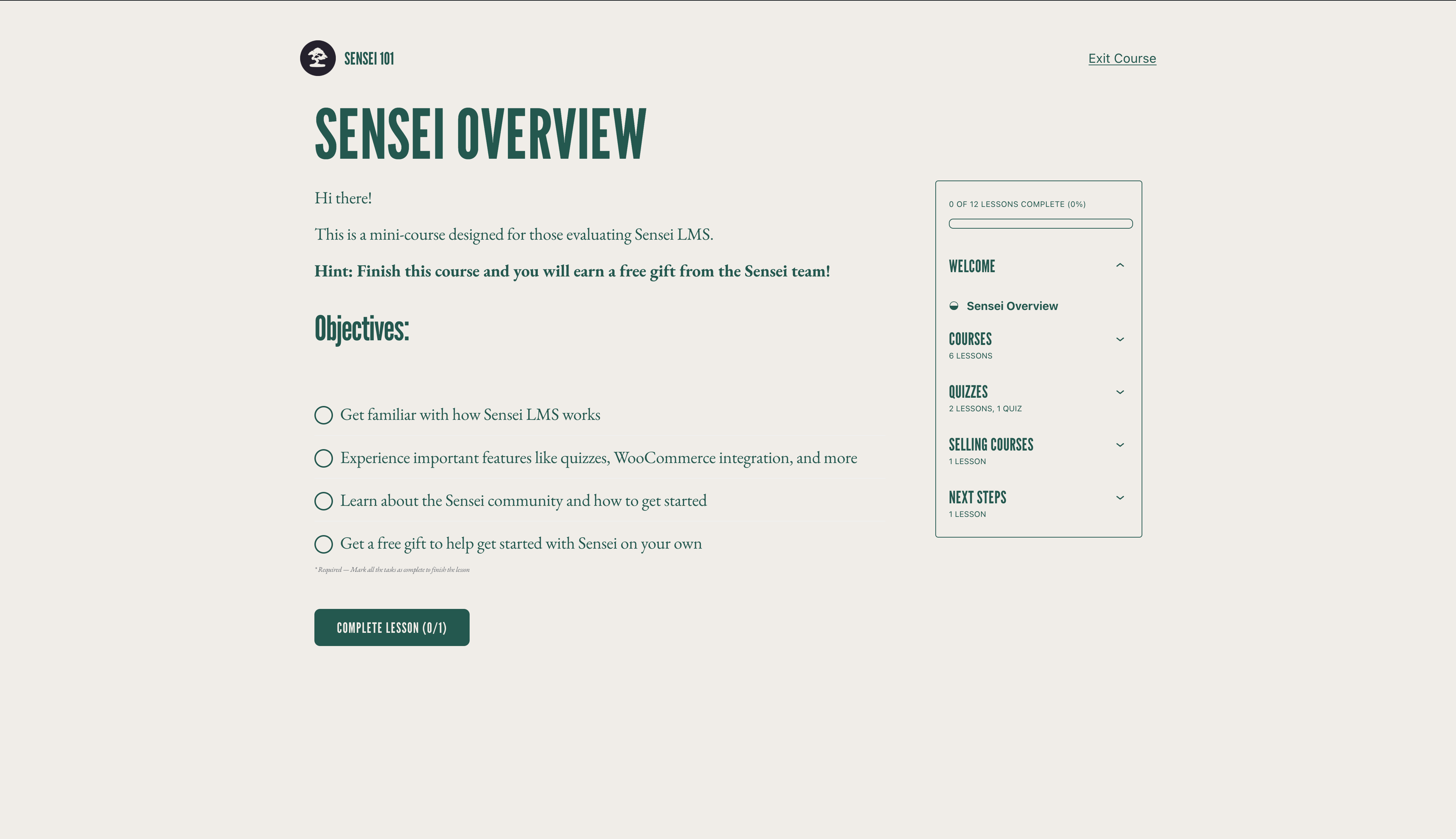
Tryb nauki 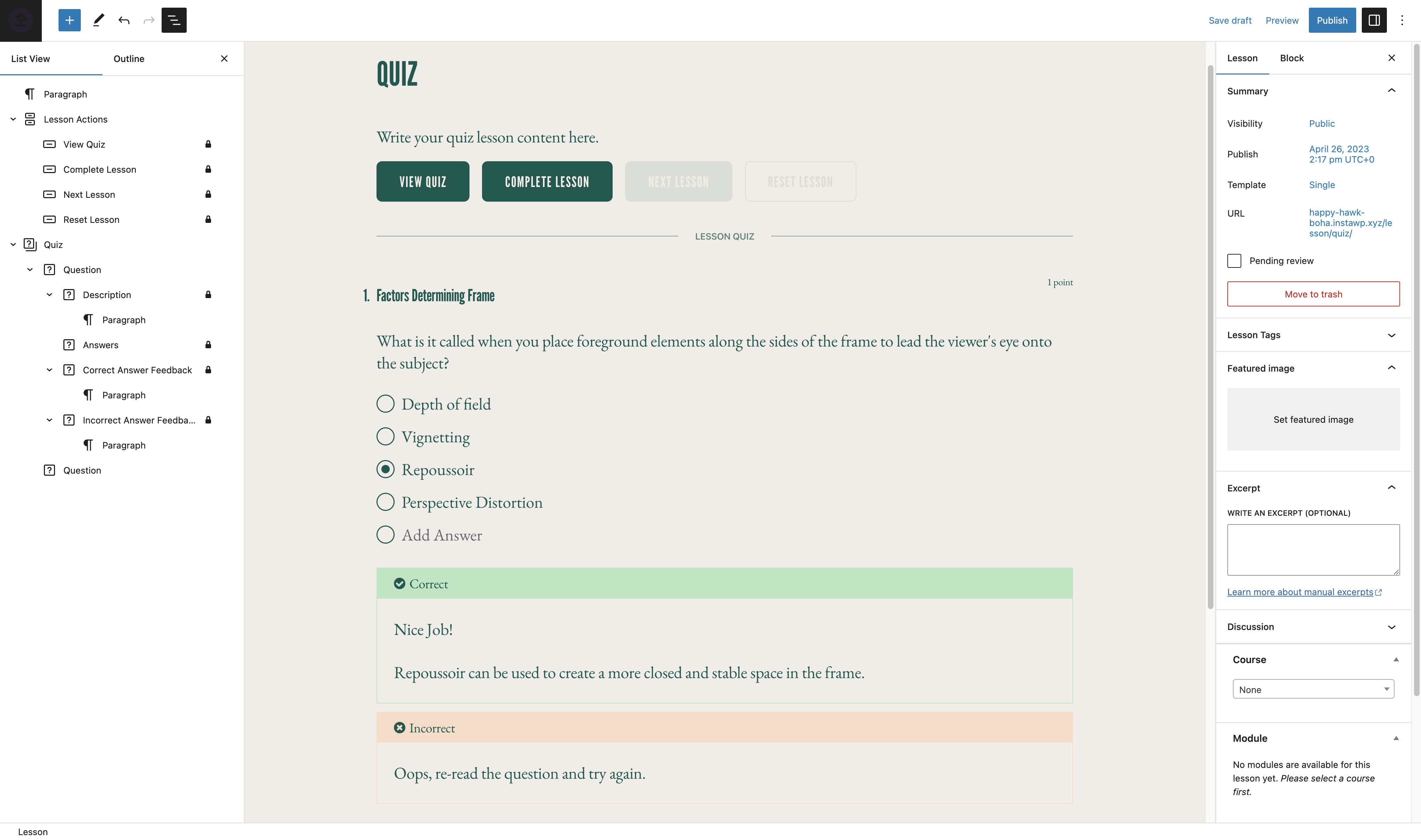
Edytor testu
Bloki
Wtyczka dodaje 14 bloków.
- Student Courses Manage what students see on their dashboard. This block is only displayed to logged in students.
- Course Results Show course results to students on the course completion page.
- Course Outline Manage your Sensei LMS course outline.
- Featured Video Add a featured video to your lesson to highlight the video and make use of our video templates.
- Course Actions Enable a student to perform specific actions for a course.
- Conditional Content Content inside this block will be shown to the selected subgroup of users.
- Lesson Properties Add lesson properties such as length and difficulty.
- Lesson Actions Enable a student to perform specific actions for a lesson.
- Course Title
- Course Theme Lesson Module
- Exit Course
- Module Group related lessons together.
- Lesson Where your course content lives.
- Category Question Pull questions from a question category.
Instalacja
Instalacja automatyczna
- Zaloguj się do panelu administracyjnego WordPressa i przejdź do Wtyczki > Dodaj nową.
- Wpisz „Sensei LMS” w polu wyszukiwania.
- Gdy już znajdziesz wtyczkę, kliknij Zainstaluj teraz.
- Kliknij Włącz.
- Skonfiguruj ustawienia, przechodząc do Sensei LMS > Ustawienia.
Instalacja ręczna
- Pobierz plik wtyczki na swój komputer i rozpakuj go.
- Za pomocą programu do FTP lub panelu hostingowego, proszę wgrać rozpakowany katalog z wtyczką do zainstalowanego WordPressa do katalogu:
wp-content/plugins/. - Zaloguj się do panelu administracyjnego WordPress i włącz wtyczkę z menu Wtyczki.
- Skonfiguruj ustawienia, przechodząc do Sensei LMS > Ustawienia.
Najczęściej zadawane pytania
-
Gdzie mogę uzyskać pomoc dotyczącą Sensei LMS?
-
Jeśli korzystasz z darmowej wtyczki, w razie jakichkolwiek pytań zapraszamy na forum pomocy technicznej. Regularnie sprawdzamy forum i odpowiadamy tak szybko, jak to możliwe.
Możesz również sprawdzić dokumentację na naszej witrynie, aby znaleźć przewodniki, poradniki i inne przydatne informacje.
-
Gdzie mogę zgłaszać błędy lub proponować ulepszenia do wtyczki?
-
Sensei jest rozwijany publicznie na GitHubie. Zachęcamy każdego do zgłaszania błędów, wysyłania pull requestów i śledzenia naszych postępów.
-
Czy Sensei współpracuje z wtyczkami do zarządzania członkostwem?
-
Sensei LMS można używać w połączeniu z Sensei Pro i WooCommerce Memberships, aby włączyć sprzedaż kursów jako część planu członkowskiego. Zobacz Sprzedaż kursów jako członkostwo po więcej szczegółów.
-
Jak mogę być na bieżąco z nowymi wydaniami i ogłoszeniami dotyczącymi Sensei LMS?
-
Przejdź na blog Sensei lub zapisz się na naszą listę mailingową.
-
Jak mogę dodać swoje kursy do galerii Sensei LMS?
-
Aby dowiedzieć się, jak zgłosić kurs do galerii Sensei LMS oraz poznać wymagania, zajrzyj do naszej dokumentacji dotyczącej galerii kursów.
-
Czy Sensei obsługuje kursy na żywo, integrację z Zoomem lub webinaria?
-
Tak! Możesz dodawać odnośniki do Zoom, Google Meet lub jakiejkolwiek innej platformy, którą wybierzesz, w lekcji kursu. Dodatkowo, Sensei zawiera układ lekcji spotkania, który możesz wybrać podczas tworzenia nowej lekcji, aby ułatwić to zadanie.
-
Czy Sensei działa w WordPress Multisite?
-
Sensei LMS działa świetnie w WordPress Multisite. Chociaż licencja Sensei Pro obejmuje tylko jedną witrynę, plan Sensei Agency pozwala na aktywację Sensei Pro na maksymalnie 20 witrynach. Jeśli używasz lub planujesz używać Sensei Pro na Multisite z więcej niż 20 witrynami, prosimy o kontakt aby uzyskać indywidualną wycenę.
-
Jak mogę sprzedawać kursy w ramach członkostwa?
-
Sensei LMS jest zgodny z Sensei Pro i WooCommerce Memberships, co umożliwia sprzedaż kursów jako część planu członkowskiego.
Zobacz artykuł sprzedaż kursów w formie członkostwa aby uzyskać więcej szczegółów.
-
Czy Sensei działa w moim języku?
-
Członkowie społeczności przetłumaczyli darmową wtyczkę Sensei LMS na 18 języków, podczas gdy Sensei Pro został profesjonalnie przetłumaczony na 16 języków. Zachęcamy do wkładu w celu dalszej poprawy.
Recenzje


Kontrybutorzy i deweloperzy
„Sensei LMS – Kursy online, testy i nauka” jest oprogramowaniem open source. Poniższe osoby miały wkład w rozwój wtyczki.
Zaangażowani


Wtyczka „Sensei LMS – Kursy online, testy i nauka” została przetłumaczona na 27 języków. Podziękuj tłumaczom za ich wkład.
Przetłumacz wtyczkę “Sensei LMS – Kursy online, testy i nauka” na swój język.
Interesuje cię rozwój wtyczki?
Przeglądaj kod, sprawdź repozytorium SVN lub czytaj dziennik rozwoju przez RSS.
Rejestr zmian
4.25.2 – 2025-12-16
Security
- Fix XSS vulnerability in the Contact Teacher block
Removed
- Remove „new” badge from Appearance settings tab #7874
Fixed
- Allow multiple choice quiz questions with no wrong answers #7872
- Fix Course List pattern not working with newest Gutenberg #7876
- Fix error when activating MailPoet #7864
- Fix lesson comments being visible to unregistered users in some cases #7848
- Fix reports screen times out on larger sites #7859
- Fix the course structure API exposing the lesson AI generated bootstrap text #7869
- Prevent duplicate queries from happening on every block render #7860
Development
- Add CLI command for recalculating course enrolment #7877
4.25.1 – 2025-09-18
Security
- Add authorization check when updating the lesson course relation
- Add authorization check when updating a lesson in the course structure
Added
- Add support for changing text color of Course Overview block #7826
Changed
Fixed
- Fix „Calling get_class() without arguments is deprecated” PHP notice #7815
- Invalid property notice for messages #7814
- Non course-list patterns showing up in the Course List block’s pattern picker #7797
- PHP fatal when calling array_rand on empty array #7828
- Squished radio buttons / checkboxes for multi-line quiz answers #7820
- Update button cursor on hover for improved accessibility #7843
4.25.0 – 2025-04-15
Added
- Allow editing course archive page title from the block editor #7786
- Autofocus the title input on the form render #7802
- Clear text indicator to indicate disabled status of Emails #7752
Changed
- Update the activation logic to always enable the setup wizard on first installation #7800
- Update Sensei Pro upgrade URL to handle WordPress.com hosted sites correctly #7790
Deprecated
- Deprecate Student Courses Block in favor of Course List block #7764
Fixed
- Button alignment on Setup wizard notice #7779
- Course outline: Fix focus issue on lesson/module add to inner blocks #7783
- Course pattern layout: Fix Safari render issue #7789
- Fix course ordering on wordpress.com #7799
- Fix loading some translations too early #7780
- Fix plugin configure link pointing to the wrong settings URL #7781
- Fix required quiz score texts #7793
- Fix undefined property notice on WP 6.8 #7773
- Occasional error when submitting a quiz #7755
- Pattern previews: Ensure consistent background color in pattern previews by using theme color variables and fixing iframe sizing issues #7796
- Prevent storing enrolment data in memory on Students screen #7772
- Students dropdown menu being offset in the admin panel #7695
- Workflow: Update PR milestone validation supporting task re-run #7787
- Newsletter wizard form: Handle server errors #7801
Development
- Update NodeJS and NPM versions