

Opis
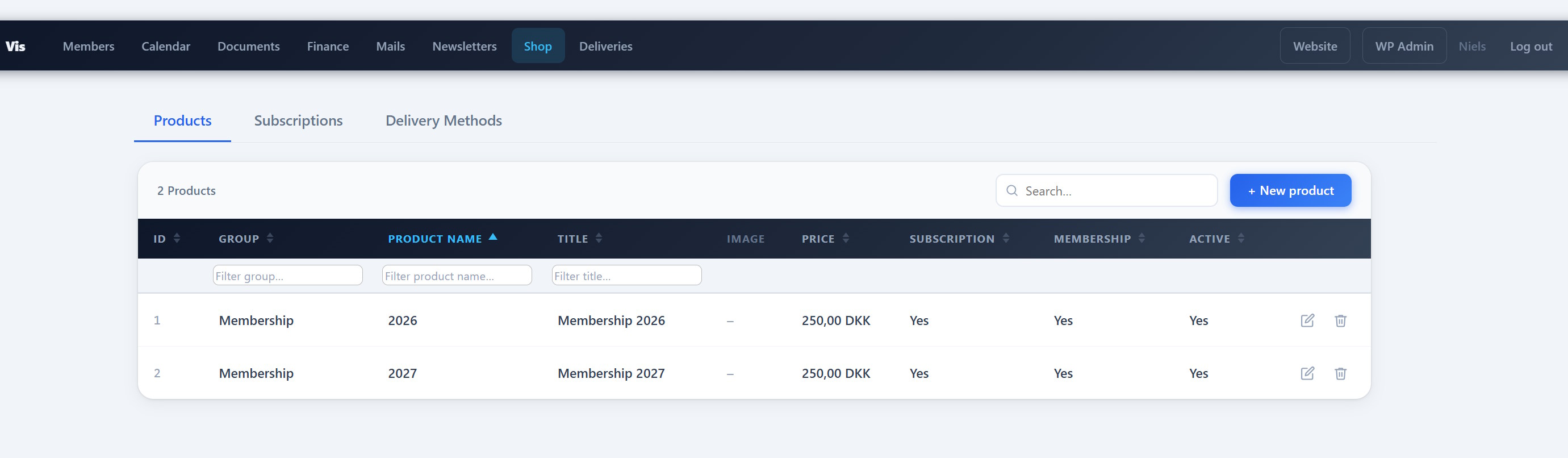
PCIO VIS Products is an extension for the PCIO VIS Member Event plugin. It adds a digital shop with products and license-key subscriptions, a public [pcio_me_shop] storefront with Stripe checkout, a Shop Orders list in Finance, automatic membership subscriptions on the member list, and a renewal/expiry reminder cron.
Features:
- Digital products and license-key subscriptions.
- Public storefront via the
[pcio_me_shop]shortcode with Stripe checkout. - Shop Orders list integrated into the core Finance area.
- Automatic membership subscriptions on the member list.
- Renewal and expiry reminder cron.
This plugin requires the PCIO VIS Member Event core plugin to be installed and active. It reuses the PCIO VIS Tickets plugin’s Stripe configuration.
External services
This plugin connects to the Stripe payment API (operated by Stripe, Inc.) to process card payments for paid products and subscription renewals. Free products (price 0) never contact Stripe. Stripe is only used when Stripe API keys have been entered in the PCIO VIS Tickets settings.
What is sent, and when:
- When a buyer checks out a paid product or renewal: the plugin creates a Stripe Checkout Session by sending the order number, line items (product names and amounts), the currency, the buyer’s email address, and success/cancel return URLs to
https://api.stripe.com. The buyer is then redirected to Stripe’s hosted checkout page, where card details are entered directly with Stripe (card data never passes through this site). - When an administrator refunds a paid order: the payment reference is sent to
https://api.stripe.comto create the refund. - On the order confirmation page: the plugin queries
https://api.stripe.comto confirm payment status (this site does not use a separate webhook for the shop).
Buyer name and email entered at checkout are stored on this site to issue and email licence keys. Because personal data and payment data are transmitted to Stripe, please ensure your own privacy policy covers this. By using this integration you and your buyers are subject to Stripe’s terms and policies:
- Stripe Services Agreement (terms): https://stripe.com/legal/ssa
- Stripe Privacy Policy: https://stripe.com/privacy
Zrzuty ekranu
Instalacja
- Install and activate the PCIO VIS Member Event core plugin first.
- Upload the
pcio-vis-productsdirectory to/wp-content/plugins/. - Activate the plugin in Plugins in the WordPress admin.
- Add products and configure the shop under the Vis admin menu.
Najczęściej zadawane pytania
-
Where does the storefront appear?
-
Add the
[pcio_me_shop]shortcode to any page, or browse the shop under/vis/shop. -
Do I need to configure Stripe here?
-
Stripe configuration is shared with the PCIO VIS Tickets plugin. No separate Stripe setup is needed in this plugin.
Recenzje
Wtyczka nie ma jeszcze żadnej recenzji.
Kontrybutorzy i deweloperzy
„PCIO VIS Products” jest oprogramowaniem open source. Poniższe osoby miały wkład w rozwój wtyczki.
Zaangażowani
Wtyczka „PCIO VIS Products” została przetłumaczona na 1 język. Podziękuj tłumaczom za ich wkład.
Przetłumacz wtyczkę “PCIO VIS Products” na swój język.
Interesuje cię rozwój wtyczki?
Przeglądaj kod, sprawdź repozytorium SVN lub czytaj dziennik rozwoju przez RSS.
Rejestr zmian
1.2.0
- Added: Manage subscriptions — the Subscriptions tab on
/vis/shopnow lets authorized users create, edit and delete member subscriptions directly, alongside the ones generated automatically from Stripe orders. The dialog picks a product, the member’s membership number, an expiry date and a status (active, expired or cancelled). - Added: Membership number linking — subscriptions are tied to a member by the core „Membership #” field. The Subscriptions tab gains Member #, Membership and Counted columns (with a Counted filter) so you can see and reconcile exactly which subscriptions count toward the active-membership total.
- Changed: subscription management is available to users with either Manage finance or Manage shop, and the
/vis/shoppage now opens for finance managers too.
1.1.0
- Added: Membership Rules admin page (Vis Membership Rules) to control how subscription expiry dates are calculated — Floating (1 year from purchase), Fixed annual start, or Fixed with a cutting date.
- Added: Subscription period selector in the product dialog so a product can follow the Floating, Fixed, or Fixed-with-cutting-date rule.
- Added: Editable email templates in the core Mails editor (
/vis/mails/) for the subscription reminder, subscription-ended, order-confirmation, and delivery-notification emails, with insertable tags such as{name},{product_name},{expire_date},{renew_url},{licence_keys},{order_no}, and{site_name}. Templates are seeded automatically, including on existing installs. - Added: New
[pcio_me_member_subscription_count]shortcode that shows an animated count of members with an active membership subscription. - Added: Active-membership count is now contributed to the core Statistics dashboard.
- Added: Subscription details (
{subscription_name},{expire_date}) are now available as tags in the member welcome email. - Added: Quantity picker with a configurable
max_qtyattribute on the[pcio_me_product_order]shortcode. - Added: Cron test mode toggle on the Vis sync page — routes all subscription emails to the site administrator and keeps expired subscriptions in place, for safe testing and migration.
- Added: Shortcode reference page now documents
[pcio_me_shop],[pcio_me_product_order], and[pcio_me_member_subscription_count], including navigation entries. - Added: Dark page-header banner (matching the Members and Finance pages) on the
/vis/shopand/vis/deliveryadmin pages. - Improved: The delivery orders list now shows the member’s address and phone (from the core member record), and the delivery-notification email includes them.
- Fixed:
/vis/deliveryshowed a duplicate section heading — the JS-rendered „Delivery Orders” inner header has been removed. - Fixed: Resolved WordPress Plugin Check warnings (nonce verification on the Membership Rules page and a discouraged schema-change query in the products database layer).
1.0.0
- Initial release.