

Opis
WordPress Multisite’s own Network Admin lets you see which plugins are network-activated, but it has no built-in way to see which plugins individual site admins have activated locally, one site at a time, across a whole network. Multisite Matrix closes that gap.
Co robi
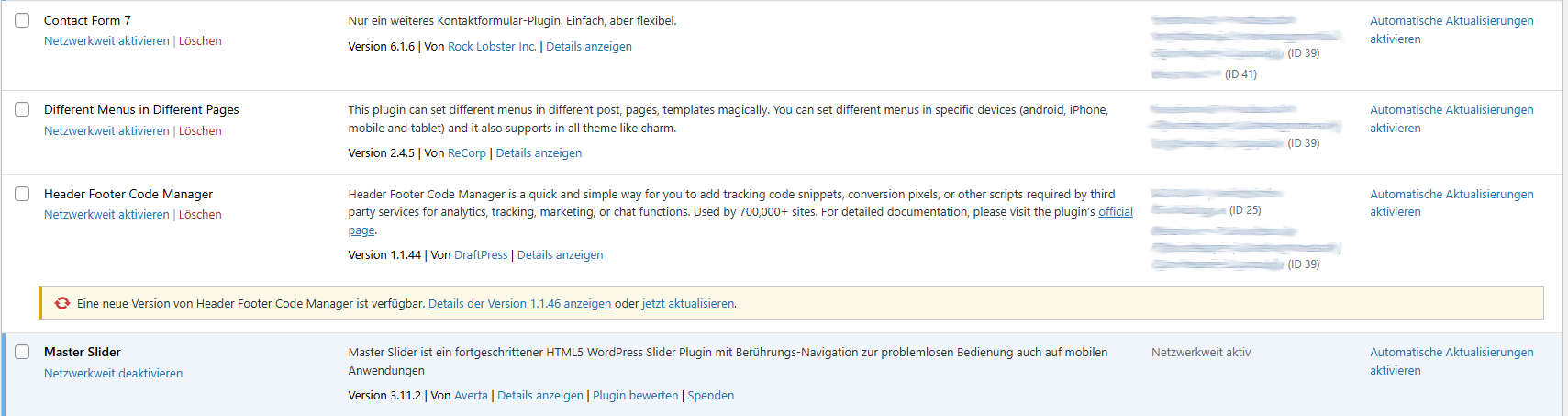
- Adds an „Active on Sites” column directly to the existing Network Admin > Plugins list, showing at a glance which sites have each plugin active locally.
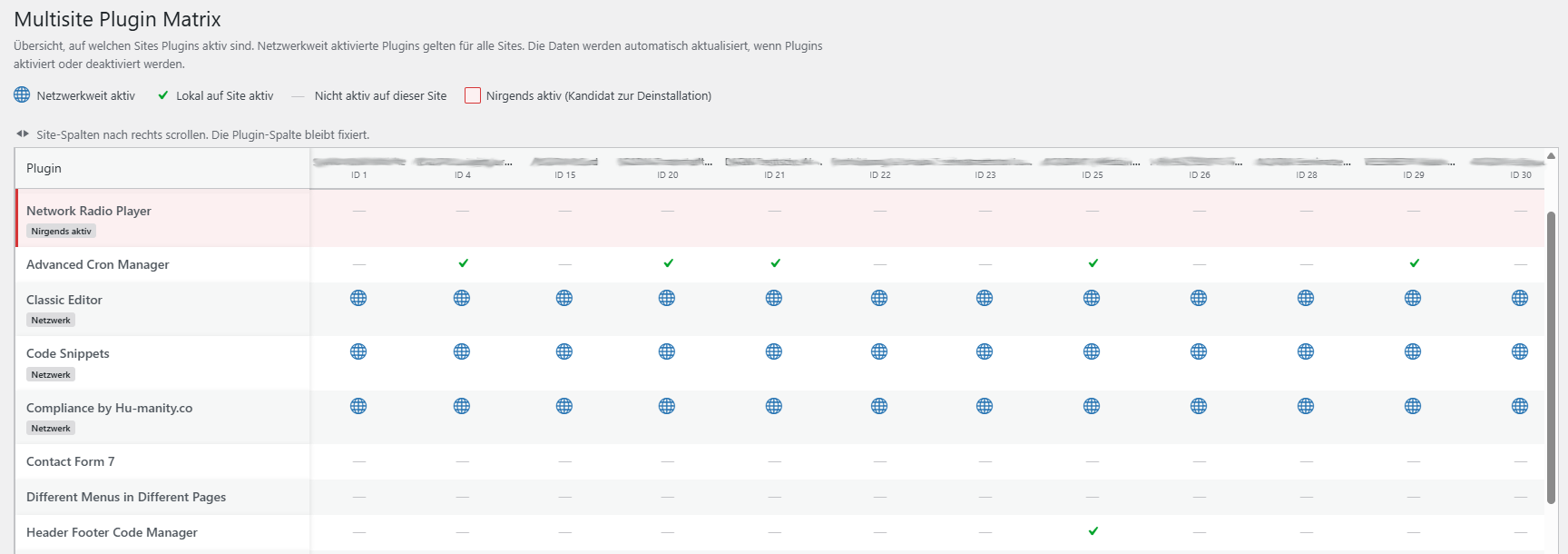
- Dodaje osobną stronę Matryca wtyczek (Administrator sieci > Wtyczki > Multisite Matrix) z pełną tabelą wtyczek i witryn: każda zainstalowana wtyczka jako wiersz, każda witryna jako kolumna, dzięki czemu możesz przejrzeć wykorzystanie wtyczek w całej sieci na jednym ekranie.
- Flags plugins that are installed but active nowhere in the network — a quick way to spot cleanup candidates before a security or performance audit.
- Distinguishes network-activated plugins (active for every site by definition) from plugins activated locally on individual sites.
- Prowadzi bezpośrednio z matrycy do ekranu Wtyczki każdej witryny, dzięki czemu możesz od razu podjąć działanie, bez wcześniejszego szukania właściwej witryny.
Dlaczego
On a network with more than a handful of sites, „which of our 40 sites still has that old SEO plugin turned on” is a real, recurring question that WordPress core simply doesn’t answer without opening every single site’s plugin screen by hand. Multisite Matrix answers it in one page load.
Jak to działa
Data is read directly from WordPress’s own site and network options — nothing is sent anywhere, no external requests are made, and the plugin makes no changes to which plugins are active. The plugin-to-site mapping is cached for an hour (via a site transient) and automatically refreshed whenever a plugin is activated, deactivated, or a site is added or removed, so the matrix never depends on a manual rebuild.
Wymagania
Multisite Matrix only does anything on a WordPress Multisite install — on a single-site install it stays completely inactive. It can only be network-activated (not activated on an individual site), and its screens are only visible to users with the manage_network_plugins capability (network administrators).
Zrzuty ekranu
Instalacja
- Upload the
multisite-matrixfolder to/wp-content/plugins/, or install it through the WordPress plugin screen directly. - Go to Network Admin > Plugins and network-activate Multisite Matrix. It cannot be activated on a single site — this is a Multisite-only plugin.
- Open Network Admin > Plugins > Multisite Matrix to see the full matrix, or just look at the new „Active on Sites” column on the regular Network Admin > Plugins screen.
Najczęściej zadawane pytania
-
Does this work on a normal (non-Multisite) WordPress install?
-
No. Multisite Matrix checks for a Multisite install on load and does nothing at all otherwise.
-
Can it activate or deactivate plugins for me?
-
No. It’s read-only by design — it shows you the current state across the network, but any activation, deactivation, or cleanup still happens the normal way, on the relevant site’s own Plugins screen (which the matrix links to directly).
-
Kto może zobaczyć stronę Matrycy wtyczek?
-
Tylko administratorzy sieci (dokładniej użytkownicy z uprawnieniem
manage_network_plugins). Zwykli administratorzy witryn jej nie widzą. -
Jak aktualne są dane?
-
The plugin-to-site map is cached for up to an hour, but it’s invalidated immediately whenever a plugin is activated or deactivated anywhere in the network, or a site is added or removed — so in practice it’s always accurate after any relevant change, not just once an hour.
-
Does it send any data anywhere?
-
No. Everything is read from your own WordPress database; the plugin makes no external requests.
Recenzje
Wtyczka nie ma jeszcze żadnej recenzji.
Kontrybutorzy i deweloperzy
„Multisite Matrix” jest oprogramowaniem open source. Poniższe osoby miały wkład w rozwój wtyczki.
Zaangażowani
Wtyczka „Multisite Matrix” została przetłumaczona na 6 języków. Podziękuj tłumaczom za ich wkład.
Przetłumacz wtyczkę “Multisite Matrix” na swój język.
Interesuje cię rozwój wtyczki?
Przeglądaj kod, sprawdź repozytorium SVN lub czytaj dziennik rozwoju przez RSS.
Rejestr zmian
1.2.5
- Fixed the plugin header Description field, which was still German — now matches the English source strings used everywhere else.
1.2.4
- Teksty źródłowe zmieniono z niemieckiego na angielski (zgodnie z konwencją WordPress.org), aby wtyczka mogła być prawidłowo zlokalizowana.
- Dodano tłumaczenia na niemiecki, francuski, hiszpański, włoski, niderlandzki, portugalski (brazylijski), polski, rosyjski, japoński i chiński (uproszczony).
1.2.3
- Zmieniono nazwy wewnętrznych funkcji, klas oraz opcji/transientów, aby używały unikatowego prefiksu „MULTMA”/„multma”, zgodnie z uwagami z przeglądu wtyczki na WordPress.org.
1.2.2
- Pierwsze wydanie na WordPress.org.