

Opis
Skorzystaj z MailPoet, aby tworzyć, wysyłać, zarządzać i rozwijać swoje kampanie e-mail marketingowe – a wszystko to bez opuszczania pulpitu WordPress.
Nasz kreator newsletterów doskonale integruje się z WordPressem, dzięki czemu każdy właściciel witryny może tworzyć piękne e-maile od podstaw lub korzystając z naszych responsywnych szablonów, które wyświetlają się bezbłędnie na wszystkich urządzeniach.
Zaplanuj swoje newslettery, wysyłaj je od razu lub skonfiguruj powiadomienia o nowych wpisach na blogu, aby wysyłały się automatycznie, za pomocą zaledwie kilku kliknięć.
Trusted by 500,000 WordPress websites since 2011.
Dzięki darmowemu planowi na start i skalowaniu płatnych planów z dostępnymi rozszerzonymi funkcjami, MailPoet jest rozwiązaniem do marketingu e-mailowego odpowiednim zarówno dla początkujących, jak i zaawansowanych marketerów.
Odwiedź naszą stronę internetową, aby uzyskać więcej informacji na temat planów i cen
Wszystkie funkcje
- Utwórz i dodaj formularz subskrypcji newslettera do swojej witryny internetowej
- Zarządzanie subskrybentami i listami subskrybentów w WordPressie
- Tworzenie i wysyłanie newsletterów za pomocą WordPressa
- Tworzenie automatycznych wiadomości e-mail w celu wysyłania powiadomień o nowych wpisach
- Wysyłanie automatycznych wiadomości powitalnych
- Opcje segmentacji subskrybentów na podstawie zachowań i zainteresowań
- Gotowe i konfigurowalne szablony formularzy e-mail i subskrypcji
- Wiele miejsc umieszczenia formularza subskrypcji: pod stronami, stały pasek, popup, slide-in, shortcode, przy intencji wyjścia
- WooCommerce emails: abandoned cart, first purchase, specific product, product category, order status change, review added
- Dostosowywanie e-maili transakcyjnych WooCommerce
- Automate subscriber management (add/remove from list, add/remove tags, update subscriber data) (paid plan required)
- Create custom automation triggers and actions (paid plan required)
- Branch your automations with if/else conditions to improve engagement (paid plan required)
- Niezawodne dostarczanie wiadomości e-mail dzięki usłudze wysyłania MailPoet (dostępna za darmo – wymagany plan)
- Podstawowe statystyki zaangażowania (dostępne za darmo) i szczegółowe statystyki zaangażowania (wymagany płatny plan)
- Segmentacja wielowarunkowa (wymagany płatny plan)
- Integracja z Google Analytics (wymagany płatny plan)
- Wsparcie za pośrednictwem naszej bazy wiedzy i forów społecznościowych (dostępne bezpłatnie) oraz priorytetowe wsparcie klienta (wymagany płatny plan).
Dlaczego warto wybrać MailPoet
- Łatwy w użyciu kreator newsletterów WordPress
- Piękne szablony, które działają idealnie na wszystkich urządzeniach
- Nie wymaga konfiguracji: działa od razu po instalacji
- Zarządzaj wszystkim z poziomu kokpitu WordPressa
- Wyższe wskaźniki dostarczalności dzięki usłudze wysyłania MailPoet
- Zgodność z RODO
- Darmowy plan dla małych nadawców lub tych, którzy dopiero zaczynają
- Dostępne zaawansowane funkcje ułatwiające rozwój.
E-maile WooCommerce
Promuj swoją firmę, sprzedawaj więcej produktów i ulepszaj obsługę klienta dzięki funkcjom WooCommerce MailPoet.
Skorzystaj z opcji automatycznych wiadomości e-mail, aby:
- Powitanie nowych klientów przy pierwszym zakupie
- Upsell poprzez wysyłanie wiadomości e-mail do klientów, którzy zakupili określony produkt lub z określonej kategorii produktów
- Convert more customers by sending a series of abandoned cart emails
- Re-engage customers who haven’t made a purchase in a while with personalized offers (paid plan required)
- Follow up with customers who left a review to encourage more engagement (paid plan required).
And with WooCommerce-specific segmentation options, you’ll be able to send targeted emails to your customers based on criteria such as their country, the number of orders they’ve placed, how much they’ve spent, and if they have an active product subscription (powered by WooCommerce Subscriptions) or membership (powered by WooCommerce Memberships).
Ponadto, będziesz w stanie zwiększyć rozpoznawalność marki poprzez dostosowanie e-maili transakcyjnych WooCommerce. Stwórz ujednolicone doświadczenie marki, zmieniając układ, kolory i czcionki używane w wiadomościach e-mail, a także dodając do nich dowolne obrazy lub dodatkowe informacje.
Serwis wysyłający MailPoet
Usługa wysyłania MailPoet jest bezpłatna, jeśli masz tylko kilku subskrybentów, a następnie dostępne są plany skalowania. Dowiedz się więcej.
Wysyłanie wiadomości e-mail i newsletterów za pośrednictwem hostingu nie jest dobrym pomysłem. Możesz napotkać ograniczenia prędkości wysyłania, a wysłane e-maile mogą trafić do spamu.
Aby ułatwić wysyłanie wiadomości, stworzyliśmy zaawansowaną infrastrukturę dostarczania wiadomości e-mail zbudowaną dla WordPressa. Nasza technologia pozwala na:
- Docieraj do skrzynek odbiorczych, a nie do skrzynek spamowych
- Wysyłaj e-maile bardzo szybko (do 50 000 e-maili na godzinę)
- Utrzymaj reputację nadawcy i zwiększ poziom zaangażowania dzięki automatycznemu odbieraniu i rozpatrywaniu skarg. Przestań automatycznie wysyłać na adresy, na które nie można dostarczyć i które zawierają reklamację
- Uwierzytelnij swoje wiadomości e-mail (za pomocą SPF i DKIM), aby poprawić dostarczalność i uniknąć skrzynek spamowych.
Usługa wysyłania MailPoet jest bardzo łatwa w konfiguracji, wystarczy wprowadzić klucz w panelu WordPress i wszystko gotowe!
Plany i ceny MailPoet
MailPoet jest dostępny do pobrania za darmo. Nasze bezpłatne pobieranie obejmuje wszystkie funkcje wymienione powyżej (z wyjątkiem tych, które wskazują na wymóg planu) zgodnie z następującymi kryteriami:
- Do 1000 subskrybentów
- Branding MailPoet w wiadomościach e-mail
- Wysyłaj wiadomości e-mail za pomocą własnej metody wysyłania (host, SendGrid, Amazon SES itp.).
Jeśli zdecydujesz się na plan MailPoet, uzyskasz dostęp do usługi wysyłania MailPoet.
Darmowy plan jest dostępny dla tych, którzy chcą rozpocząć z kilkoma subskrybentami i chcieliby skorzystać z usługi wysyłania MailPoet. Nasze płatne plany oferują funkcje i funkcjonalność dla osób z większymi listami, które chcą rozwijać swoją działalność za pomocą marketingu e-mailowego.
Zapoznaj się z naszą stroną z cenami, aby uzyskać szczegółowe informacje na temat tego, co obejmuje każdy plan.
Przed instalacją
Uwaga:
- Obsługa wielu witryn (multisite) jest ograniczona
- Zapoznaj się z naszymi minimalnymi wymaganiami.
Tłumaczenia
- Albański
- arabski
- kataloński
- Czeski
- duński
- holenderski
- Dutch (Formal)
- French (Canada)
- French (France)
- niemiecki
- German (Switzerland)
- German (Formal)
- grecki
- Hindi
- włoski
- japoński
- polski
- Portuguese (Brazil)
- Portuguese (Portugal)
- rumuński
- rosyjski
- serbski
- Slovak
- Spanish (Mexico)
- Spanish (Spain)
- szwedzki
- turecki
- Ukraiński
Zapraszamy doświadczonych tłumaczy do tłumaczenia bezpośrednio w naszym projekcie Transifex. Należy pamiętać, że wszelkie tłumaczenia przesłane za pośrednictwem strony „Tłumaczenie WordPress” nie będą działać.
Zabezpieczenia
Nasze repozytorium jest publiczne w serwisie GitHub.
Masz do nas pytanie? Skontaktuj się z nami pod adresem security@ nasza domena lub zgłoś błędy w zabezpieczeniach do naszego programu Bug Bounty.
Korzystanie z usług stron trzecich
MailPoet korzysta z następujących usług, które są niezbędne do jego pełnej funkcjonalności:
- Translate WordPress.com – służy do pobierania tłumaczeń dla wtyczki.
Aby poprawić komfort użytkowania, MailPoet może korzystać z następujących bibliotek innych firm, jeśli włączone jest ustawienie wczytaj biblioteki innych firm:
-
Czcionki Google – używane w edytorze formularzy, którego można używać do dostosowywania formularzy, oraz w Edytorze wiadomości e-mail do stylizowania wiadomości e-mail. Można to indywidualnie wyłączyć za pomocą filtra. Regulamin i polityka prywatności
-
WordPress.com – used for searching in Knowledge Base with the help of AI.
-
Mixpanel – używany do wysyłania danych o korzystaniu z wtyczki MailPoet, gdy użytkownik zgadza się na udostępnianie nam danych o użytkowaniu. Regulamin i polityka prywatności
-
Satismeter – służy do proszenia o opinie. Regulamin i polityka prywatności
-
Crowdsignal – używany do ładowania naszej ankiety dezaktywacyjnej w celu ulepszenia naszej wtyczki. Regulamin i polityka prywatności
Ładowanie wszystkich tych bibliotek jest domyślnie wyłączone. Opcja ta może być włączona w Ustawienia MailPoet’s > Zaawansowane > Załaduj biblioteki stron trzecich.
Zrzuty ekranu

Sample newsletters 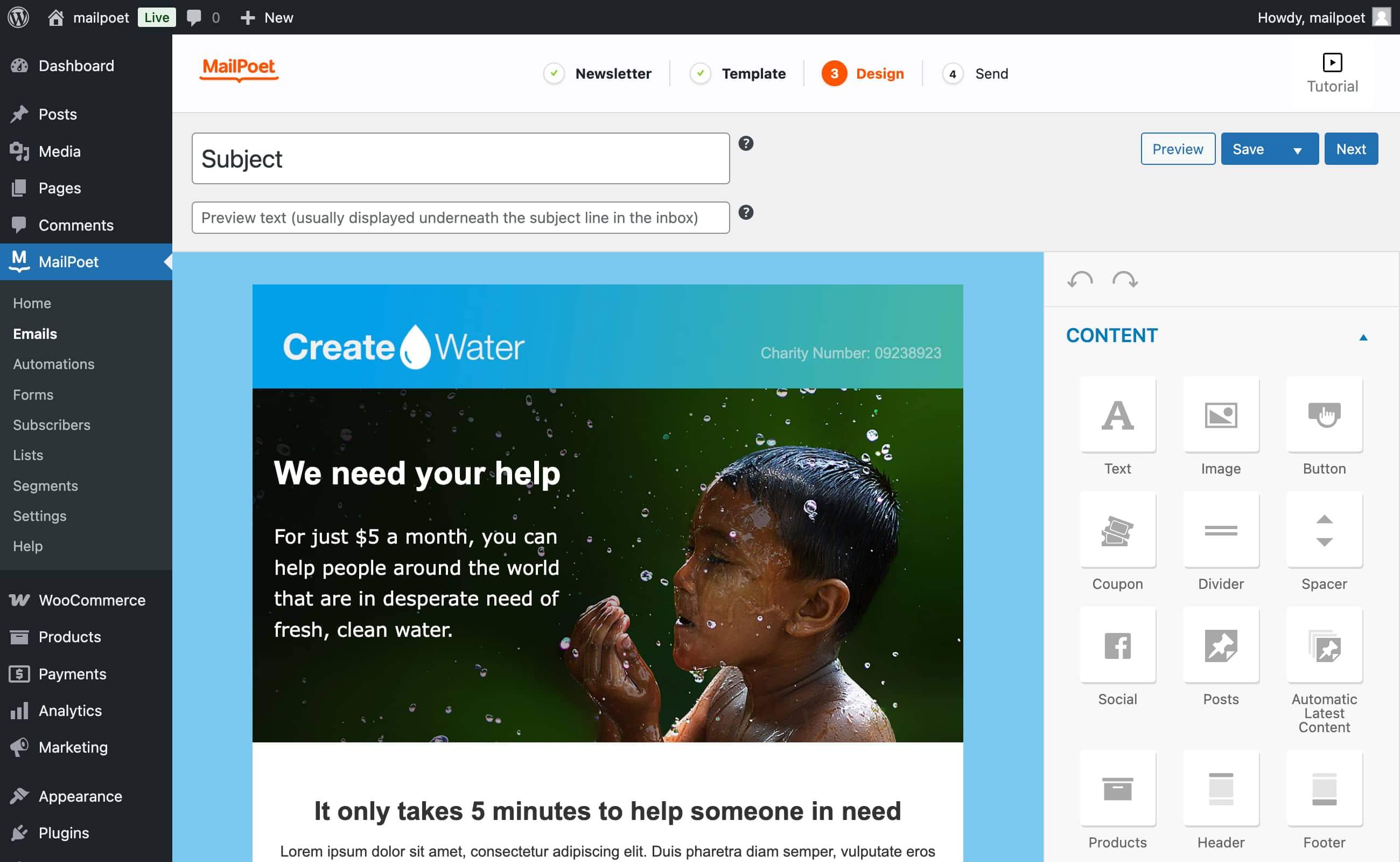
Kreator wiadomości e-mail typu „przeciągnij i upuść” 
Typy wiadomości e-mail MailPoet 
Statystyki newslettera (Premium) 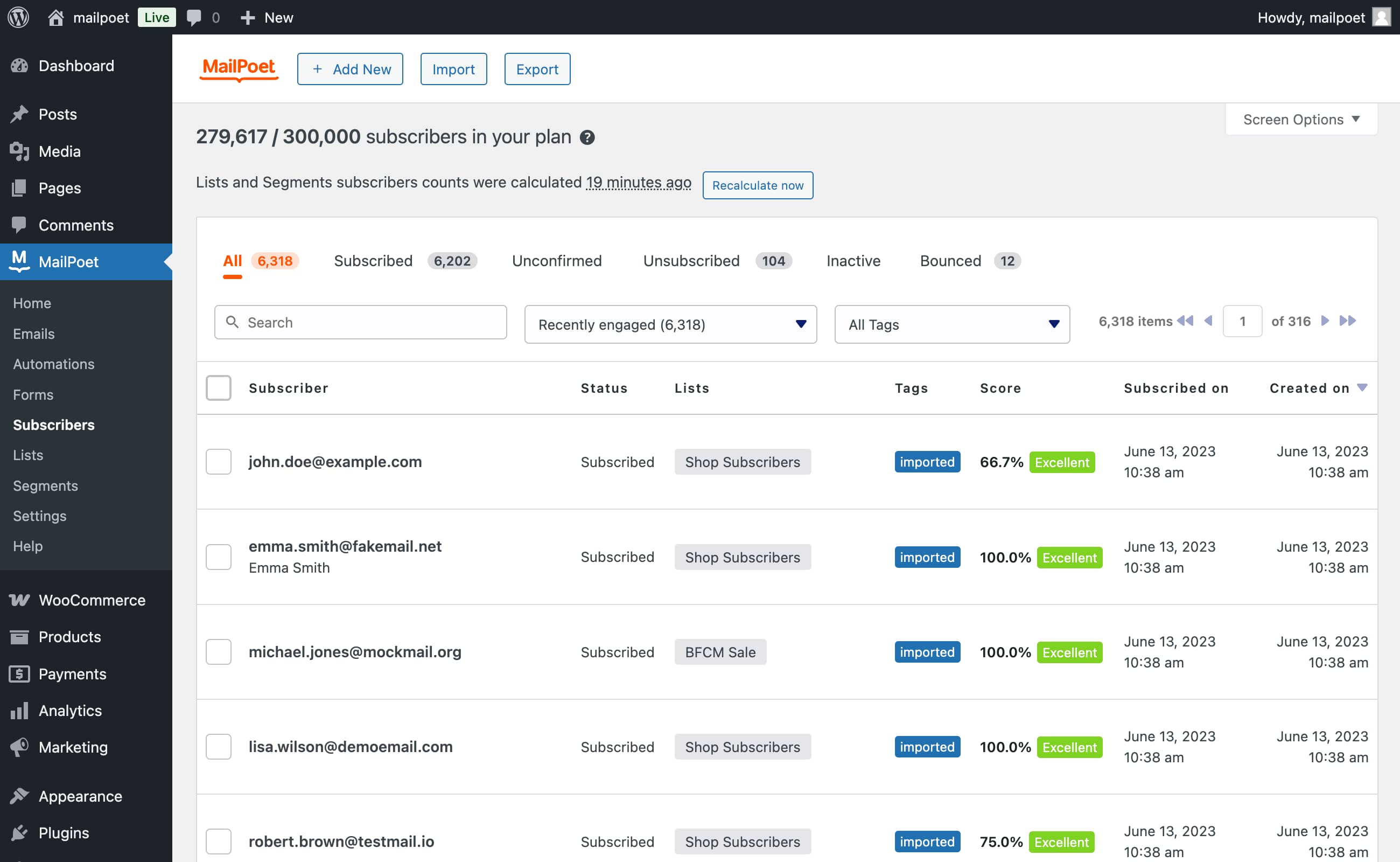
Import subskrybentów (poprzez plik CSV lub bezpośrednio z Mailchimp) 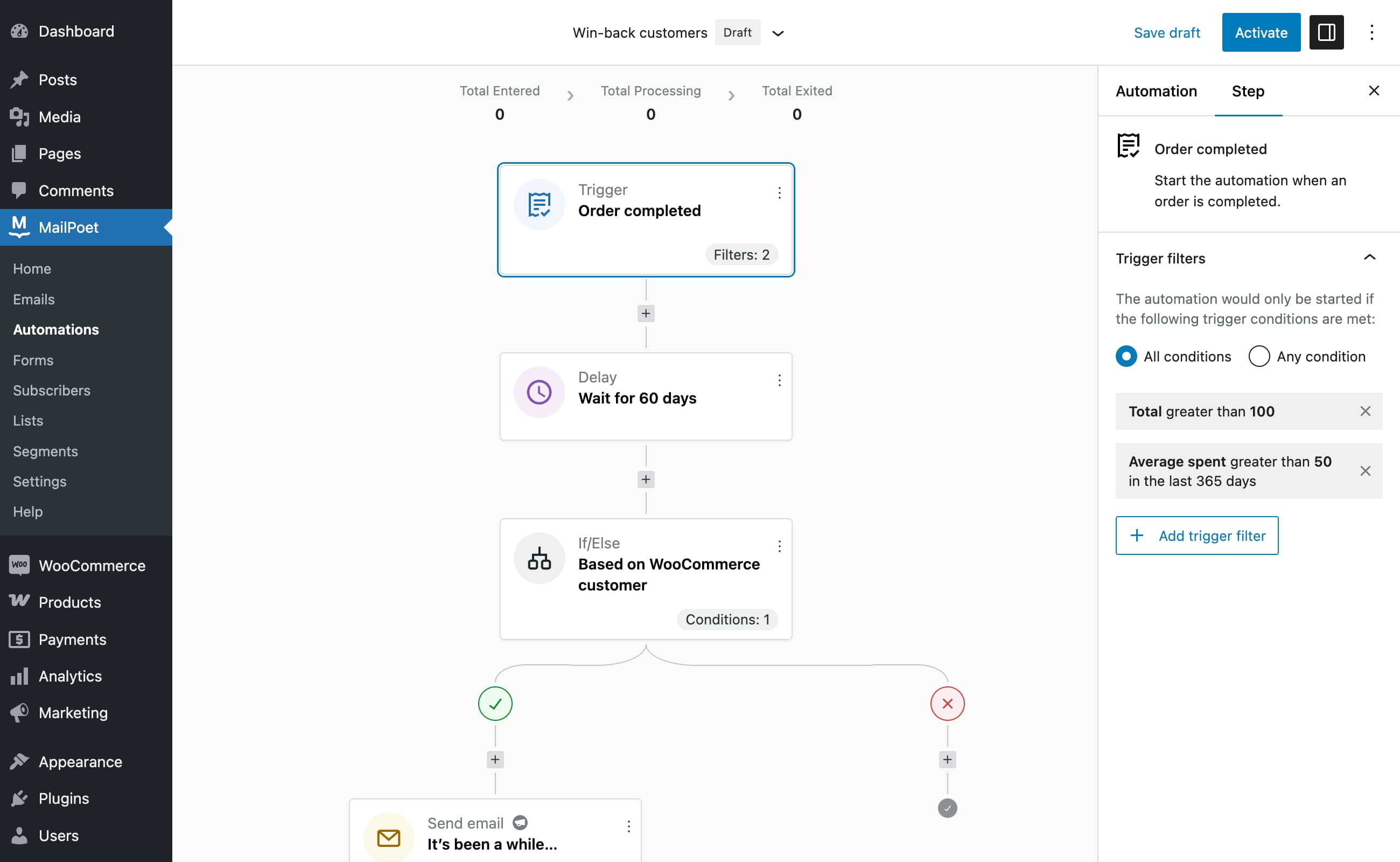
Automation editor (Premium)
Bloki
Wtyczka dodaje 1 blok.
- MailPoet Marketing Opt-in
Najczęściej zadawane pytania
-
Czy MailPoet przechowuje dane subskrybentów użytkownika?
-
Nie przechowujemy żadnych danych subskrybentów. Jeśli jednak wysyłasz z nami, przetwarzamy wszystkie wiadomości e-mail, które mają zostać wysłane. Oznacza to, że MailPoet rejestruje tylko adresy e-mail, aby zapewnić skuteczne działanie naszej usługi. Nie śledzimy niczego innego.
-
Czym jest usługa wysyłania MailPoet?
-
Usługa wysyłania MailPoet jest przeznaczona wyłącznie do wysyłania wiadomości e-mail WordPress i WooCommerce. Nasza własna technologia zapewnia niezrównaną szybkość (ponad 50 000 e-maili na godzinę) i wydajność, 99% uptime i zero strat.
-
Masz swobodę wyboru sposobu wysyłania wiadomości e-mail: własny hosting (domyślny, ale niezalecany), usługa wysyłania MailPoet, SendGrid, Amazon SES lub większość dostawców SMTP, w tym MailGun, itp.
-
Dlaczego powinienem korzystać z usługi wysyłania MailPoet?
-
Nasz globalny wskaźnik dostarczalności wynosi 98,5%, często przekraczając standardy branżowe. Monitorujemy każdy z milionów e-maili, które wysyłamy do naszych użytkowników.
Niezależnie od tego, czy wysyłasz 10 czy 100 000 e-maili dziennie, usługa wysyłania MailPoet obsługuje newslettery małych firm, a także ogromne listy mailingowe z dziesiątkami tysięcy subskrybentów.
Gorąco zachęcamy do niewysyłania wraz z hostingiem, oto dlaczego.
Jeśli dopiero zaczynasz swoją przygodę z newsletterami, oferujemy darmowy plan na start.
-
Czy mogę odfiltrować określone kategorie z powiadomień o wpisach?
-
Tak! W MailPoet możesz ustawić kategorie lub tagi do uwzględnienia / wykluczenia. Pozwala to wysyłać tylko wpisy z określonych kategorii lub tagów, zapewniając, że nieistotne wpisy pozostaną poza wiadomościami e-mail. Możesz także skonfigurować wiele wiadomości e-mail z powiadomieniami o wpisach, aby lepiej dopasować je do zainteresowań subskrybentów.
-
Czy MailPoet jest zgodny z RODO?
-
Tak, jesteśmy zgodni z RODO. Nie mamy jednak umowy o przetwarzaniu danych. Nasza polityka prywatności może działać jako umowa i RODO bierze to pod uwagę. Korzystając z naszej usługi, użytkownik akceptuje naszą politykę prywatności.
Sugerujemy również dodanie linku do naszej polityki prywatności na własnej stronie z polityką prywatności. Ważne jest, aby upewnić się, że subskrybenci wiedzą, że MailPoet dostarcza wiadomości e-mail, jeśli wysyłasz je za pomocą MailPoet.
Możesz również przeczytać nasz przewodnik dotyczący zgodności z RODO.
-
Tak, dzięki MailPoet klienci mogą subskrybować listę mailingową przy składaniu zamówienia. Możesz nawet wysłać im przypomnienie o porzuconym koszyku, jeśli zapomnieli dokończyć zakup.
-
Czy to MailPoet czy Mail poet?
-
To MailPoet, a nie mail poet. Odpowiemy jednak na każde z nich!
-
Potrzebna pomoc?
-
Sprawdź naszą bazę wiedzy lub skontaktuj się z nami za pośrednictwem naszej strony pomocy technicznej.
Recenzje


Kontrybutorzy i deweloperzy
„MailPoet – newslettery, e-mail marketing i automatyzacja” jest oprogramowaniem open source. Poniższe osoby miały wkład w rozwój wtyczki.
Zaangażowani


Wtyczka „MailPoet – newslettery, e-mail marketing i automatyzacja” została przetłumaczona na 28 języków. Podziękuj tłumaczom za ich wkład.
Przetłumacz wtyczkę “MailPoet – newslettery, e-mail marketing i automatyzacja” na swój język.
Interesuje cię rozwój wtyczki?
Przeglądaj kod, sprawdź repozytorium SVN lub czytaj dziennik rozwoju przez RSS.
Rejestr zmian
5.22.3 – 2026-03-31
- Changed: Register new email pattern categories (Sales announcements, Educational campaign, Events) and reassign patterns;
- Fixed: Fix incorrect asterisk on email label and spacing before required asterisk on Manage Subscription page;
- Fixed: Fix Bluesky social icon not loading in the newsletter editor;
- Fixed: Prevent fatal error on hosts with strict MAX_JOIN_SIZE database limits when loading pages with segment subscriber counts;
- Fixed: Sending frequency in System Info showing misleading values when using MailPoet Sending Service;
- Fixed: Searching in Subscribers Trash with no results no longer redirects to the All tab or hides the Trash tab.