

Opis
Loggedin is a session manager for WordPress — it gives you control over the login sessions your users hold, and the tools to end them when you need to.
At its core, Loggedin caps the number of simultaneous WordPress sessions a user account is allowed to hold. When the cap is reached, you choose what happens next — log out the oldest device, log out every other device, or block the new login outright. It’s the lightweight, no-bloat way to stop account sharing on membership sites, LMS courses, paid communities, and any WordPress install where one paid account shouldn’t be open on five devices at once.
The plugin hooks straight into WordPress’s standard authentication pipeline and uses the native WP_Session_Tokens API, so it works on every host, with every theme, and alongside every login plugin you might already run. No cron jobs, no background polling, no third-party services.
How it works
A „session” in WordPress is the authenticated token created the moment a user logs in — one per browser, per device. Two browsers on the same laptop count as two sessions; a phone and a desktop count as two. Closing a tab does not end a session — the token lives server-side until the user explicitly signs out or another login displaces it.
Loggedin watches every login attempt:
- Counts the user’s current active sessions.
- Compares that count to the limit you’ve configured.
- Applies the rule you’ve picked — silently make room for the new login, or reject the new login with an error on wp-login.
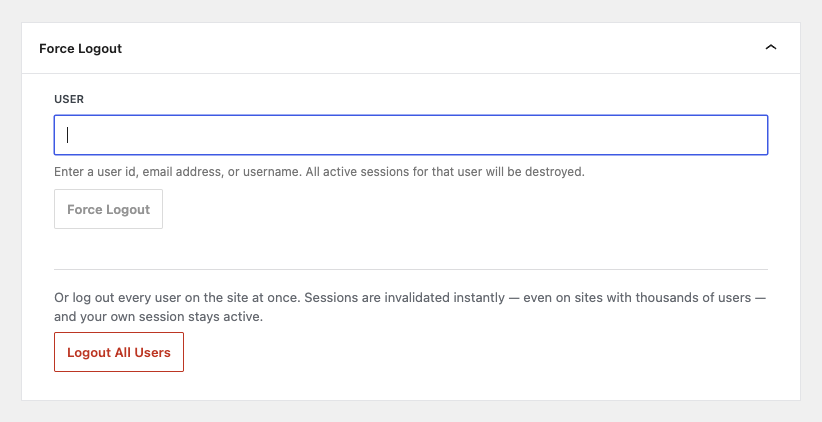
There’s a one-click Force Logout panel in the admin to clear every session for a specific user when someone’s locked out by the cap and can’t reach their other devices. Identify the user by ID, email, or username — all three work. Need a clean slate instead? Logout All Users signs out every account on the site in one click — instantly, even with thousands of users — while your own session stays active.
Who it’s for
- Membership sites — MemberPress, Paid Memberships Pro, Restrict Content Pro, WooCommerce Memberships, etc. Stop one paid account from being shared across a household, a classroom, or a Discord server.
- Online courses & LMS — LearnDash, LifterLMS, TutorLMS, Sensei. Make sure the seat someone paid for is actually used by that someone.
- Subscription stores — WooCommerce Subscriptions, Easy Digital Downloads recurring. Keep subscriber counts honest.
- Corporate intranets & client portals — Enforce a one-device-at-a-time policy for staff or client accounts.
- BuddyPress / BuddyBoss communities — Reduce ban-evasion and duplicate-account abuse.
- Compliance-driven sites — Healthcare, finance, education installs where audit policy requires a per-account session cap.
Features
- Session management from the dashboard — Inspect and end user sessions from Users Loggedin, or from WP-CLI. Add the Active Sessions add-on for a live, sortable view of every signed-in user and device.
- Global concurrent-login limit — Pick any number from 1 upwards as the per-user cap.
- Three built-in modes — Logout Oldest (kick the user’s oldest device, keep the rest), Logout All (the new login becomes the only active session), or Block New (reject the login and show an error on wp-login).
- Admin Force Logout — Type a user ID, email, or username and clear every active session for that user in one click.
- Logout All Users — Sign out every user on the site at once. Instant at any scale — no per-user loops, no timeouts — and the admin who clicks the button stays logged in.
- Works with any session storage — Uses the standard
WP_Session_TokensAPI. Stock WordPress, Redis, Memcached — all supported (the Logout Oldest mode needs the default user-meta storage; the other modes work everywhere). - Customizable error message — Override the message shown when a login is blocked, via a single filter.
- WP-CLI support — Inspect and destroy user sessions and read or write settings from the command line:
wp loggedin sessions list <user>,wp loggedin sessions destroy <user>,wp loggedin sessions destroy-all,wp loggedin settings set maximum 3. Ideal for bulk operations, deploy scripts and headless installs. - Built for developers — Every decision passes through documented PHP hooks and filters. Override the cap per user / role / capability, exempt service accounts, audit force-logouts, or splice the plugin into your own auth pipeline. Full hook reference in the developer docs.
- Lightweight — No cron, no background polling, no remote calls. The whole plugin runs at the moment a login happens.
- Translation-ready — Loaded with the WordPress i18n APIs; contribute translations on WordPress.org.
📦 Add-ons
Extend Loggedin with these official add-ons:
- Active Sessions — See exactly who’s signed in right now, drill into each device per user, and sign out a single session — or every session — in one click.
- Auto Logout — Sign users out automatically after a period of inactivity. Set an idle timeout, warn users before the session ends, and keep unattended machines from staying signed in.
- Limit Per User — Override the global session cap for an individual user account directly from their WordPress profile. Perfect for tiered access or trusted-staff exemptions.
- Limit Per Role — Set a different concurrent-session cap per WordPress role. Give administrators more headroom while keeping subscribers tight, or vice versa.
- Real-time Logout — Detect logouts in near-real-time. When Loggedin terminates a session, the user’s other open tabs reload to wp-login automatically — no waiting for the next page click.
📚 Documentation
- Getting started
- General settings
- Force Logout (Manage Sessions)
- WP-CLI commands
- Add-ons overview
- Developer docs — hooks, filters, REST
🐛 Bug reports
Found a bug? File it on the Loggedin GitHub repository.
GitHub is for bug reports and development-related issues only. For end-user support, please use the WordPress.org support forums.
Zrzuty ekranu

Instalacja
- Install Loggedin from the WordPress.org plugin directory (Plugins Add New search „Loggedin”) or upload the ZIP under Plugins Add New Upload Plugin. Full instructions: how to install a plugin.
- Włącz wtyczkę.
- Go to Users Loggedin to configure the concurrent-login limit and pick the rule applied when the limit is reached.
That’s it. The default — limit of 1, Logout All mode — already prevents account sharing on a fresh install.
Najczęściej zadawane pytania
-
Is Loggedin a full session manager?
-
It manages the sessions WordPress already creates, rather than replacing WordPress’s session handling. Here’s exactly what’s in the free plugin:
- Limit how many sessions an account can hold at once, and choose what happens when the limit is reached.
- Force logout every session for any user, from the admin or from WP-CLI.
- Inspect a user’s active sessions — login time, expiry, IP and device — via
wp loggedin sessions list.
For a live, sortable view of every signed-in user across the site, with per-device detail and one-click sign-out, add the Active Sessions add-on. To sign idle users out automatically, add the Auto Logout add-on. Login alerts are on the roadmap as an add-on too.
If all you need is to cap concurrent logins and stop account sharing, the free plugin does that on its own — no add-on required.
-
Will this stop users from sharing their WordPress password?
-
It stops simultaneous sharing — two people can’t be signed in to the same account on different devices at the same time once the cap is set to
1. They can still take turns logging in if you don’t want to block the new login outright. Pick Block New mode to refuse the second login entirely and force the password-sharer to also log out the first device, which most people won’t do. -
Does this work with WooCommerce, MemberPress, LearnDash, BuddyPress, etc.?
-
Yes. Loggedin hooks into the standard WordPress authentication pipeline (
wp_authenticate_userandcheck_password), so any plugin that logs users in through the normal WordPress flow — which is essentially every membership, LMS, e-commerce, and community plugin — is covered automatically. No integration code required. -
Can I set different limits for administrators and subscribers?
-
Yes, with the official Limit Per Role add-on. It adds a per-role panel to the settings page where you can give each WordPress role its own cap (e.g. administrators: 5, editors: 3, subscribers: 1). Users with multiple roles get the highest configured limit.
-
Can I set a different limit for one specific user?
-
Yes, with the official Limit Per User add-on. It adds a field to the WordPress profile screen so you can override the global cap on a per-user basis — useful for shared editorial accounts, executive users, or anyone who legitimately needs more sessions than your default.
-
Can I log users out automatically after they go idle?
-
Yes, with the official Auto Logout add-on. Set an inactivity timeout and idle users are signed out on their own, with an optional warning shown before the session ends — useful for shared workstations and anywhere an unattended browser shouldn’t stay signed in.
-
Will current users be logged out when I install or change the limit?
-
No. Loggedin only acts when a new login happens. Existing sessions stay active until they expire, the user logs out, or a future login displaces them under the rule you’ve configured.
-
Where can I find the settings for Loggedin?
-
In the WordPress admin, go to Users Loggedin. You’ll see two tabs — Settings for the cap and login logic, and Add-ons for installing and licensing first-party extensions.
-
What are the available login logic options?
-
The plugin offers three built-in modes:
- Logout Oldest — When the limit is reached, the user’s single oldest active session is terminated to make room for the new login. Closest match to consumer „remember me” UX.
- Logout All — When the limit is reached, every other active session for the user is terminated and the new login becomes the only active session.
- Block New — When the limit is reached, the new login attempt is rejected with an error on wp-login.
Additional modes can be added via the
loggedin_logicsfilter. See the General Settings docs for details. -
How long does a login session last?
-
The duration of a WordPress login session is controlled by WordPress, not Loggedin.
- „Remember Me” checked at login session lasts 14 days.
- „Remember Me” not checked session lasts 2 days.
Customize the duration with the standard
auth_cookie_expirationfilter:`phpfunction custom_auth_cookie_expiration( $expire ) {
return MONTH_IN_SECONDS; // 30 days for every login.
}add_filter( 'auth_cookie_expiration’, 'custom_auth_cookie_expiration’ );
` -
What if a user has reached the limit but doesn’t know which devices are active?
-
Administrators can force-logout every session for the user from the dashboard:
- Go to Users Loggedin in the WordPress admin.
- Scroll to the Force Logout panel at the bottom of the Settings tab.
- Enter the user’s ID, email address, or username and click Force Logout. All active sessions for that user are terminated immediately.
-
Can I log out every user at once?
-
Yes. The Logout All Users button in the Force Logout panel signs out every account on the site — useful after a password-reset campaign, a suspected credential leak, or before decommissioning a membership. It completes instantly regardless of user count because it doesn’t loop through users: a single site-wide timestamp invalidates every session created before it, and each stale session is rejected on its next request. Your own session survives, so you won’t be dumped to the login screen. Also available as
wp loggedin sessions destroy-allon WP-CLI. -
Does Loggedin work with Redis / Memcached / external session storage?
-
Yes for the Logout All and Block New modes — both go through the standard
WP_Session_TokensAPI, which respects whatever storage backend WordPress is configured to use. The Logout Oldest mode needs the default user-meta storage because the WP API doesn’t expose a „drop the oldest” primitive; pick Logout All instead if your sessions live elsewhere. -
Does Loggedin support WP-CLI?
-
Yes, since 3.1.0. Every command lives under
wp loggedin—wp loggedin sessionslists, counts and destroys a user’s active sessions, andwp loggedin settingsreads and writes the plugin settings. Destructive commands prompt for confirmation unless you pass--yes.See the WP-CLI documentation for the full command reference, options and scripting examples, or run
wp help loggedinin your terminal. -
Is Loggedin GDPR-compliant?
-
Loggedin stores no personal data itself. It only counts and manipulates WordPress session tokens that already exist in your database via the standard
WP_Session_TokensAPI. No external services are called, no telemetry is sent. -
Does Loggedin slow down logins?
-
No. The work Loggedin does on each login is one query for the user’s existing session tokens and an in-memory count — measured in microseconds. No HTTP calls, no cron jobs, no background polling.
-
Can I customize the error message shown when a login is blocked?
-
Yes, via the
loggedin_error_messagefilter:`phpadd_filter( 'loggedin_error_message’, function ( $message ) {
return 'Your account is already signed in elsewhere. Sign out from another device to continue.’;
} );
`See the developer docs for every filter and action the plugin exposes.
Recenzje


Kontrybutorzy i deweloperzy
„Loggedin – Session Manager, Limit Concurrent Logins & Force Logout” jest oprogramowaniem open source. Poniższe osoby miały wkład w rozwój wtyczki.
Zaangażowani

Wtyczka „Loggedin – Session Manager, Limit Concurrent Logins & Force Logout” została przetłumaczona na 5 języków. Podziękuj tłumaczom za ich wkład.
Interesuje cię rozwój wtyczki?
Przeglądaj kod, sprawdź repozytorium SVN lub czytaj dziennik rozwoju przez RSS.
Rejestr zmian
3.3.1
- Fix: Some valid add-on license keys were rejected as invalid. Keys containing a
%followed by two characters from 0–9 or a–f, in either case (for example%bB) were shortened before being sent to the licensing server. Affected add-ons could not be activated and so stopped receiving updates.
3.3.0
- New: Logout All Users — sign out every user on the site in one click from the Force Logout panel, with a confirmation dialog. Instant at any user count, and the admin who triggers it stays logged in.
- New:
wp loggedin sessions destroy-all— the same site-wide logout from WP-CLI. - New: REST endpoint
POST /loggedin/v1/sessions/destroy-allbacking the admin button. - New:
loggedin_logout_all_usersaction fired when a site-wide logout is triggered, andloggedin_session_invalidatedaction fired for each stale session as it is rejected. - Improve: The site-wide logout goes through the standard
WP_Session_TokensAPI, so it works with any session storage backend.
3.2.0
- Improve: Faster settings reads — the plugin’s settings are now built once per request instead of on every read, cutting repeat work on each login and admin page load.
- Improve: Loggedin is now published under the Foxe Labs brand. Nothing about how the plugin works has changed.
- Improve: Updated every link in the plugin to the new foxelabs.com product pages and docs.foxelabs.com documentation.
- Improve: Removed the leftover Loggedin section on Settings General. It only pointed at the real settings page and has been redundant since 2.0 — settings live under Users Loggedin.
- Improve: Dropped the manual translation loading call — WordPress has loaded translations for wordpress.org plugins by itself since 4.6, so the call was redundant.
- Compat: Tested with WordPress 7.1.
3.1.0
- New: WP-CLI support — manage Loggedin from the command line with
wp loggedin sessions(list, count, destroy) andwp loggedin settings(list, get, set). Runwp help loggedinfor the full reference. - New:
wp loggedin sessions destroy <user> --token=<hash>signs a user out of a single device instead of all of them. - New:
loggedin_cli_initaction so add-ons can register their own subcommands under thewp loggedinnamespace. - New:
loggedin_destroy_sessionaction fired when an individual session is destroyed. - Improve: Renamed to „Loggedin – Session Manager, Limit Concurrent Logins & Force Logout” to reflect the plugin’s broader scope. Nothing about the concurrent-login limiting has changed — same settings, same behaviour, same plugin.
- Improve: The CLI refuses to write a setting the sanitizer would reject, so a typo can no longer silently reset your login logic to the default.
- Improve: CLI commands are only loaded on WP-CLI requests — a normal page load doesn’t pay for them.
3.0.2
- New: Review-request notice restored, powered by the
duckdev/wp-review-noticelibrary and scoped to the Loggedin settings screen with a 7-day delay. - Improve: Legacy review-notice state migrated to the new storage keys so users who already dismissed the prompt stay dismissed.
- Improve: Admin notices now render inside the plugin’s centered page column instead of above the header.
- Fix: Left-hand gap between the plugin header and the admin sidebar caused by WordPress’s default
#wpcontentpadding.
3.0.1
- New:
loggedin.admin.tabsJS filter — addons can register their own React component as a tab in the Loggedin admin nav, with optionalbefore/afterpositioning hints. Powers the new Active Sessions addon. - New: Cross-sell banner on the Force Logout panel routed through
loggedin.settings.force_logout.cross_sellso addons can hide or replace it once installed. - Improve: Addon card layout reworked — primary CTA pinned to the left of the footer, „More details” link on the right, title-cased license button labels.
- Fix: The v2 v3 settings migration never ran on existing installs, leaving legacy option keys in place after the upgrade.
3.0.0
- New: Modern React-powered admin under Users Loggedin with two tabs — Settings (concurrent-login limit + login logic + Force Logout panel) and Add-ons (catalogue + license management).
- New: REST API at
/loggedin/v1/for settings, session management and add-on licensing. - New: Unified
loggedin_settingsoption registered withshow_in_rest, readable and writable by the React admin and by external integrations through the standard core-data flow. - New: Force Logout panel now accepts a user ID, email or username — the resolver detects the input shape automatically.
- New: Add-ons module powered by Freemius — official add-ons (Real-time Logout, Limit Per User, Limit Per Role) self-register via the new
loggedin_register_addonfilter and appear in the Add-ons tab. - New: JavaScript extension slot — add-ons can append their own React
PanelBodyto the Settings tab via theloggedin.settings.panelsfilter. - New: Documented PHP hook surface —
loggedin_init,loggedin_settings_defaults,loggedin_admin_script_vars,loggedin_addons_catalog,loggedin_destroy_oldest_sessionand more. - Improve: Reorganised plugin structure (PSR-4 namespaces under
DuckDev\Loggedin\) and aligned with WordPress Coding Standards. - Improve: Comprehensive sanitisation pass across every input and option write path.
- Improve: PHP 7.4 is now the minimum supported version.
For the full release history, see the changelog.