

Opis
Wtyczka własnych bloków dla WordPressa
★★★★★
Czarodziejska różdżka dla programistów do tworzenia własnych bloków WordPress. Stworzyliśmy wtyczkę Leniwe bloki dla WordPressa, aby zapewnić każdemu programiście dostęp do potężnych narzędzi potrzebnych do szybkiego uruchamiania witryn internetowych opartych na edytorze bloków WordPress (zwanym Gutenbergiem).
Oficjalna strona | Dokumentacja | GitHub
Twórz własne bloki wizualnie, dodawaj kontrolki do bloków metodą „przeciągnij i upuść”, twórz bloki wyjściowe za pomocą kodu HTML lub PHP. Możesz tworzyć własne bloki, a także własne pola meta dla określonych typów treści. Co więcej, możesz tworzyć szablony wpisów z predefiniowanymi blokami dla dowolnego typu treści.
🚀 Łatwy start
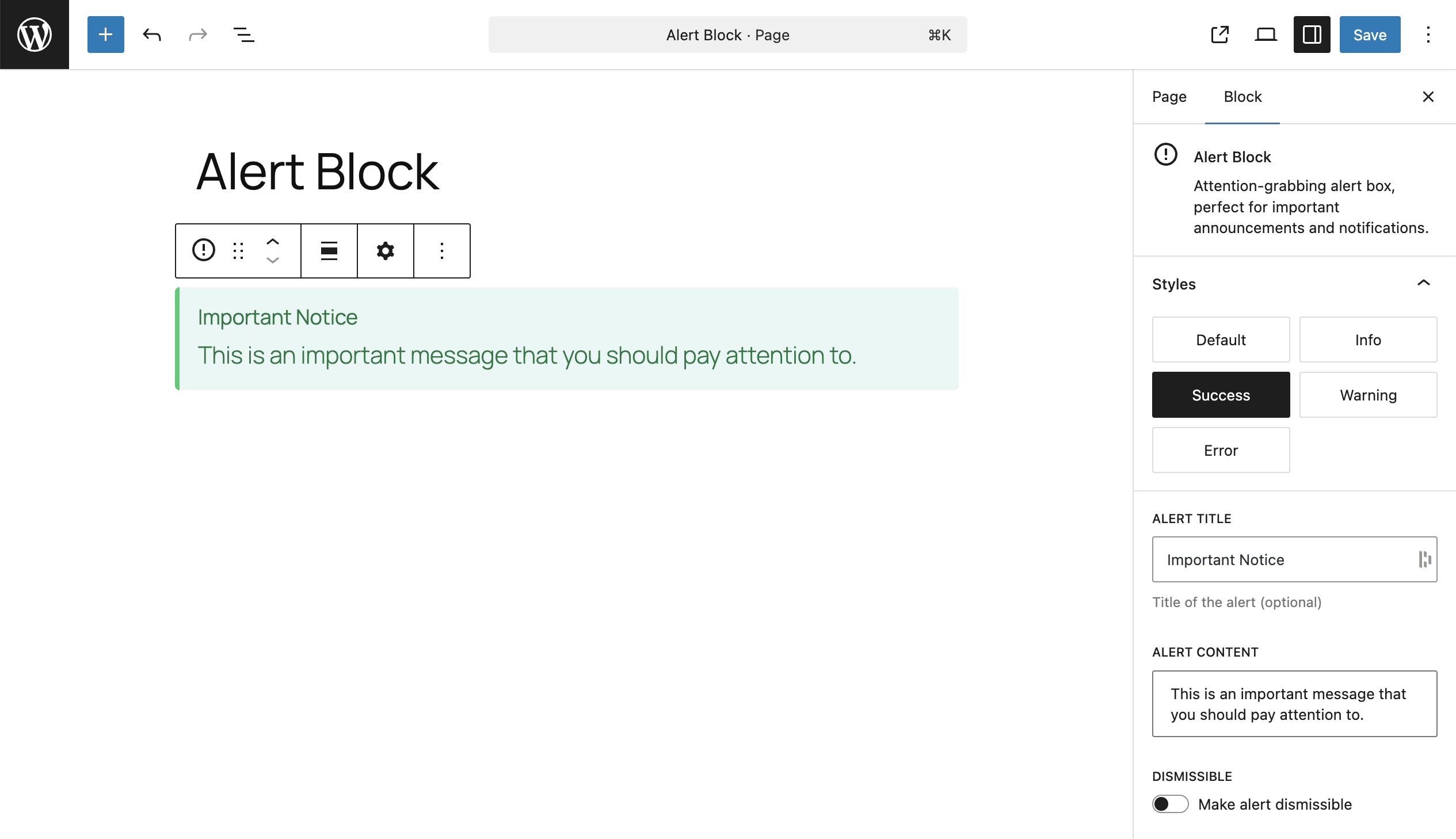
Oto wszystko, czego potrzebujesz, aby wdrożyć swój własny blok w edytorze WordPress:
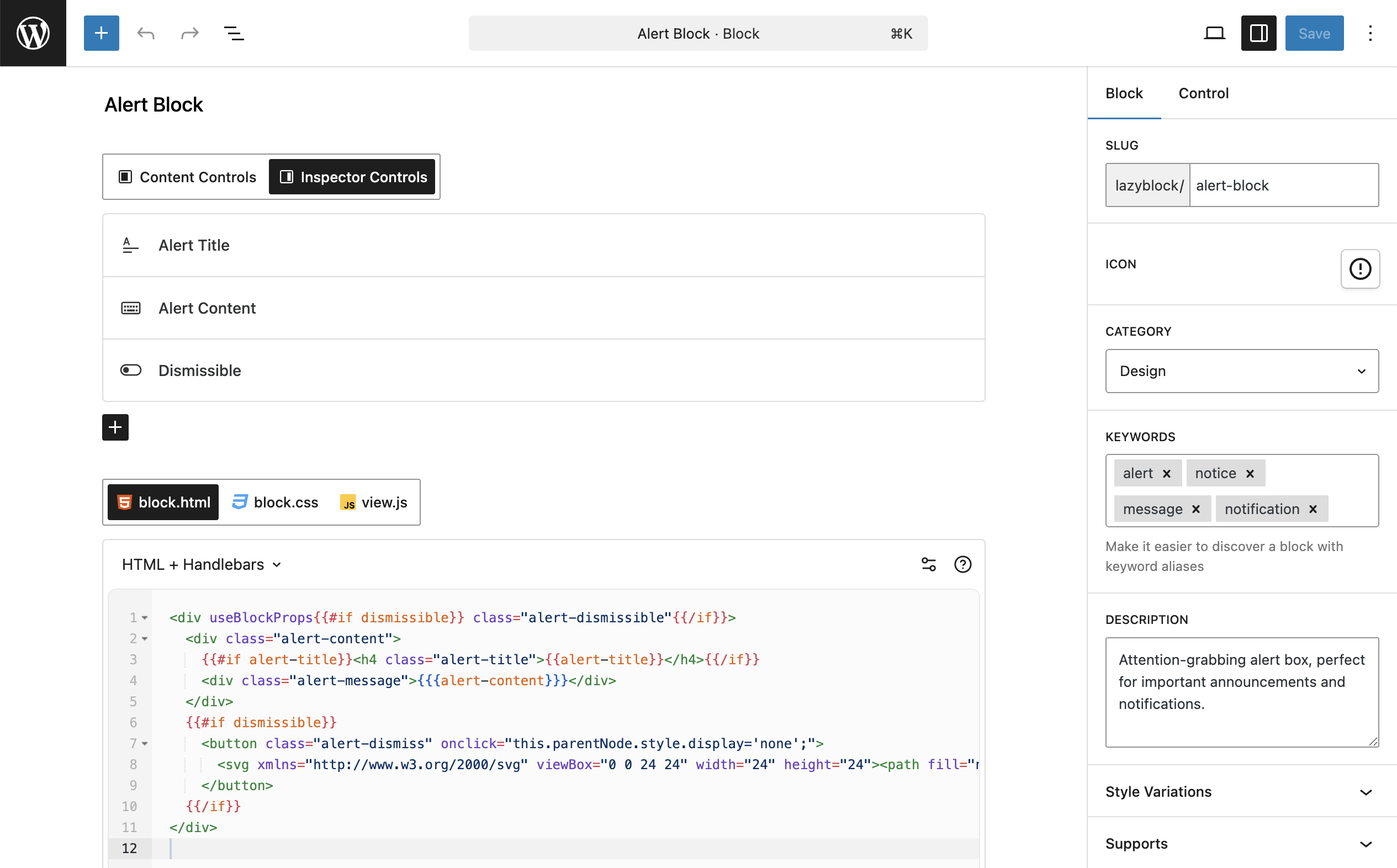
1. Skonfiguruj blok własny
Nadaj nazwę swojemu blokowi własnemu, ustaw ikonkę, kategorię itp.
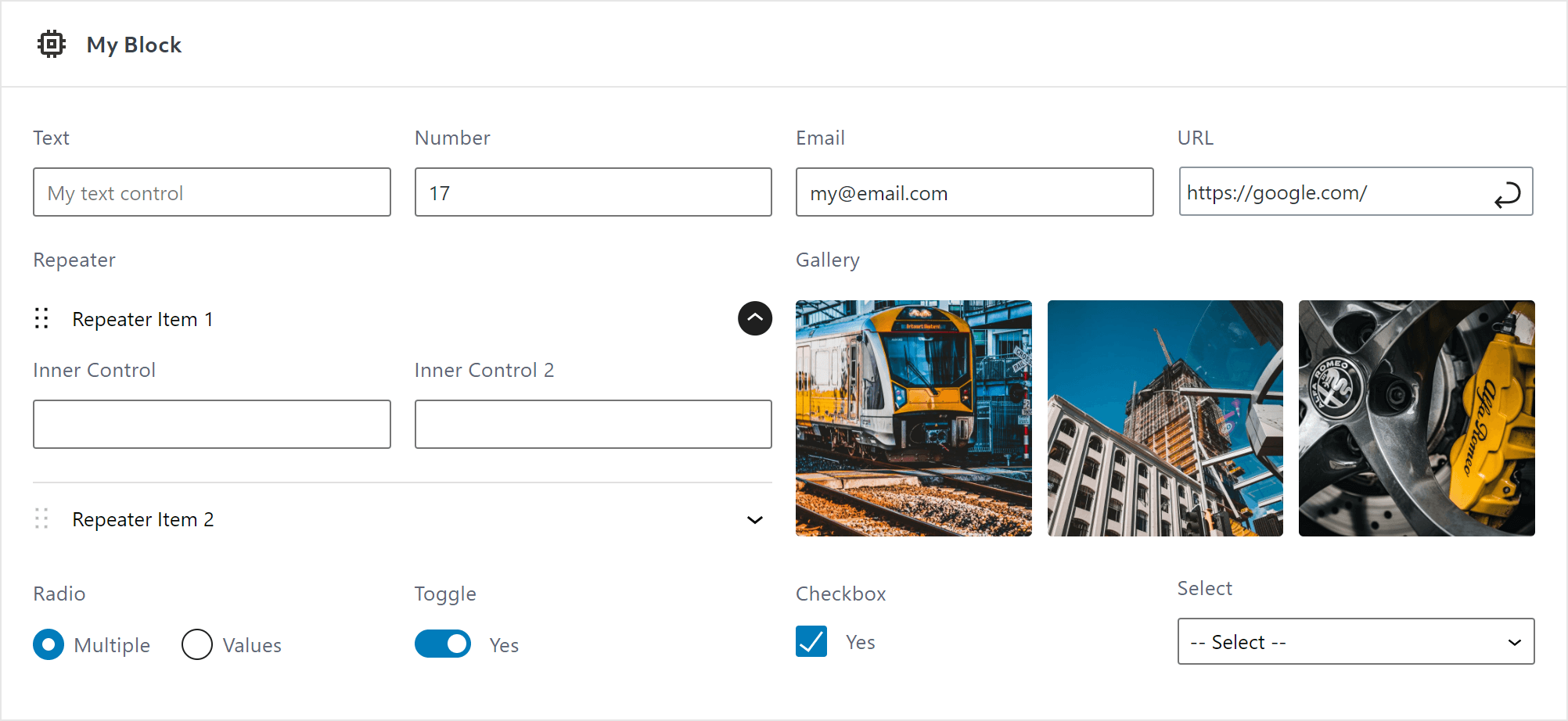
2. Dodaj kontrolki
Dodaj pola kontrolne, takie jak prosty tekst i złożone selektory obrazków.
3. Napisz kod wyjściowy
Kod wyjściowy dla Twojego własnego bloku z obsługą HTML i PHP.
🌟 Funkcje
- Własne bloki z kodem wyjściowym
- Własne bloki dla pól meta wpisów
- Duży zestaw predefiniowanych elementów sterujących
- Pokaż kontrolki w treści bloku / inspektorze
- Dozwolone są wielokrotne metody wyjściowe
- Własny PHP
- Własny kod HTML + kierownica
- Pliki szablonów w katalogu motywu
- Eksport / import bloków
🔥 Kontrolki
Aby zarządzać atrybutami bloków własnych, musisz użyć kontrolek. Leniwe bloki oferują obszerny zestaw predefiniowanych kontrolek:
- Podstawowe
- Tekst
- Pole tekstowe
- Liczba
- Zakres
- Adres URL
- Hasło
- Treść
- Obrazek
- Galeria
- Plik
- Tekst sformatowany
- Edytor klasyczny
- Edytor kodu
- Bloki wewnętrzne
- Wybór
- Wybierz
- Pole wyboru
- Pole zaznaczenia
- Przełącz
- Zaawansowane
- Selektor koloru
- Selektor daty i czasu
- Układ
- Powtarzacz
- Własne elementy sterujące przeczytaj naszą obszerną dokumentację
🏳️ Wielojęzyczny
Leniwe bloki dodają nową warstwę kompatybilności z WPML. Wszystkie kontrolki tekstowe bloków własnych są kompatybilne z WPML i gotowe do tłumaczenia. https://www.lazyblocks.com/docs/multilingual/
🛠 Stworzone dla programistów
Leniwe bloki stworzone przez programistów dla programistów dają nieograniczoną swobodę tworzenia własnych bloków. Dodatkowo, dostępne są filtry PHP i akcje, które pozwalają dostosować każdy element własnych bloków z poziomu zaplecza. Możliwość korzystania z PHP i systemu szablonów motywów.
Każda część interfejsu użytkownika powinna być intuicyjna w przypadku prostych bloków własnych, jeśli jednak chcesz stworzyć coś bardziej złożonego, konieczne może okazać się przeczytanie naszej obszernej dokumentacji.
🔥 Leniwe bloki Pro
Wtyczka Leniwe bloki jest również dostępna w wersji profesjonalnej, która oferuje więcej opcji i funkcji! Dowiedz się więcej o Leniwych blokach Pro
Aby stale utrzymywać darmową wersję wtyczki i zapewniać szybkie i skuteczne wsparcie techniczne, oferujemy wersję Pro wtyczki. Wersja Pro umożliwia:
-
Dodatkowe elementy sterujące
- Wpisy – Przeszukaj i wybierz wpisy na podstawie typu treści lub taksonomii
- Taksonomia – Wyszukiwanie i wybieranie kategorii, znaczników i innych własnych taksonomii
- Użytkownicy – Wyszukiwanie i wybieranie użytkowników na podstawie ich ról
- Jednostki – Zaawansowane wprowadzanie liczb z możliwością wyboru dowolnej jednostki CSS
- Wiadomość – Wyświetla pomocną wiadomość pomiędzy elementami sterującymi
- Edytor kodu – Wstawianie części kodu za pomocą edytora z podświetlaniem składni
-
Warunki kontrolek
Warunkowo wyświetlaj/ukrywaj kontrolki. Aby nie przeciążać bloku ogromną listą kontrolek, możesz ukryć niektóre z nich w zależności od wartości innych kontrolek. -
Style i skrypty
Dodaj własny kody CSS i JavaScript do swoich bloków. Zdefiniuj style dla edytora i front-endu, a także skrypty dla interaktywnych funkcji front-endu. Zasoby są wczytywane automatycznie tylko wtedy, gdy są potrzebne, aby zapewnić optymalną wydajność. -
Panele i rozdzielacze
Panele i rozdzielacze umożliwiają grupowanie elementów sterujących. Pomagają one lepiej zorganizować interfejs użytkownika panelu blokowego. -
Wstępne wczytywanie bloków
Wyświetla podgląd bloków natychmiast po wczytaniu edytora stron. -
Ulepszenia SEO
Dodatkowe wsparcie dla analizy treści we wtyczkach Rank Math i Yoast SEO.
Odkryj jeszcze więcej funkcji własnych bloków w Leniwe bloki Pro już dziś!
Zrzuty ekranu
Bloki
Wtyczka dodaje 2 bloki.
- Block Builder
- Free Content
Instalacja
Instalacja automatyczna
Automatyczna instalacja to najłatwiejsza opcja, ponieważ WordPress sam obsługuje przesyłanie plików i nie musisz opuszczać przeglądarki internetowej. Aby przeprowadzić automatyczną instalację Leniwe bloki, zaloguj się do kokpitu WordPress, przejdź do menu Wtyczki i kliknij Dodaj nową.
W polu wyszukiwania wpisz „Lazy Blocks” i kliknij „Szukaj wtyczek”. Po znalezieniu naszej wtyczki możesz wyświetlić jej szczegółowe informacje, takie jak data wydania, ocena i opis. Co najważniejsze, możesz ją zainstalować, klikając „Zainstaluj teraz”.
Instalacja ręczna
Metoda instalacji ręcznej polega na pobraniu naszej wtyczki Leniwe bloki i przesłaniu jej na serwer WWW za pomocą ulubionej aplikacji FTP. Instrukcje, jak to zrobić, znajdziesz w kodeksie WordPressa tutaj.
Recenzje


Kontrybutorzy i deweloperzy
„Kreator bloków własnych – Leniwe bloki” jest oprogramowaniem open source. Poniższe osoby miały wkład w rozwój wtyczki.
Zaangażowani
Wtyczka „Kreator bloków własnych – Leniwe bloki” została przetłumaczona na 11 języków. Podziękuj tłumaczom za ich wkład.
Przetłumacz wtyczkę “Kreator bloków własnych – Leniwe bloki” na swój język.
Interesuje cię rozwój wtyczki?
Przeglądaj kod, sprawdź repozytorium SVN lub czytaj dziennik rozwoju przez RSS.
Rejestr zmian
4.4.1 – Aug 31, 2026
- changed Lazy Blocks to stay active next to Lazy Blocks Pro instead of being deactivated
4.4.0 – Aug 26, 2026
- added WordPress 7.1 compatibility
- added filters for extending how a block renders in the editor preview
- improved the Gallery control in the block builder, which now previews its images in a grid
- improved Gallery control loading speed on galleries with many images, fetching image data in one request instead of one per image
- fixed dragging values in a multi-select control inside the editor canvas
- fixed Image, File and Gallery values not being read when written as raw JSON in block markup
- fixed Repeater values not being read when written as a raw array in block markup
- Pro:
- added a Rich Text control that edits inline the way a core block does, and rebuilt the wizard presets on it
- fixed the update notice still offering a version already installed
4.3.1 – Jun 11, 2026
- improved performance by caching prepared
get_blocks()results within a single request - fixed Lazy Blocks role capability sync to run once on plugin upgrade instead of on every admin request
- Pro:
- fixed SEO frontend preload performance by batching initial block renders in a single request
- fixed code editor syntax highlighting when system dark mode is enabled
4.3.0 – May 4, 2026
- added compatibility for WordPress 7.0
- added support Groups Treść and List groups for controls in Inspector
- fixed Checkbox with multiple options and Save in Meta error
- fixed possible vulnerability – stronger checks on who can change block code (editor, front-end output, and scripts), so permissions are respected even if something tries to update block meta outside the normal editor
- fixed displaying unfinished block drafts with an empty slug
- minor fixes and changes
4.2.1 – Feb 4, 2026
- fixed context-aware capability check for PHP block rendering (resolves XSS)
4.2.0 – Dec 3, 2025
- added caching for the get_blocks() function to prevent loading block custom posts on every page load. This fixes the issue with heavy SQL calls on sites using a large number of blocks (20+)
- fixed URL control inside the 'content’ placement. Since you asked to keep it working in Content, we restored the control here and now display settings in a Modal – this is a workaround for Gutenberg limitations with URL components inside iframe preview
- fixed required control check and post locking when a block is rendered inside a preview example
- Pro:
- added Link control: https://www.lazyblocks.com/docs/blocks-controls/link/
- added Token Field control: https://www.lazyblocks.com/docs/blocks-controls/token-field/
- added Token Field appearance for Taxonomy control
- fixed incorrect path display for theme template code folder for blocks with custom namespace
4.1.1 – Sep 25, 2025
- security fix: prevent unauthorized block export access
- added
$contentattribute tolzb/block_render/outputfilters - Pro:
- fixed rendering blocks in widgets screen when Rank Math is active
4.1.0 – Aug 18, 2025
- !zmiana przełomowa – w szablonach motywów zmieniono nazwę
$contextna$render_location, aby zamiast tego używać$contextdla bloków Gutenberga. Funkcja kontekstu: https://www.lazyblocks.com/docs/blocks-code/relationships/ - requires PHP version 8.0 or higher, with version 8.3 and above recommended
- added JS filter for devs:
lzb.registerBlockType.args - added PHP filters for devs:
lzb/register_blocks,lzb/get_blocks - fixed content wrapper controls color inheritance from parent
- fixed losing focus from input fields in the inspector controls when block render preview updated
- fixed URL control rendering in Content – display fallback Text control
- disable possibility to add URL control inside Repeater inserted inside Content
- usunięto elementy sterujące dla potomków po usunięciu elementu sterującego powtarzającego
- drobne poprawki
- Pro:
- dodano obsługę relacji bloku i kontekstu
- ulepszone pobieranie treści bloków dla wtyczek SEO, aby umożliwić dokładną analizę, oraz dodane wstępne wczytywanie, aby zapobiec wielokrotnemu pobieraniu podczas wczytywania strony edytora. Dowiedz się więcej -> https://www.lazyblocks.com/docs/blocks-code/relationships/
4.0.3 – Jul 7, 2025
- Pro:
- fixed incorrect displaying controls in inspector inside different groups
4.0.2 – Jun 26, 2025
- fixed displaying block border in editor when used repeater in inspector
4.0.1 – Jun 4, 2025
- restored
lzb/block_render/allow_wrapperfilter to prevent existing user blocks from breaking, but we now deprecate this hook and display a notice to migrate to the useBlockProps attribute - Pro:
- fixed updater caching issue that sometimes caused Forbidden errors
4.0.0 – Jun 2, 2025
- deprecated Templates feature. You need to migrate to the WordPress FSE theme and use Template editor natively. Learn more -> https://wordpress.org/documentation/article/template-editor/. Our implementation will still work for existing sites, but it is deprecated for future use.
- improved Block Builder UI and reworked some option names and placement
- added possibility to control the block wrapper and remove the block border from the editor https://www.lazyblocks.com/docs/blocks-code/use-block-props/
- added setup wizard with predefined blocks for quick start your custom blocks https://www.lazyblocks.com/docs/create-block/#setup-wizard
- added more Supports options: color, layout, shadow, spacing, dimensions, typography https://www.lazyblocks.com/docs/create-block/#block-settings
- added
lzb/register_block_type_datafilter to override block registration data - removed
lzb/block_render/allow_wrapperPHP filter, because user can now provide their own wrapper in block code - rename „Styles” to „Style Variations” to prevent collision with block custom CSS options
- fixed saving Ghost Kit supports settings
- fixed duplicated block IDs after duplicating 2 and more blocks at once
- fixed URL control size in Inspector
- fixed block render if output is '0′ string
- fixed block attribute display in the block builder preview
- fixed render context when inside block builder preview
- minor fixes and improvements
- Pro
- added possibility to add Styles and Scripts for your block https://www.lazyblocks.com/docs/blocks-code/styles-scripts/
- added support for Posts Statuses in Posts control settings
- added support for Meta controls in conditional logic
- added in SEO plugins proper handling of blocks content, which does not have Editor code output but only Frontend
- display options in posts and users controls by default when no search text added
- removed Native Blocks Style feature in favour of use
useBlockPropsattribute - fixed default value in multiple Posts, Taxonomy and Users controls
- fixed SEO plugins don’t count blocks content length
- fixed $wpdb->prepare syntax error in Maria DB
3.8.3 – Dec 21, 2024
- fixed XSS issue in admin blocks list page
3.8.2 – Dec 13, 2024
- Pro
- fixed automatic plugins update. In case you can’t automatically update plugin, install it manually https://www.lazyblocks.com/docs/account-and-license/download-lazy-blocks-pro-plugin/
3.8.1 – Dec 10, 2024
- remove experimental notice under WPML setting
- minor changes in readme
- Pro:
- fixed block crash when conditional logic added to the control which is no longer exists
3.8.0 – Dec 7, 2024
- added WordPress 6.7 compatibility
- added better error messages to block Inspector and to the editor toolbar when block has invalid required controls
- added prompt to remove metadata from post after removing block which contains the control with Save in Meta option enabled
- added possibility to clear the Gallery control
- added duplicate row button to Repeater control
- added
wp_get_attachment_imageHandlebars helper - added possibility to activate/deactivate blocks
- added support for embed links to the Classic Editor control
- added Groups for Inspector – Default, Styles and Advanced
- added reset button to Time control
- added Multiple option support for Checkbox control
- improved Repeater control UI
- improved block duplication process – add copy suffix and disabled block by default
- improved control with Save in Meta displaying in the editor of post, which does not support custom fields
- fixed invalid block builder render when there are no blocks registered
- fixed offsetHeight JS error in block builder preview
- fixed hardcoded
wp-contentstring in the block builder UI: changed to wp content dir core constant - fixed displaying default block icon in blocks list admin UI
- fixed saving of Repeater row addition and removal in undo/redo manager
- fixed align class rendering in block when align attribute is disabled
- prevent changing block post statuses – support only draft and publish
- rename Constructor to Block Builder
- removed advanced validation from the URL control to prevent required check fails on relative links or links to applications
- removed the ability to use URL control within Content, since the Gutenberg no longer renders it correctly here
- Pro:
- added possibility to change block slug Namespace and register Collection
- fixed block editor styles for Code control extension
- migrate Pro plugin from Paddle to LemonSqueezy
3.7.0 – May 23, 2024
- improved Required control options – added more validation checks and better error messages
- fixed Classic control loading in legacy Widgets screen
- fixed Number/Range controls default value
0when it is not selected - changed
lzb.editor.control.isValueValidhook tolzb.editor.control.validate - removed Multiline option from RichText control as it is deprecated
3.6.2 – May 1, 2024
- added error handler to prevent block from breaking in editor when there are invalid HTML in block output
- fixed get_meta_value_by_block method to not crash if no meta available
3.6.1 – Mar 21, 2024
- reverted the code for validating HTML as it does more harm than good. In the next update, we will need to add error handlers in JS instead of trying to validate HTML inside PHP.
3.6.0 – Mar 15, 2024
PRO plugin:
- fixed decoding of WPML encoded strings in conditional logic in editor
Free + PRO plugin:
- added compatibility for the latest Gutenberg and WordPress 6.5
- added error handler for invalid HTML. The block will no longer crash, it will display the error message
- added support for new Ghost Kit extensions
- changed Classic control to use Modal since we can no longer use the TinyMCE inside editor iframe
- fixed styles enqueue in editor iframe
- fixed adding default toggle/checkbox value in the new repeater row
- fixed
react-selectstyles render inside editor iframe - fixed
react-selectremoving items by clicking on X button - fixed decoding of WPML encoded strings in repeater, gallery, file and image controls in editor
- fixed displaying Navigation and Patterns in block Condition selector
- fixed loading block control scripts in block builder when no blocks registered yet
3.5.1 – Aug 30, 2023
- fixed JS error in editor in block containing
<script>tag in content when preview showed
3.5.0 – Aug 18, 2023
- added support for WordPress 6.3
- all blocks now have
apiVersion3, which means that in the latest Gutenberg you will have an iframed page editor - fixed block rendering error inside core/group block
- fixed editor error when view block preview or add a couple of reusable blocks
- minor changes
3.4.5 – Jul 24, 2023
- fixed wrong template rendering in Editor after InnerBlocks component used
3.4.4 – Jul 20, 2023
- fixed InnerBlocks component rendering number values with
$character
3.4.3 – Jul 12, 2023
PRO plugin:
- fixed JS error in Posts control in editor
FREE plugin:
- fixed blocks rendering on Widgets screen
- fixed default value with an empty array element of multi select
- fixed JS error in multiple Select control in editor when null value
3.4.2 – Jul 1, 2023
PRO plugin:
FREE plugin:
- fixed Anchor option and ID attribute rendering in the block wrapper (Gutenberg reverted feature for automatic Anchor render in the dynamic blocks)
3.4.1 – Jun 30, 2023
PRO plugin:
- added higher priority for block preloading feature to let 3rd-parties hook the output before preloading
FREE plugin:
- added defaults to user registered blocks (fixes the problem, when old registration configs fails when we add new parameters)
- added
remove_blockmethod to the Blocks class to allow removing user registered blocks - added filter
lzb/block_render/allow_inner_blocks_wrapper - added support for
classNameattribute in<InnerBlocks />component - skip control assets enqueue if there are no blocks registered (fixes the JS error in editor)
- fixed nested blocks not displaying appender button with InnerBlocks component
3.4.0 – Jun 24, 2023
PRO plugin:
- added controls conditions based on selected block style or for a specific class name
- added support for Term ID output in Taxonomy control
- added
lazy-blocks.phpfile as a helper when included within a theme or plugin - added support for Equal and Contains conditions for Units control
- added
==classand!=classcondition operators - changed saved attribute of Taxonomy control to ID when selected Term Object
- fixed Posts and URL controls not displaying all available post types
FREE plugin:
- added
<InnerBlocks />component support. Learn more here – https://www.lazyblocks.com/docs/blocks-code/inner-blocks/- it is required to change your block code to use
<InnerBlocks />component if you use the InnerBlocks control - the old InnerBlocks control is now marked as deprecated and will be removed in future plugin updates
- it is required to change your block code to use
- added possibility to register Block Styles https://developer.wordpress.org/block-editor/reference-guides/block-api/block-styles/
- added option for Image control to insert from URL
- added new Supports settings – Reusable and Lock
- added possibility to sort tags inside the Select component
- added width support for controls in the block builder UI
- added apiVersion 3 to blocks
- added
include_withinmethod to include plugin within theme or plugin. Learn more here https://www.lazyblocks.com/docs/examples/include-lazy-blocks-within-theme-or-plugin/#how-to-include-plugin-files - added
lzb/control_valuefilters. Learn more here https://www.lazyblocks.com/docs/php-filters/lzb-control_value/ - added
filter_control_valuemethod into the Base control class for 3rd-party controls - added JS hook
useBlockControlPropsto use in 3rd-party controls - added helpful attributes to control wrappers such as
data-lazyblocks-control-name - added control values filtering inside the repeater rows
- added
Toggle alllabel to Repeater control toggle - improved Repeater control to automatically open a newly added Row
- improved Free block and InnerBlocks appender style in editor (Displays like in core blocks)
- improved usage of Lazy Block’s
render_callbackto prevent conflicts with Gutenberg’srender_callback - improved meta controls, templates editor – use
useEntityPropinstead ofeditPost - improved Color Picker control:
- use a single toggle to open the full color palette
- added option to disable color palette
- added Alongside text option
- moved Ghost Kit supports settings to separate panel in block builder
- moved Edit Block icon to the block toolbar
- changed
import_blockmethod to public in Tools class - changed bundler to
wp-scripts– faster builds and development process - fixed styles loading inside the editor iframe
- fixed block render duplicate custom CSS and anchor
- fixed Classic Editor error in widgets editor
- fixed block builder styles in editor with Astra theme
- fixed JS error when
conditionfield is not added in the PHP block registration - fixed sortable inside editor iframe
- fixed displaying label and help in controls, where these settings are disabled
- fixed duplicate Redux store loading inside block builder
- removed CodeEditor component from lazyblocks Redux store (reduced editor.js file size)
- removed
throttle-debounceusage, use lodash instead - removed HTML elements from block descriptions, as it is deprecated since WordPress v6.2
3.3.0 – Jan 4, 2023
PRO plugin:
- added support for Repeater control in the Conditional Logic
FREE plugin:
- added notice for invalid control name when creating block
- fixed Preview component JS actions call after fetch complete
- fixed displaying Date and Time pickers
- fixed Date Time Picker displaying date in the toggle label
3.2.1 – Dec 4, 2022
PRO plugin:
- fixed block preloading inner-blocks attribute
- fixed displaying controls in columns
FREE plugin:
- added support for WPML
- added „Edit Block” link inside the block description
- fixed incorrect detection of the selected block to hide/show controls and preview
- fixed displaying control label with Required mark
- fixed margin between control and help text
- fixed block render error when add „Hide If Not Selected” option to Inner Blocks control
- fixed error „Render callback is not specified” when preview block with empty output code
- fixed export block PHP closing function call
- fixed JS error when change value of new control inside existing repeater
- fixed Classic Editor and Repeater save attribute conflict
- fixed debounce preview is not always reloaded after changes
- fixed usage of deprecated action „lzb_handlebars_object”
- fixed deprecated warning even if no deprecated hook used
3.1.0 – Nov 16, 2022
PRO plugin:
- added block preloading feature – all blocks loaded immediately, when you open the page editor
- added support for content analysis in Rank Math and Yoast
- added setting to remove block frame in page editor and display it as native block
- added Link Suggestions option to URL control (select post types to suggest links when typing)
- added Rich Preview option to URL control (display page title and image of selected URL)
FREE plugin:
- added support for Blocks API v2
- added
lzb/inithook for developers to register blocks in PHP - added autoFocus to block builder control Type popup input search
- added autoFocus to choices component when adding new choice
- added JS filters –
lzb.components.PreviewServerCallback.allowFetch,lzb.constructor.code-settings.output-method,lzb.constructor.code-settings.output-code,lzb.constructor.code-settings.output-template,lzb.constructor.code-settings.preview,lzb.constructor.code-settings.additional - added PHP filters –
lzb/block_defaults,lzb/block_data - added PHP actions –
lzb/init - fixed block builder control Type popup padding
- fixed block builder code preview iframe width
- fixed admin PHP warning when user with Editor role
- fixed blocks conditional displaying in selected post types
- fixed registering user blocks which don’t have all control parameters
- fixed registering block inside
inithook - fixed BaseControl help with HTML generates JS errors in console
- fixed Select control with Multiple option CSS overflow problem
- fixed templates custom meta settings width
- fixed control label displaying when it is empty
- changed block configs sanitization function priority to prevent possible conflicts
- removed URL control Reset button, use standard icon instead
- disabled custom class name support in Free block
- deprecated action
lzb_handlebars_object, uselzb/handlebars/objectinstead
3.0.0 – Nov 9, 2022
PRO plugin:
- Lazy Blocks Pro is finally released and available here – https://www.lazyblocks.com/pro/
FREE plugin:
- a lot of code rewrites to improve stability and performance
- added support for Image control data in the repeater title short tags
- added possibility to save block data with html tags. Supported block description, controls labels and help fields
- added basic styles to the Code Editor control
- added support for „Content Only” lock in Templates
- added support for multiple color palettes (registered in the theme and in Gutenberg itself) in the Color Picker control
- fixed enqueue styles in FSE
- fixed „Hide if block is not selected” option when control displayed in both placements (Inspector and Content)
- fixed „Hide if block is not selected” option to work with inner blocks
- fixed adding defaults to the new row in repeater
- fixed unlocking post saving when remove locked block
- fixed URL control styles
- fixed icon box in admin block list ui when no icon selected
- fixed block builder rendering when 3rd parties use the
allowed_block_types_allhook - fixed widgets screen block error
- fixed Classic Editor control in Widgets Screen
- fixed Rest permissions check errors
- fixed error message displaying when block preview is not rendered
- simplified exported block configs (removed fields with default values)
- changed
react-sortable-hoctodnd-kit– no more error messages in the console - removed limitation for 3 tags per block
- removed wrapper from controls displayed inside Inspector
- minor changes
2.5.3 – Jan 8, 2022
- added block inserter preview (thanks https://github.com/nk-crew/lazy-blocks/pull/230)
- fixed PHP8 deprecation warning
- fixed security issue in the code for duplicating post (thanks to the Wordfence team)
- minor changes
2.5.2 – Dec 6, 2021
- added support for color slugs in the Color controls when using new FSE themes
- added code preview in the block builder (thanks https://github.com/nk-crew/lazy-blocks/pull/227)
- fixed propagating cut event in the block builder (thanks https://github.com/nk-crew/lazy-blocks/pull/226)
- removed default value generated for repeaters, as it was not working correctly
2.5.1 – Nov 5, 2021
- added „Free Content” block in the Templates editor
- fixed PHP warnings when migrating to v2.5.0
2.5.0 – Nov 5, 2021
- improved Templates editor (now you can use Gutenberg editor and insert full-featured blocks)
- fixed
get_lzb_metaoutput of array and object values - fixed Block Builder screen title click in WP 5.9
- fixed long block names word wrap in export page
- fixed Color Picker control styles in editor
2.4.3 – Sep 27, 2021
- changed post types list limit in the templates editor ()
- changed minimal PHP version to 7.2
2.4.2 – Sep 22, 2021
- added option to use the color slug in the Color Picker control (see Output Format option)
- fixed js errors in the widget screen
- changed minimal WP version to 5.8
2.4.1 – Aug 27, 2021
- fixed 'wp-editor’ deprecated error
- fixed conflict with Widgets Gutenberg editor
- fixed repeater sorting error
- removed accepted list for file control Upload button since it is not working correctly in some cases
2.4.0 – Aug 18, 2021
- added support for WordPress 5.8
- added a lot of UI improvements
- added slug check in the block name before register block (fixes possible errors)
- added placeholder color in image and gallery controls if images no more exist in media library
- added control names autocompletion to code editor in the block builder
- fixed multiple select control wrong height and styles
- fixed displaying control post meta using function
get_lzb_metawhen live reload preview - fixed Classic Control toolbar sticky
- fixed Date Control JS error
- fixed long words render in control labels and descriptions
- fixed PHP 8 deprecated error
- fixed wrong activation hook call
2.3.1 – Mar 19, 2021
- added compatibility with WordPress 5.7
- added possibility to display default meta value (without hard code, using native WordPress 5.5+ API)
- improved date time picker styles
- improved block builder controls rendering code
- fixed double classes rendering in editor, when Single Output code enabled
- minor changes
2.3.0 – Jan 10, 2021
- added possibility to duplicate blocks
- added top toolbar to admin pages
- improved Date Time picker
- always display TimePicker component (to let users manually set day, month and year)
- display only necessary parts of TimePicker component
- better format on button label
- changed block builder Type selector to modal
- fixed Classic control initialize problem in WordPress 5.6 update
- fixed block builder disabled Update button
- fixed block builder controls label margin
- fixed compatibility with Amazon S3 Offload Media plugin (changed image and gallery controls image URL retrieve method)
- minor changes
Further changelog entries can be found in the CHANGELOG.md file.