

Opis
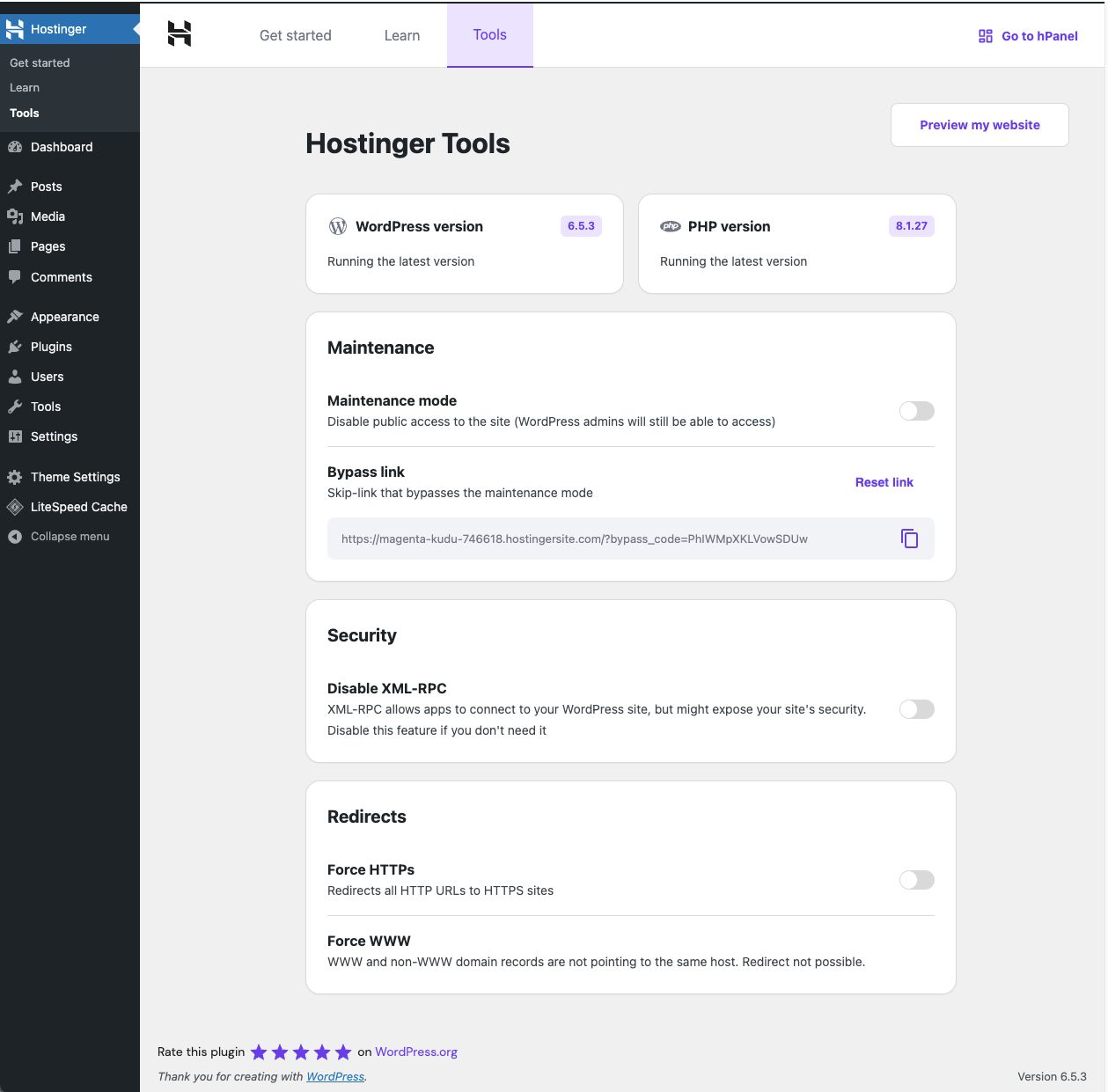
Narzędzia Hostinger to wtyczka wszystko w jednym zaprojektowana w celu usprawnienia podstawowych zadań administratorów witryn WordPress. Ta wtyczka oferuje szereg funkcji, które pomogą Ci skutecznie zarządzać informacjami na Twojej stronie, trybem konserwacji, bezpieczeństwem i przekierowaniami.
Features:
Basic Info
- Wyświetla aktualną wersję WordPressa i automatycznie sprawdza dostępność aktualizacji.
- Pokazuje aktualną wersję PHP i automatycznie sprawdza dostępność aktualizacji.
Maintenance Mode
- Łatwe włączanie i wyłączanie trybu konserwacji w witrynie.
- Podaj adres URL umożliwiający pominięcie trybu konserwacji dla wybranych użytkowników.
Security
- Włącz lub wyłącz żądania XML-RPC, aby zwiększyć bezpieczeństwo swojej witryny.
- Włącz lub wyłącz stronę Autoryzuj aplikację, aby zwiększyć bezpieczeństwo swojej witryny.
Redirects
- Wymuś używanie protokołu HTTPS we wszystkich adresach URL w celu bezpiecznego przeglądania.
- Wymuś używanie protokołu WWW we wszystkich adresach URL, aby zapewnić spójność dostępu do witryny.
LLMs.txt Generation
- Automatyczne generowanie ustrukturyzowanego pliku LLMs.txt w formacie Markdown.
- Podaj tytuł witryny internetowej, opis, wpisy, strony i produkty (jeśli WooCommerce jest włączony).
- Aktualizuj plik w przypadku zmiany treści lub opublikowania nowej treści.
- Pomóż narzędziom opartym na AI lepiej zrozumieć i wchodzić w interakcję z treścią Twojej witryny.
Narzędzia Hostinger to nowa wersja poprzedniej wtyczki Hostinger, oferująca zaktualizowane i ulepszone doświadczenie.
Asystent wdrażania i sekcja Nauka, które wcześniej były zawarte w tej wtyczce, zostały przeniesione do osobnej wtyczki Łatwe wdrażanie Hostinger.
Zrzuty ekranu
Instalacja
Minimum Requirements- Zalecany jest PHP 8.0 lub nowszy
- Zalecany jest MySQL 5.6 lub nowszy
Jeśli utworzysz witrynę WordPress na koncie hostingu WordPress zarządzanego przez Hostinger, ta wtyczka zostanie zainstalowana automatycznie.
Alternatywnie możesz użyć automatycznej instalacji z kokpitu, a WordPress zajmie się transferem plików – nie musisz opuszczać przeglądarki internetowej. Aby wykonać automatyczną instalację wtyczki Hostinger, zaloguj się do kokpitu WordPress, przejdź do menu Wtyczki i kliknij Dodaj nową.
W polu wyszukiwania wpisz Hostinger, a następnie kliknij Szukaj wtyczek. Gdy nas znajdziesz, możesz wyświetlić szczegóły na ten temat, takie jak punkt wydania, ocena i opis. Co najważniejsze, oczywiście możesz zainstalować ją, klikając Zainstaluj teraz, a WordPress zajmie się resztą.
Manual installationMetoda ręcznej instalacji wymaga pobrania wtyczki Hostinger i przesłania jej na serwer WWW za pośrednictwem ulubionej aplikacji FTP. Instrukcje, jak to zrobić, znajdują się w kodeksie WordPressa tutaj.
UpdatingAutomatyczne aktualizacje powinny działać bezproblemowo, jednak nadal zalecamy wykonanie kopii zapasowej witryny.
Najczęściej zadawane pytania
-
Jak zainstalować wtyczkę
-
Jeśli utworzysz witrynę WordPress na koncie hostingu WordPress zarządzanego przez Hostinger, ta wtyczka zostanie zainstalowana automatycznie.
Alternatywnie możesz zainstalować wtyczkę bezpośrednio z kokpitu WordPress. Po prostu przejdź do Wtyczki > Dodaj nowe wtyczki, wyszukaj „Hostinger Tools” w repozytorium wtyczek, kliknij Zainstaluj, a następnie Włącz.
-
Czy korzystanie z wtyczki Narzędzia Hostinger wiąże się z kosztami?
-
Wtyczka Narzędzia Hostinger jest dostępna bezpłatnie. Jednak funkcje Asystent AI do tworzenia treści są dystrybuowane z inną wtyczką dostępną wyłącznie dla naszych klientów korzystających z planów hostingu Business i Cloud.
-
Czy istnieją jakieś szczególne wymagania dotyczące hostingu dla tej wtyczki?
-
Wtyczka Narzędzia Hostinger została zaprojektowana tak, aby działać bezproblemowo na dowolnej platformie hostingowej, zapewniając szeroką kompatybilność i łatwość użytkowania. Jednak wtyczka wymaga następujących minimalnych wymagań:
* PHP 8.0 lub nowszy
* MySQL 5.6 lub nowszy -
Czy mogę uzyskać dostęp do materiałów edukacyjnych poza tą wtyczką?
-
Tak, materiały edukacyjne, które możesz znaleźć w tej wtyczce, są dostępne na naszym kanale YouTube Akademia Hostinger i stronie internetowej Poradniki Hostinger.
Recenzje


Kontrybutorzy i deweloperzy
„Narzędzia Hostinger” jest oprogramowaniem open source. Poniższe osoby miały wkład w rozwój wtyczki.
Zaangażowani
Wtyczka „Narzędzia Hostinger” została przetłumaczona na 20 języków. Podziękuj tłumaczom za ich wkład.
Przetłumacz wtyczkę “Narzędzia Hostinger” na swój język.
Interesuje cię rozwój wtyczki?
Przeglądaj kod, sprawdź repozytorium SVN lub czytaj dziennik rozwoju przez RSS.
Rejestr zmian
3.0.78 (2026-09-22)
- Feature: Link to llms.txt from the public site head
3.0.77 (2026-08-25)
- Tweak: Rename Kodee to Hostinger Agent
3.0.76 (2026-08-20)
- Tweak: Bump Tested Up to 7.1
- Tweak: Update dependencies
3.0.75 (2026-08-11)
- Feature: Update dependencies
- Fix: Remove BOM from llms.txt
3.0.74 (2026-08-06)
- Feature: Add custom application password message
3.0.73 (2026-07-29)
- Fix: Security dependencies
3.0.72 (2026-07-07)
- Fix: Update dependencies
3.0.71 (2026-07-02)
- Fix: Update dependencies
3.0.70 (2026-06-25)
- Fix: Update dependencies
3.0.69 (2026-06-23)
- Fix: Update dependencies
3.0.68 (2026-06-16)
- Fix: Llms.txt generation from hPanel
3.0.67 (2026-06-02)
- Tweak: Update dependencies
3.0.66 (2026-04-29)
- Feature: Enable application passwords
- Dev: Update Deployment Workflow Automations
- Tweak: Update dependencies
3.0.65 (2026-04-08)
- Version bump: PATCH
3.0.64 (2026-04-08)
- Dev: Update Deployment Workflow Automations
3.0.63 (2026-04-07)
- Tweak: Update dependencies
3.0.62 (2026-04-02)
- Tweak: Update dependencies
- Dev: Update Release automation workflow
3.0.61 (2026-03-31)
- Tweak: Update dependencies
- Dev: Release Workflow Automation
3.0.60 (2026-03-10)
- Tweak: Update dependencies
3.0.59 (2026-03-03)
- Fix: XML RPC disable settings not working
- Fix: Prevent LLMS warning when LLMS is disabled
- Tweak: Bumps up required php version in readme.txt
3.0.58 (2026-02-10)
- Fix: Minimum php version notice
3.0.57 (2026-01-06)
- Tweak: Implement PHP Compat WP
- Feature: Remove MCP settings
- Fix: LLMS file overwrite
3.0.56 (2025-12-09)
- Feature: Add CTA to copy Web2Agent URL to clipboard
3.0.55 (2025-12-02)
- Feature: Bump up WP Tested up to Flag
- Dev: Add code automation workflow
- Dev: Bump up package versions
3.0.54 (2025-11-20)
- Feature: Update readme
- Fix: Security issue
3.0.53 (2025-10-09)
- Feature: Learn more destination link changed in LLMS section
3.0.52 (2025-09-30)
- Fix: Settings route
- Dev: Fix release updater
- Tweak: Bump dependencies
3.0.51 (2025-09-18)
- Feature: Added Cli command for AI discovery features
3.0.50 (2025-09-15)
- Remove plugin split banner
3.0.49 (2025-09-05)
- Removed warnings
- UI improvements
- Assets optimization
3.0.48 (2025-08-21)
- Support for MCP optional entry in llms.txt
- Add Learn More in MCP section
- Generate llms.txt entries in the background
3.0.47 (2025-08-08)
- Add MCP choice
- Updated translations
3.0.46 (2025-08-05)
- Fixed empty lines in llms.txt
3.0.45 (2025-07-28)
- Update WP helper package
3.0.44 (2025-07-23)
- Update translations
3.0.43 (2025-07-22)
- Add Web2MCP feature
- Fix Settings state on failure
- Bump dependencies version
3.0.42 (2025-07-03)
- Menu translations
3.0.41 (2025-06-19)
- Update translations for ES, MX and CO
3.0.40 (2025-06-17)
- Added latest translations
- Provide visual feedback to user when changing settings
- Fixed www urls rewrite
3.0.39 (2025-06-12)
- Updated logic to detect 3rd Party LLMs files
- Updated UI and Copy for LLMS section
- Add support for WooCommerce products in LLMS.txt
- Added check for main plugin class to prevent class not found issues
- Update readme.txt tags
3.0.38 (2025-06-09)
- Tweaks the UI for PHP and WordPress version under Tools
- Fallback to Site URL when no Blog Title is set in LLMS.txt
- Clear cache on settings change
3.0.37 (2024-05-12)
- Remove unused assets
- Fixed Jetpack autoloader issue
- Added LLMS.txt generation functionality
- Added few new Spanish locales (es_AR, es_CO, es_MX)
3.0.36 (2024-04-29)
- Style corrections
3.0.35 (2024-04-28)
- Add edit site button support for block themes
3.0.34 (2024-04-10)
- Add preview and site edit buttons
3.0.33 (2025-04-04)
- Remove hardcoded references
3.0.32 (2025-03-04)
- Updated compatibility
3.0.31 (2025-02-24)
- Fixed assets load issue
3.0.30 (2025-02-24)
- Enhanced WordPress application security settings
3.0.29 (2025-02-21)
- Update packages
3.0.28 (2025-02-12)
- Added correct reseller link to PHP update
3.0.27 (2025-02-11)
- Fixed bypass code regeneration
3.0.26 (2025-02-10)
- Fixed settings update
3.0.25 (2025-02-10)
- Added new translations
3.0.24 (2025-02-10)
- Fixed bypass input field visibility
3.0.23 (2025-02-07)
- Added ability enable or disable Authorize application page
3.0.22 (2025-01-08)
- Added preview website link in navbar
3.0.21 (2024-12-09)
- Added recommended PHP version
3.0.20 (2024-12-03)
- Updated packages
3.0.19 (2024-11-13)
- Dismiss plugin split notice after close
3.0.18 (2024-11-08)
- Remove unused assets
- Remove flush cache duplicates
3.0.17 (2024-10-24)
- Updated plugin url by locale
3.0.16 (2024-10-22)
- Fix cache litespeed cleaning
3.0.15 (2024-10-18)
- Woocommerce coming soon mode cache flush
3.0.14 (2024-10-11)
- Add tutorial link
3.0.13 (2024-10-09)
- Fix
force wwwrow not being shown when user is not eligible to adjust it
3.0.12 (2024-10-01)
- Fix maintenance mode cache issue
3.0.11 (2024-09-13)
- Fix logo visibility
3.0.10 (2024-09-11)
- Update packages
3.0.9 (2024-08-04)
- Added conditional check for maintenance class CLI
3.0.8 (2024-08-27)
- Updated recommended PHP version
3.0.6 (2024-07-30)
- Added cli commands descriptions
3.0.5 (2024-07-24)
- PHP version card change
- Translations
3.0.4 (2024-07-09)
- Vendor autoload fix
3.0.3 (2024-07-02)
- Added tests
3.0.2 (2024-06-19)
- Updated menu package
3.0.1 (2024-06-06)
- Added skeleton loader for UI
- Removed hPanel links from admin bar menu
3.0.0 (2024-05-30)
- Renamed plugin to Hostinger Tools
- Added check WordPress and PHP versions
- Added ability to enable/disable maintenance mode and get bypass link
- Added ability to enable/disable XML-RPC
- Added ability to force redirects to HTTPS and WWW URLs
- Moved Onboarding steps and Learning section to separate plugin Hostinger Easy Onboarding
2.2.4 (2024-05-13)
- Update prebuilt websites
2.2.3 (2024-05-08)
- Increased minimum PHP version
2.2.2 (2024-04-17)
- „Omnisend” authentication fix
2.2.1 (2024-04-16)
- Fixed loading issues
2.2.0 (2024-04-15)
- Compatibility fixes
2.1.9 (2024-04-03)
- CSAT survey improvements
2.1.8 (2024-03-29)
- Assets compatibility fix
2.1.7 (2024-03-27)
- Improved internal services
- Added links to hPanel in admin bar
- Fixed hpanel redirect to subdomain
2.1.6 (2024-03-18)
- CSS fixes
2.1.5 (2024-03-16)
- Fixed Namespace issues
2.1.4 (2024-03-14)
– Removed vendors
2.1.3 (2024-03-14)
- Refactored codebase
2.1.2 (2024-03-13)
- Removed sessions
2.1.1 (2024-03-08)
- Changed „Omnisend” promo appearance conditions
2.1.0 (2024-03-04)
- Lower WordPress version requirement
- Added „Omnisend” plugin upgrade promo message
2.0.9 (2024-02-20)
- Astra theme compatibility
- Internal services improvements
2.0.8 (2024-02-14)
- Fixed files loading
2.0.7 (2024-02-13)
- Survey adjustments
2.0.6 (2024-02-09)
- Added affiliate surveys
- Internal services improvements
2.0.5 (2024-02-06)
- Added surveys
2.0.4 (2024-02-02)
- Added jump to hPanel
- Redesign tabs section
2.0.3 (2024-01-19)
- Fixes
- Added promotional banner
2.0.2 (2024-01-19)
- Updated internal services
2.0.1 (2024-01-16)
- Added onboarding step for affiliate plugin
2.0.0 (2024-01-10)
- Increased minimal WordPress version
1.9.9 (2023-12-18)
- Fixed assets load on subfolder installations
1.9.8 (2023-12-14)
- Version mismatch fix
1.9.7 (2023-12-13)
- Added tests, adjusted assets loading
- Fixed maintenance security issue
1.9.6 (2023-12-01)
- Added filter for tabs / tab content
1.9.5 (2023-11-27)
- Hide notices in hostinger page
- Remove surveys
1.9.4 (2023-11-23)
- Fix survey requests
1.9.3 (2023-11-21)
- Fixed RTL survey issues
- Added survey close button
1.9.2 (2023-11-19)
- Fixes
1.9.1 (2023-11-15)
- Add translations
1.9.0 (2023-11-15)
- Fix survey transients
1.8.9 (2023-11-14)
- Added onboarding survey
- Fix onboarding steps duplicates
1.8.8 (2023-11-13)
- Bugfixes
1.8.7 (2023-10-30)
- Add woocommerce onboarding survey
1.8.6 (2023-10-23)
- Translations
1.8.5 (2023-10-20)
- Text corrections
1.8.4 (2023-10-20)
- Added regenerate website tab
- Style corrections
1.8.3 (2023-10-13)
- Add domain connection step
- Hide preview banner
1.8.2 (2023-10-05)
- Adjust CSAT survey
1.8.1 (2023-10-03)
- Remove video iframes
1.8.0 (2023-09-27)
- Additional amplitude events
1.7.2 (2023-09-22)
- Hide notices in hostinger page
1.7.1 (2023-09-20)
- Add additional request header
1.7.0 (2023-09-08)
- Add CSAT survey
1.6.7 (2023-09-08)
- Bugfixes
- Redirect all users from hpanel
- Text changes
1.6.6 (2023-08-17)
- Add additional submenu items
1.6.5 (2023-08-14)
- Add translations
1.6.4 (2023-08-08)
- Add additional AI assistant buttons
1.6.3 (2023-07-11)
- Add AI asistant
1.6.2 (2023-06-15)
- Fixed maintenance mode conflicts with other plugins
1.6.1 (2023-06-13)
- Fixed unused assets
- Fixed maintenance mode cache
1.6.0 (2023-06-08)
- Add plugin update feature
1.5.0 (2023-05-23)
- Add onboarding steps autocomplete date
1.4.1 (2023-05-15)
- Fix site health session warning
1.4.0 (2023-04-17)
- Added new „Add product” step
- Adjusted onboarding steps by website type
- Updated logo upload step
- Autocomplete site title step on settings change
1.3.0 (2023-04-11)
- Autocomplete onboarding steps
- Redirect Hosting clients by segment
- Hide logo upload step if theme not support
- Updated How To videos
- Updated translations
- Updated onboarding steps
1.2.0 (2023-03-22)
- Updated How To videos
- Added Lithuanian language translations
- Updated assets
- Redirect from Hostinger dashboard into plugin