
Opis
This is Cookie Compliance for WordPress — the WordPress component of Cookie Compliance, the consent management platform by Hu-manity.co. (Previously published as „Compliance by Hu-manity.co”, and before that „Cookie Notice”.) One product: this plugin runs the consent banner on your WordPress site, and the Cookie Compliance dashboard is where you configure it, manage every domain you own, and keep your consent records.
Zgodność z plikami ciasteczka to w pełni funkcjonalna platforma do zarządzania zgodami (CMP), która zapewnia zautomatyzowane funkcje zgodności i ulepszone mechanizmy kontroli projektu w najnowocześniejszej aplikacji internetowej. Zgodność z plikami ciasteczka umożliwia stronom internetowym proaktywne podejście do przepisów dotyczących ochrony danych i zgody. Jest to pierwsze rozwiązanie oferujące Zgodę intencjonalną, nowy model zgody, który uwzględnia najnowsze wytyczne z ponad 100 krajów oraz nowe standardy wiodących organizacji międzynarodowych, takich jak IEEE i Europejskie Centrum Praw Cyfrowych (noyb.eu). Zgodność z plikami ciasteczka zapewnia atrakcyjne, wielopoziomowe doświadczenie i oferuje nowe opcje i mechanizmy kontroli, dzięki którym odwiedzający witrynę mogą lepiej zrozumieć i podejmować decyzje dotyczące prywatności danych.
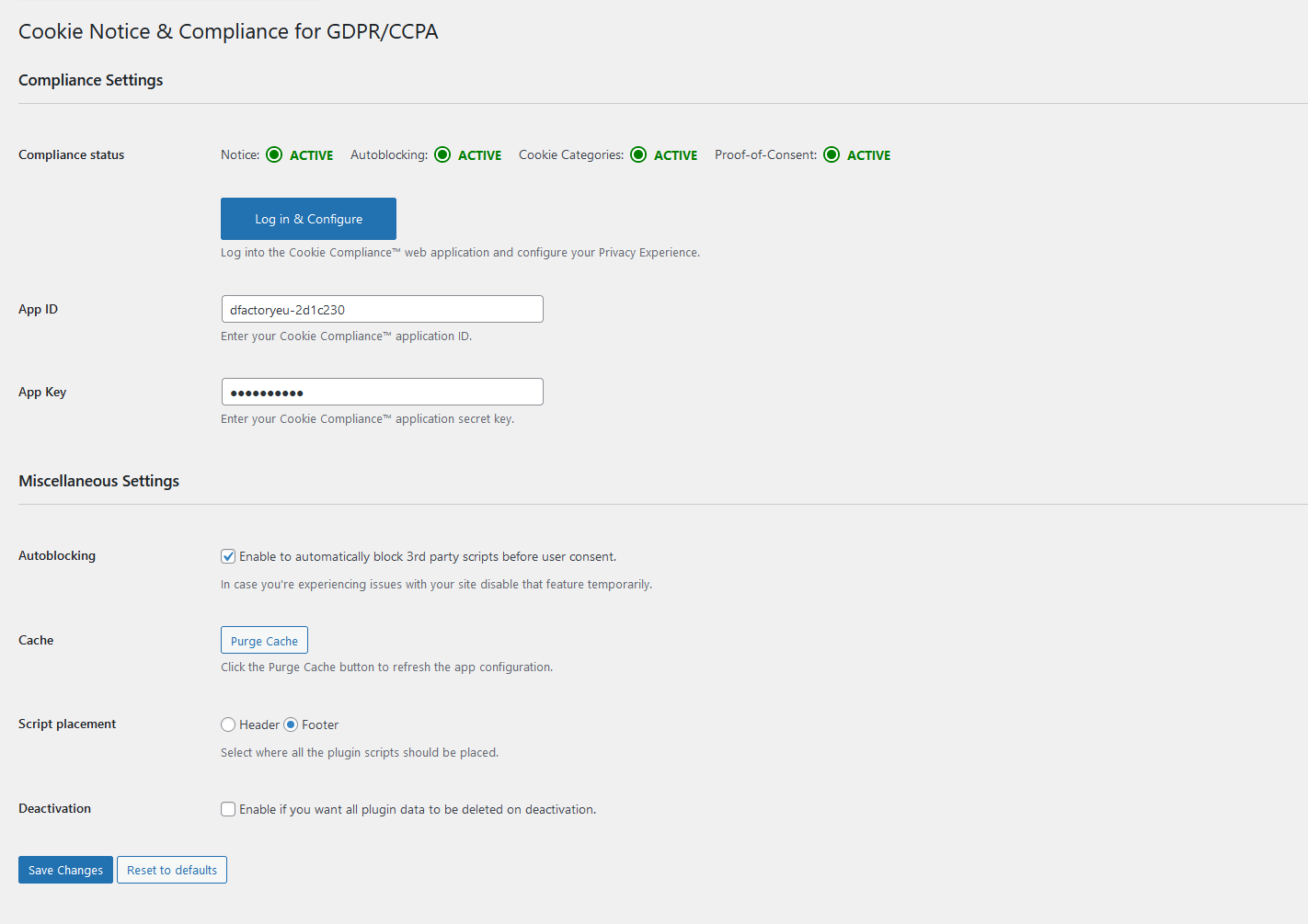
You can run this plugin two ways. In Banner Only mode it works on its own, with no account, and gives you the consent banner and its settings. In Connected mode — free or paid — you sign in to Cookie Compliance from inside WordPress and the plugin unlocks the platform features listed below: automatic script blocking, purpose categories, consent records, Google, Microsoft and Facebook consent modes, multilingual banners and multi-domain management. The two lists below say exactly which features belong to which mode.
Nasza aplikacja internetowa Zgodność z plikami ciasteczka wprowadza bardziej etyczny i proaktywny sposób rejestrowania i zarządzania zgodami. Ta wczesna wersja powstającego frameworka „Zgoda intencjonalna” jest wynikiem ciągłej współpracy Hu-manity.co z czołowymi firmami z listy Fortune 500, rządami i organizacjami normalizacyjnymi, które uważają, że nierównowaga między konsumentami a korporacjami jest nie do utrzymania, jeśli chodzi o prywatność danych i zgodę online. Udostępniamy ją wszystkim właścicielom i operatorom witryn internetowych, którzy podzielają to przekonanie i wspierają naszą misję eliminacji niejasnych schematów w zakresie zgody online.
Matt Sinderbrand – Dyrektor ds. Platformy, Hu-manity.co
Banner Only mode (this plugin on its own, no account)
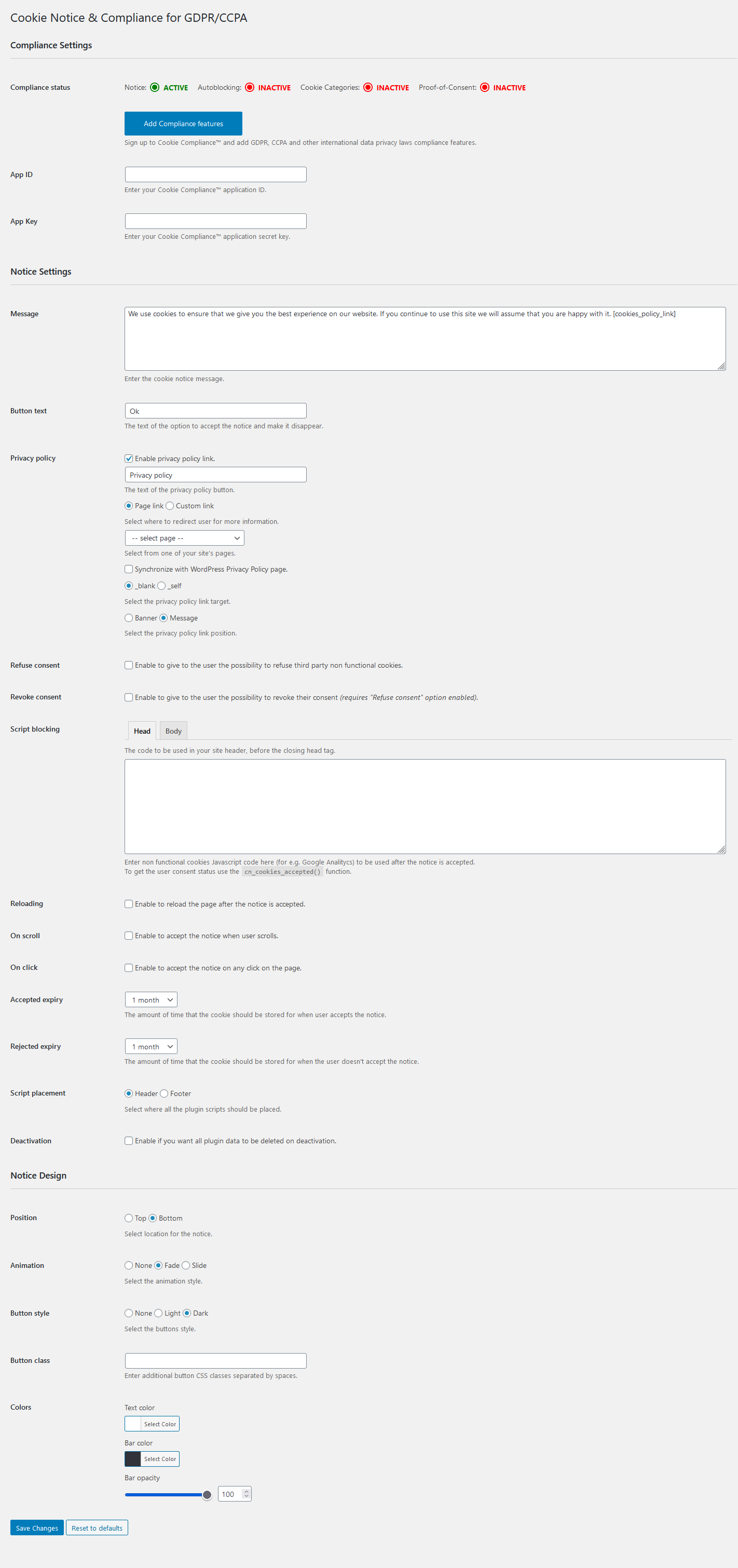
Cookie Compliance for WordPress provides a simple, customizable website banner to help your website comply with certain cookie consent requirements.
Funkcje banera:
- Dostosowywalny komunikat powiadomienia
- Zgoda wyrażona po kliknięciu, przewinięciu lub zamknięciu
- Wiele opcji wygaśnięcia plików ciasteczka
- Odnośnik do strony Polityki prywatności
- Synchronizacja strony Polityki prywatności WordPress
- Zgodność z WPML i Polylang
- Przyjazna dla SEO
- WP Consent API integration registers Cookie Compliance as the active Consent Management Platform under the WP Consent API when that free companion plugin is active — no account required — so cooperative plugins such as WooCommerce, Google Site Kit, Burst Statistics, WP Statistics, AddToAny and Pixel Manager for WooCommerce automatically gate themselves on the consent your visitors give in the banner.
Connected mode (this plugin + the Cookie Compliance dashboard)
Signed in to Cookie Compliance, on a free or paid plan, you get access to the most up-to-date formatting guidelines and technical compliance requirements for over 100 countries and legal jurisdictions.
Funkcje banera:
- Intencjonalna zgoda oferuje 3 równe przyciski, dając odwiedzającym witrynę możliwość zaakceptowania wszystkich, niektórych lub żadnego pliku ciasteczka za pomocą opcji pakietowych zwanych Poziomami dostępu do danych. Poziomy dostępu do danych usprawniają konwersję zgody i eliminują ukryty schemat zwodniczych, nierównych wyborów w pierwszej warstwie. Zgodność z zasadą równego wyboru określoną w RODO i innych przepisach o ochronie danych.
- Selektor czasu trwania zgody pozwala odwiedzającym kontrolować, jak długo ich zgoda będzie ważna w Twojej witrynie. Pozwala Twojej witrynie dostosować się do najnowszych wytycznych organów ochrony danych UE, które stanowią, że zgoda na pliki ciasteczka powinna być ważna nie dłużej niż 6 miesięcy.
- Kategorie celów plików ciasteczka ułatwiają odwiedzającym witrynę dostosowywanie zgód według kategorii. Spełnia wymogi dotyczące wyraźnej zgody, określone w RODO i innych przepisach o ochronie danych.
- Wskaźniki zgody wyświetlają dane dotyczące zgody użytkownika oraz listę zablokowanych/dozwolonych stron trzecich bezpośrednio na rozwiniętej stronie banera. Jest zgodny z najnowszymi wytycznymi organów ochrony danych UE, takich jak CNIL (Francja) i ICO (Wielka Brytania).
- Konfigurowalny dokument prywatności zawiera przydatne informacje, które ułatwiają użytkownikom zrozumienie ryzyka i korzyści związanych z udostępnianiem danych. Pozwala podsumować kluczowe elementy informacji o ochronie prywatności w witrynie i jest zgodny z zasadą świadomego pozyskiwania zgód, określoną w przepisach RODO.
- Konfigurowalny kontakt prywatności umożliwia podanie danych kontaktowych administratora danych osobowych firmy, a także przydatnych odnośników do formularzy wniosków osób, których dane dotyczą, i innych zasobów dotyczących prywatności danych. Jest zgodny z zasadą świadomego pozyskiwania zgód, określoną w przepisach RODO.
Cookie Compliance dashboard features:
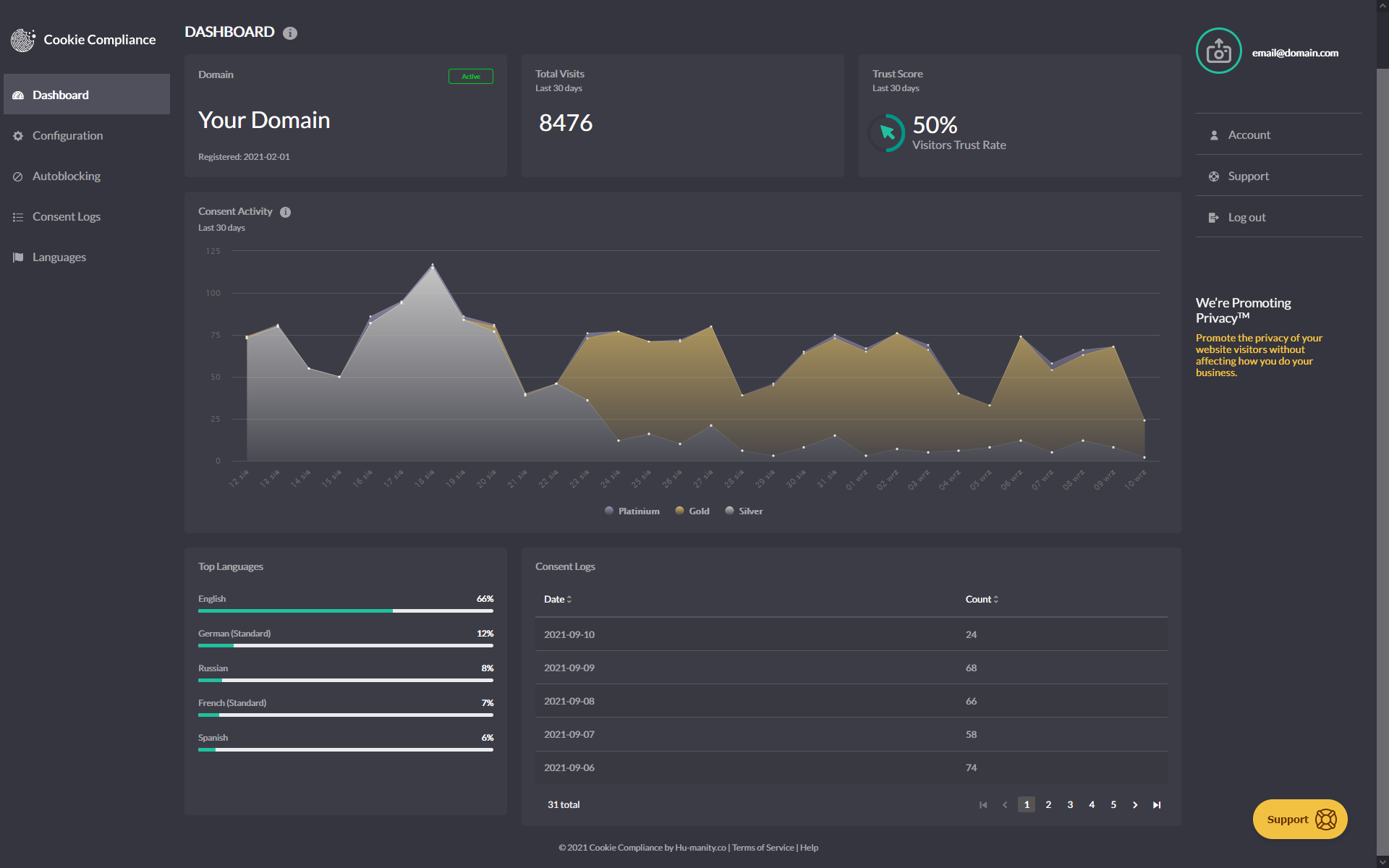
- Panel analityki zgód wyświetla dane zdarzeń dla liczby wizyt i zapewnia „wskaźnik zaufania”, który pomaga śledzić, jak odwiedzający witrynę ustawiają swoje zgody. Wprowadź zmiany w swoim banerze, aby poprawić współczynnik akceptacji plików ciasteczka i monitoruj postępy za pomocą wykresu aktywności związanej ze zgodami.
- Domyślne konfiguracje zgodne z RODO, CCPA i innymi przepisami pomagają wyeliminować ciemne wzorce i umożliwiają szybkie i łatwe wdrożenie banera zgody bez zgadywania. Dostosuj wygląd dowolnej domyślnej konfiguracji, aby pasowała do wyglądu i stylu Twojej witryny.
- Automatyczne blokowanie skryptów domyślnie blokuje wszystkie nieistotne skrypty plików ciasteczka oraz ramki iFrame i jest zgodne z ważnymi zasadami dotyczącymi zgody na mocy RODO i innych przepisów o ochronie danych; aby zachować zgodność z przepisami, Twoja witryna musi zarejestrować zgodę użytkownika przed ustawieniem lub wysłaniem plików ciasteczka.
- Google Consent Mode v2 ensures that your website can still gather valuable insights and perform effectively while respecting users’ privacy preferences by dynamically adjusting the behavior of Google services (ad_storage, analytics_storage, ad_user_data, ad_personalization) according to user consent.
- Tryb zgody Facebooka umożliwia Twojej witrynie mierzenie wpływu Twoich reklam na Facebooku, śledzenie aktywności i konwersji w witrynie oraz automatyczne wyświetlanie reklam na Facebooku, jeśli użytkownik wyraził na to zgodę.
- Microsoft Consent Mode holds Microsoft advertising (UET) signals until a visitor consents, then applies their choice automatically — the same way Google and Facebook consent modes do.
- Global Privacy Control (GPC) & Do Not Track automatically applies a visitor’s browser-level opt-out signal to the Marketing category as soon as the banner can read it — no visitor interaction required.
- WP Consent API integration registers Cookie Compliance as the active Consent Management Platform under the WP Consent API — in Banner Only mode or connected — when that free companion plugin is active, so cooperative plugins such as WooCommerce, Google Site Kit, Burst Statistics, WP Statistics, AddToAny and Pixel Manager for WooCommerce automatically gate themselves on the consent your visitors give in the banner, with no extra configuration.
- Przechowywanie danych o zgodzie automatycznie przechowuje dane o każdej zgodzie i udostępnia je do eksportu. Zgodne z wymogami dotyczącymi dowodu zgody określonymi w RODO i innych przepisach o ochronie danych.
- Wsparcie wielojęzyczne automatycznie tłumaczy wszystkie teksty banerów i umożliwia wprowadzenie własnych tłumaczeń dla każdego pola tekstowego, aby zapewnić użytkownikom spójne doświadczenie związane z wyrażaniem zgody.
- Zarządzanie wieloma domenami umożliwia zarządzanie dodatkowymi domenami bezpłatnymi lub profesjonalnymi w ramach jednego konta oraz pozwala na dostosowanie konfiguracji i wyglądu banerów dla każdej domeny niezależnie.
Proaktywne podejście do Zgodności z plikami ciasteczka:
Dla wszystkich firm zasoby niezbędne do nadążania za najnowszymi przepisami rosną wraz z uchwalaniem każdego nowego prawa. W związku z rosnącą z dnia na dzień liczbą przypadków egzekwowania przepisów, uważamy, że jako zaufany dostawca zgód, kluczowe jest, aby zrobić wszystko, co w naszej mocy, aby pomóc Ci być na bieżąco z tymi przepisami i wyeliminować ryzyko dla Twojej firmy.
Zgodność z plikami ciasteczka obejmuje wszystkie obecne i przyszłe przepisy:
- RODO (UE)
- Dyrektywa o prywatności i łączności elektronicznej (UE)
- Rozporządzenie o prywatności i łączności elektronicznej (UE)
- PECR (Wielka Brytania)
- LGPD (Brazylia)
- PIPEDA (Kanada)
- PDPB (Indie)
- CCPA (Kalifornia, USA)
- VCDPA (Wirginia, USA)
- Ustawa o ochronie prywatności w Kolorado (USA)
- CPRA (Kalifornia, USA)
Zgodność z plikami ciasteczka uwzględnia wszystkie najnowsze wytyczne dotyczące formatowania:
- Europejski Inspektor Ochrony Danych (EIOD)
- ICO (Wielka Brytania)
- CNIL (Francja)
- GPDP (Włochy)
- BfDl (Niemcy)
- AEPD (Hiszpania)
- Europejskie Centrum Praw Cyfrowych (noyb.eu)
Zgodność z plikami ciasteczka ma na celu zwalczanie ciemnych wzorców
Ciemne wzorce to techniki interfejsu użytkownika (UI), które zmuszają odwiedzających witrynę do podjęcia decyzji (takich jak zgoda na instalację plików ciasteczka na ich urządzeniach), których w innym przypadku mogliby nie podjąć. Najczęstszym Ciemnym wzorcem jest brak identycznego przycisku „Odrzuć wszystkie” na pierwszej warstwie powiadomienia o zgodzie. Ciemne wzorce są wyraźnie zakazane na mocy RODO i innych przepisów o ochronie danych.
Jako część naszego proaktywnego podejścia, zgodność z plikami ciasteczka jest domyślnie skonfigurowana w celu zapobiegania ciemnym wzorcom dzięki naszemu unikatowemu projektowi świadomej zgody.
Privacy
Cookie Compliance for WordPress is a Consent Management Platform client. Depending on how you use it, the plugin may send data to Hu-manity.co services on your behalf. This section describes what data leaves your WordPress server and when. It is kept up to date as the plugin evolves; material changes are noted in the changelog.
Plugin-only mode (Banner Only)
If you install the plugin and choose „Banner Only” in the Welcome screen — or never open the Welcome screen at all — the plugin operates entirely on your WordPress site. No account is created and the plugin does not initiate calls to Hu-manity.co services.
Connected mode (Free or Professional)
If you create a Cookie Compliance account from the Welcome screen (or log into an existing one), the plugin connects your site to the Hu-manity.co platform. While connected, the plugin sends data over HTTPS to Hu-manity.co’s platform services (hosted under *-api.hu-manity.co) for the following purposes:
- Account sign-up and sign-in, and registering your site as an application.
- Fetching and updating your banner configuration.
- Fetching consent analytics and individual consent records shown in the Audit Trail.
- Processing subscription payments (Professional plans only).
The data sent depends on the feature you are using and typically includes:
- Account-identifying data such as the email address and password used for sign-up or sign-in.
- Site-identifying data such as your site’s URL, title, description, and language.
- Application credentials (App ID and Secret Key) issued to your site at registration, included with subsequent platform requests.
- Subscription and billing data for Professional plans, such as the selected plan identifier and a one-time payment token described below.
- Integration telemetry such as the plugin version, the admin interface and language you use, which of the plugin’s own options are switched on, basic diagnostics about how it is running, and which of the caching or JavaScript-optimisation plugins it needs to stay compatible with are active on your site, and whether a Google, Meta or Microsoft tracking plugin is active, sent as HTTP headers so we can understand integration adoption and support the plugin.
- Operational metadata such as the timestamp and locale of a request, as is normal for HTTPS API calls.
As the plugin evolves, additional non-personal fields of the same categories listed above may be sent to support new features. Material changes are noted in the changelog.
Payments (Professional plans only)
Payment card details are collected by Braintree’s hosted-fields SDK running in your browser and are tokenized there. The plugin and Hu-manity.co servers do not receive raw card data. A one-time, non-replayable Braintree token is sent to Hu-manity.co’s platform to create the subscription.
Deactivation feedback
If you deactivate the plugin and fill in the optional deactivation feedback form, the reason you select, any free-text comment you type, and your site URL are sent once to Hu-manity.co so we can improve the product. Submitting the form is optional; clicking „Skip” sends nothing. This applies to both Plugin-only and Connected modes.
The banner shown to your site visitors
The consent banner shown to your site visitors is served from cdn.hu-manity.co/hu-banner.min.js. When a visitor interacts with the banner, the banner script (running in the visitor’s browser, not the plugin) communicates directly with Hu-manity.co services to record the consent decision — this is what makes consent records available to you in the Audit Trail. This data flow is between the visitor’s browser and Hu-manity.co and does not pass through your WordPress server. Because these requests originate in the visitor’s browser, the visitor’s IP address is visible to Hu-manity.co as part of standard HTTPS network handling.
Local state set by the plugin
The plugin stores operational state in three places. None of this is transmitted to Hu-manity.co:
- On your WordPress server (options and transients) — for example, a welcome-modal dismissal timestamp (
cookie_notice_welcome_dismissed) and short-lived caches of API tokens and configuration. - In the admin user’s browser (localStorage) — for example, first-run setup flags such as
cn_setup_wizard_complete_*andcn_has_platform_config_*. - In visitor browsers (a short-lived
hu-formcookie, 5 minutes) — set when forms with consent integration are submitted. Used locally by the form-consent flow.
As the plugin evolves, additional keys may be stored in any of these locations. They remain local state on your site or in the user’s browser — not data sent to Hu-manity.co. Material changes to this pattern would be noted in the changelog.
Data the plugin does not send
- The plugin does not transmit visitor IP addresses, cookies, page URLs, or page content as data fields. IP addresses are, as with any HTTPS request, visible to the receiving server as part of standard network handling.
- The plugin does not transmit the content of your posts, pages, users, or WordPress database.
- The plugin does not send data to third parties other than Hu-manity.co and, for Professional plan payments, Braintree (a PayPal service).
Service providers
- Hu-manity.co / Cookie Compliance — primary service provider.
- Terms of Service: https://cookie-compliance.co/terms-of-service/
- Privacy contact: https://cookie-compliance.co/documentation/privacy-contact/
- Braintree (a PayPal service) — processes Professional plan signups initiated from the plugin (not invoked for Banner Only or Free).
- When you manage your subscription from the Cookie Compliance web application, additional payment gateway providers may process your billing information.
- Hu-manity.co’s email subscription service — receives your account email address and name to manage newsletter and operational email preferences. You can unsubscribe at any time via the email footer or by deleting your account.
Account and consent data is processed in the European Union (AWS Ireland region). Hu-manity.co’s public marketing websites (hu-manity.co, cookie-compliance.co) are hosted separately in the United States.
How long we retain your data
- Plugin-side caches on your WordPress server (API tokens, subscription data, configuration) are short-lived, with TTLs typically up to 24 hours. The visitor
hu-formcookie expires after 5 minutes. - On the Hu-manity.co platform, account information and consent records are retained as long as your Cookie Compliance account is active, and are removed when the account is deleted or via an erasure request.
What rights you have over your data
- Stop further sends. Deactivate the plugin from the Plugins screen — no …
Zrzuty ekranu
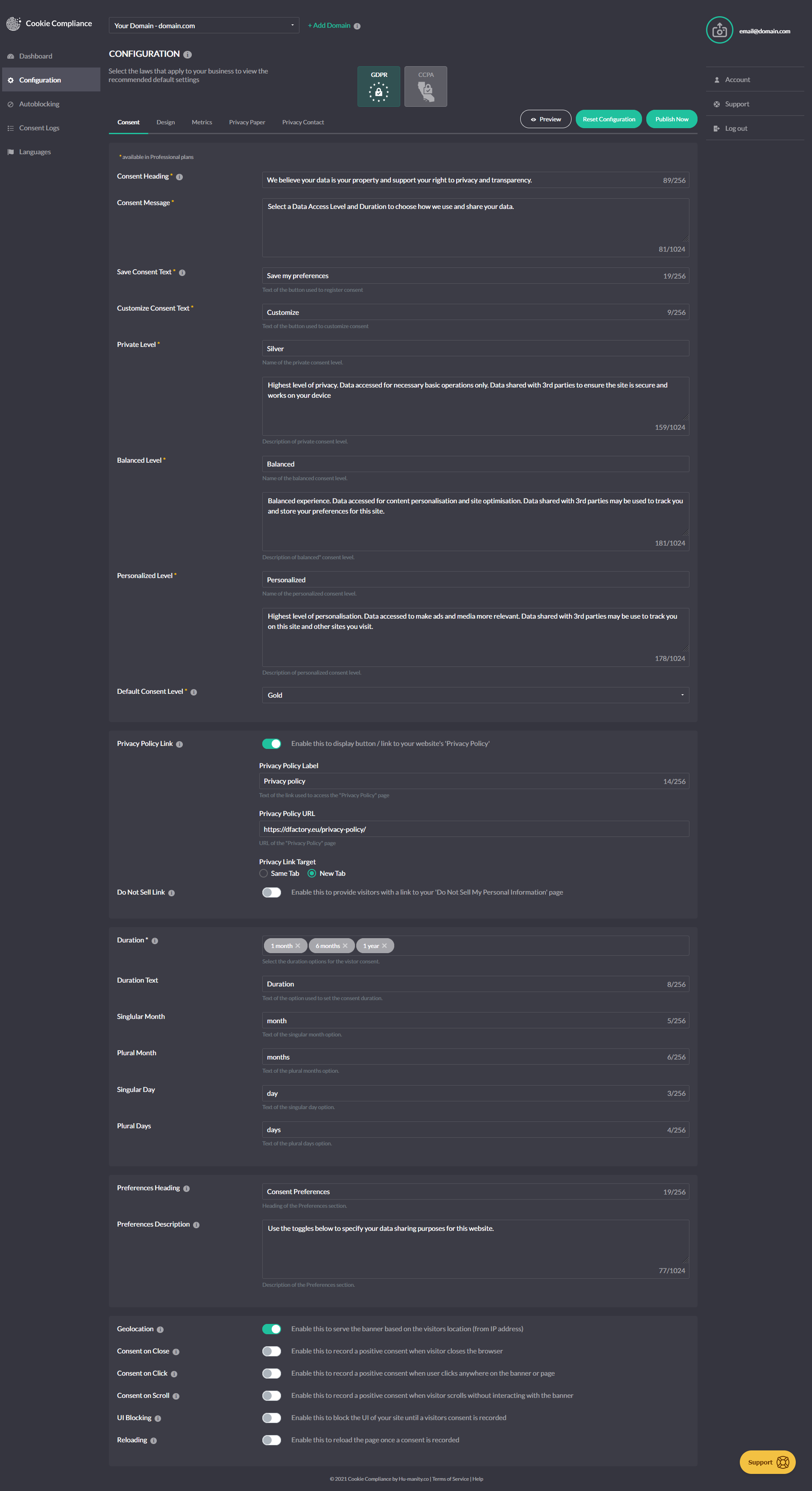
Instalacja
- Install Cookie Compliance for WordPress either via the WordPress.org plugin directory, or by uploading the files to your server.
- Activate the plugin through the 'Plugins’ menu in WordPress.
- Go to Settings > Compliance in your WordPress admin — the setup wizard will launch automatically on first activation.
- Choose your setup path in the welcome screen: sign in to Cookie Compliance (Free or Professional) for the full compliance features, or select Banner Only to run the plugin on its own.
- If connecting: create a Cookie Compliance account or sign in to an existing one directly from the wizard — no need to leave WordPress.
- Select your plan, configure your banner using the guided checklist, and you’re live.
- Return to Settings > Compliance any time to adjust your configuration, review consent logs in the Audit Trail, or manage your Cookie Compliance connection.
Najczęściej zadawane pytania
-
Yes! This plugin is free software, and Cookie Compliance has a free plan. There are paid plans too, depending on your needs and your website traffic.
-
Yes. Cookie Compliance is one product, and this plugin is its WordPress component — it runs the consent banner on your site. The Cookie Compliance dashboard is the other half, where you configure the banner, manage every domain you own and keep your consent records. It was previously published as „Compliance by Hu-manity.co”, and before that „Cookie Notice”; the plugin, your settings and your updates are unaffected by the name.
-
No. Banner Only mode DOES NOT include technical compliance features such as automatic script blocking, consent purpose categories, or consent record storage. Those need the plugin signed in to Cookie Compliance.
-
Does Connected mode make my site fully compliant with GDPR and US Privacy Laws?
-
Not by itself — it gives you what you need to configure it that way. Signed in to Cookie Compliance you get the technical compliance features — automatic script blocking, consent purpose categories and consent record storage — covering requirements for over 100 countries and legal jurisdictions. Whether your site is fully compliant depends on how you configure them and on how your site uses personal data.
-
Yes. Point an MCP-capable assistant (Claude Code, Cursor, and others) at https://mcp.cookie-compliance.co/mcp — no account is required to start. On WordPress, keep using this plugin for placement rather than pasting a snippet. Details: https://cookie-compliance.co/mcp/
Recenzje


Kontrybutorzy i deweloperzy
„Cookie Compliance for WordPress – Cookie Consent, GDPR & CCPA” jest oprogramowaniem open source. Poniższe osoby miały wkład w rozwój wtyczki.
Zaangażowani
Wtyczka „Cookie Compliance for WordPress – Cookie Consent, GDPR & CCPA” została przetłumaczona na 32 języki. Podziękuj tłumaczom za ich wkład.
Przetłumacz wtyczkę “Cookie Compliance for WordPress – Cookie Consent, GDPR & CCPA” na swój język.
Interesuje cię rozwój wtyczki?
Przeglądaj kod, sprawdź repozytorium SVN lub czytaj dziennik rozwoju przez RSS.
Rejestr zmian
3.1.12
- Improvement: Your site stays connected and protected through a brief network or server problem, rather than waiting for the next scheduled check to recover.
- Improvement: Banner settings from your account hold steady between checks.
- Improvement: On multisite networks where the plugin is network-activated but each site keeps its own account, the WP Consent API integration follows that site’s own selected privacy laws.
- Improvement: On multisite networks, your privacy laws, banner design, visit figures and consent records show up consistently across every screen, and visit-limit warnings reach each site.
- Improvement: On the Consent Logs screen, records that cannot be loaded are now reported as such instead of appearing as an empty list, and the CSV export does the same — a log with no entries and a log that could not be reached no longer look alike.
- Improvement: Upgrading to a paid plan now waits for the payment to be confirmed before reporting it. A declined card, or a network problem during checkout, is reported plainly with the reason — previously the upgrade could appear to have gone through and then revert. Connecting a site and adding billing details confirm their result the same way.
- Improvement: Forms protected by Gravity Forms reCAPTCHA wait for reCAPTCHA to finish loading after a visitor accepts cookies, so the form submits without a reload.
- Improvement: The Compliance dashboard reports what it can see — which protections are switched on. Turning Autoblocking off is no longer flagged where your selected laws permit it, and a switched-off script blocking engine is called out clearly.
3.1.11
- Fix: Region-specific (geolocation) rules now apply from a visitor’s very first pageview, not just after the plugin’s next scheduled refresh — as long as your settings synced within the last 12 hours.
- Fix: Free-plan sites now show their real 1,000 visits/month allowance right away instead of 0 right after reconnecting an account or switching back from a paid plan.
3.1.10
- New: Two controls over script blocking on the Configuration tab, where there was one. „Autoblocking” keeps its existing job — holding third-party scripts until a visitor chooses. The new „Script blocking engine” switch turns Cookie Compliance’s blocking off entirely, for every visitor and every region, if you’d rather handle it yourself or with another tool. Both are on by default, so nothing changes unless you want it to.
- Fix: On sites connected to a Cookie Compliance account, a second publish made within about two minutes of the first now reaches your site promptly — handy when you’re adjusting settings and republishing to check the result. What you publish has always been saved correctly; this shortens the wait for the site to pick it up. Affects 3.1.3 through 3.1.9, and complements the more frequent scheduled check added in 3.1.9.
- Fix: On WordPress multisite networks, the settings every site shares — your Cookie Compliance account, banner and blocking list — are now protected, so only a Network Administrator can change them and the whole network stays on the right account. Sites with their own separate account keep full control, and single-site installs are unaffected.
- Fix: On Free-plan sites that reach their monthly visit limit, your Autoblocking choice is now remembered while blocking is paused, and applies again the moment the next cycle begins — including if you save other settings in the meantime.
- Fix: On Free-plan sites, the visit-limit alert now appears only once autoblocking has actually paused — so it no longer warns that scripts may be firing while your Autoblocking setting still reads „On”.
3.1.9
- Fix: On sites that honour Global Privacy Control or Do Not Track, a visitor’s opt-out is now applied as soon as the banner can act on it, instead of waiting for your settings to load.
- Fix: On sites using Gravity Forms with Google reCAPTCHA, visitors can page through a multi-page form before choosing cookies — only the final submit waits for consent. Since 3.1.5 Next and Previous waited too. Worth retesting if you run a multi-page form.
- Fix: On those same sites, a visitor who has already accepted cookies is no longer asked to accept again when submitting. They are now told that the form is still loading, or that reCAPTCHA did not load, whichever is the case.
- Tweak: On those same sites, a developer can switch this compatibility off site-wide with the
cookie_notice_gravity_forms_recaptcha_enabledfilter. Google reCAPTCHA is still held until a visitor accepts, either way. - Fix: On sites with page caching, your caching plugin is now told not to store pages viewed by anyone who can manage the banner. Script blocking is off on those pages, so a cached copy served to a visitor left them unprotected. Most caching plugins honour this; a CDN that ignores your site’s caching rules needs its own exclusion for logged-in users. Purge your cache once after updating — copies already stored are not cleared automatically.
- Tweak: On sites connected to a Cookie Compliance account, the requests the plugin already makes now carry a little more about your setup — its version and which features are on, your site’s language, basic diagnostics, which caching or optimisation plugins you use, and whether a Google, Meta or Microsoft tracking plugin is active. Nothing about your visitors, your content or your users is sent; the Privacy section lists it all.
- Tweak: On those same sites, publishing usually pushes your changes out within seconds; the scheduled check behind that now runs twice a day instead of once, halving the wait when a push cannot get through.
3.1.8
- Improvement: On sites running WordPress in a language other than English, the Compliance settings screens can now be translated. Their text was previously fixed in English no matter which language your site used. Translations are supplied by the translation community, so screens stay in English until a translation for your language is available.
- Fix: On sites using reCaptcha by BestWebSoft, the captcha now appears as soon as a visitor accepts cookies, rather than only when they accept within the first few seconds of the page loading. Until they accept, the form says that the captcha needs their consent, instead of reporting a connection problem.
- Tweak: On sites using Google, Facebook or Microsoft Consent Mode, your signal settings now travel with the page, so those platforms receive them from the first pageview of a visit.
3.1.7
- Rebrand: Plugin renamed from „Compliance by Hu-manity.co” to „Cookie Compliance for WordPress” — one product, of which this plugin is the WordPress half. The plugin’s admin screens, and the name a screen reader announces for the banner, now read „Cookie Compliance” throughout. Your settings, connection, consent records and updates are unchanged; nothing to do. Renamed text may show in English until translations catch up.
- Fix: On sites using Google Consent Mode, the Advertising, Analytics and Functional group controls are replaced by one control per signal, still grouped under those headings. Each changes only its own signal, so Security Storage is no longer reset by another control and no longer reports itself as not applied. It can also be set to Basic Operations, for storage that is strictly necessary on your site.
- Fix: On sites connected to a Cookie Compliance account, opening Upgrade to Pro after being signed in a day or more now returns you to sign-in, instead of an error that refreshing could not clear.
- Fix: On sites whose domain was moved to a different Cookie Compliance app or plan, the visit limit now follows the current plan. It is enforced only from recent visit figures, and Sync Config is no longer switched off when the limit is reached — it is what clears it. Google Consent Mode and your consent records no longer depend on your visit allowance.
- Tweak: The Compliance settings screen now opens straight away and refreshes from the Admin Portal in the background, instead of showing nothing until that finished. If the refresh cannot complete, it says it is showing your last synced settings, and when they were synced.
- Tweak: If your consent mode settings change elsewhere while you have the Consent Modes panel open, your unsaved edits are kept and the panel tells you the stored settings have moved on.
- Tweak: Site Health now reports your plan, cycle visits against your limit, and how old the usage figures are — measured from when they were calculated, not from when this site last pulled them.
3.1.6
- Tweak: On sites managed from both the Admin Portal and the WordPress Protection screen, saving one consent mode setting now leaves the others exactly as you set them.
- Tweak: On sites using Google, Facebook, or Microsoft consent modes, each signal is now matched to a purpose category — Content Personalization, Site Optimization, or Ad Personalization — so the setting you pick is what the banner sends, and the category names match the Admin Portal. The earlier „Always” option has been retired; if you used it, open Protection and choose a category.
3.1.5
- Fix: On sites using Gravity Forms with Google reCAPTCHA, forms can now be submitted as soon as a visitor accepts cookies — on the same page, with no reload. Previously the submit button could stay in a loading state indefinitely. Visitors who have not chosen yet are now asked to accept cookies, instead of seeing a button that appears to do nothing. Sites that have already moved Google Recaptcha to Basic Operations are unaffected.
- Fix: On sites where visitors sign in — membership sites, online courses, shops — signed-in visitors now get cookie blocking and the correct consent signals to Google, Microsoft and Meta, the same as every other visitor. Previously any signed-in visitor was treated as someone working on the site: nothing was held back for them, and those services were told consent had been given before the visitor had answered the banner. Blocking is still switched off for users who can manage the banner, so you can keep working on your own site as before. If your site needs a wider exemption, a developer can adjust it with the
cn_manage_cookie_notice_capfilter.
3.1.4
- Fix: On sites protected by a security plugin or firewall (such as WordFence), saving your settings after adding Google Tag Manager or analytics code could fail with a „403” error. The plugin now sends that code in a form these tools don’t mistake for an attack, so your settings save normally.
- Fix: The consent banner now displays and blocks cookies reliably on sites using a JavaScript optimizer — including WP Rocket, Autoptimize, LiteSpeed Cache, SiteGround Speed Optimizer, WP Fastest Cache, and WP Hummingbird’s „Delay JavaScript”. These tools could delay or combine the Cookie Compliance script, so the banner appeared late (or not at all) and cookies could load before a visitor consented; the plugin now signals them to leave its script alone, whether or not the plugin’s „Caching Compatibility” option is enabled.
3.1.3
- Fix: On sites that use SiteGround Speed Optimizer, LiteSpeed Cache, or Breeze to combine, defer, or minify JavaScript, the plugin now reliably keeps the Cookie Compliance script out of those optimizations — so the banner displays and cookies stay blocked until a visitor consents. These tools could previously prevent the script from loading; this extends the compatibility added in 3.1.1.
- Tweak: The plugin’s upgrade screen now links you to the Admin Portal to complete a subscription there, with the plan pre-filled. Use it when you need a multi-domain plan, an invoice/VAT receipt, or a payment method other than card — all long available in the Admin Portal; the in-plugin card checkout remains available as before.
- Tweak: Privacy-law settings now stay in sync with the Admin Portal. Per-region (geolocation) rules are configured in the Admin Portal and are respected when you save a law selection in the plugin, and each law’s on-screen description reflects what the banner does on your plan.
- Tweak: Standardized wording across the plugin — the Hu-manity.co web application is now consistently referred to as the „Admin Portal”.
3.1.2
- Compatibility: Verified and confirmed compatible with WordPress 7.0.
- Fix: Banner position and banner size now save correctly on sites without a Cookie Compliance subscription — since 3.0.1 these settings appeared to save but silently reverted on every reload.
- Fix: Reconnecting a domain to a different Cookie Compliance app now refreshes its plan status right away — the visit-limit notice and autoblocking allowance update on save instead of lagging until the next hourly sync.
- Fix: Account setup now confirms an explicit success response before activating a paid plan, so an incomplete or interrupted server reply can no longer leave an account on the wrong plan.
- Tweak: Banner-script delivery is now server-controlled, so future banner improvements can roll out gradually and safely without requiring a plugin update. Your current banner is unchanged.
- Tweak: Configuration and plan changes made in your Cookie Compliance dashboard now apply to your site faster. Previously a publish or plan upgrade could take until the next scheduled sync to take effect; your site now refreshes its settings right away via a secure server signal.
3.1.1
- Fix: The cookie compliance banner and per-form privacy consent prompts now render correctly on sites where Cloudflare Rocket Loader or a caching/optimizer plugin (WP Rocket, LiteSpeed Cache, Autoptimize, NitroPack, Jetpack Boost) defers script execution. The plugin’s inline configuration and per-form helper scripts now signal these tools to skip them, extending the banner-script protection added in 3.0.3.
- Tweak: The WordPress dashboard widget now shows a protection scorecard — GPC signal, consent records, and visit quota — replacing the previous usage chart.
3.1.0
- New: WP Consent API integration — Compliance now registers as the active Consent Management Platform under the WP Consent API when that plugin is installed, so cooperative plugins like WooCommerce, Google Site Kit, Burst Statistics, WP Statistics, AddToAny, and Pixel Manager for WooCommerce automatically gate themselves on the consent state captured by your banner. Hu-manity’s four consent levels map to the WP Consent API’s five categories: Strictly Necessary functional (always allowed), Functional preferences, Analytics statistics and statistics-anonymous, Marketing marketing. Global Privacy Control automatically suppresses the marketing category. A new „WP Consent API” toggle on the Configuration tab lets you turn the integration off; it is on by default when both plugins are active.
- Tweak: The loading screen now reads „Hang tight — this may take a few seconds on slower connections” and the troubleshooting panel waits 15 seconds before appearing, giving slow connections more breathing room before setup suggestions surface.
3.0.6
- Tweak: The Consent Security Policy (CSP) warning on the Compliance settings page now clears immediately once a valid .htaccess is detected — reloading the page, clicking Purge Cache, or clicking Pull Configuration each re-evaluate in real time.
3.0.5
- Fix: Disabling Autoblocking via the legacy settings form on multisite sites now saves correctly.
3.0.4
- Fix: The Compliance settings page no longer breaks on sites where Cloudflare Rocket Loader or a caching/optimizer plugin (WP Rocket, LiteSpeed Cache, Autoptimize, NitroPack, SG Speed Optimizer, or Jetpack Boost) is configured to process WP admin scripts. The plugin’s admin bundle now signals these tools to skip it, extending the same banner-script protection added in 3.0.3.
- Fix: If the Compliance settings page fails to load, you now see a „Loading Compliance dashboard…” message that reveals troubleshooting steps (caching plugin, browser extension, incognito mode) and a link to support — replacing the silent white screen some users hit when a CDN, optimizer, or browser extension blocked the admin bundle.
3.0.3
- Tweak: Send client type, plugin version, and admin UI mode (React or Legacy) as HTTP headers on platform API requests to support integration adoption analytics. No effect on banner behavior, site visitors, or consent data.
- Docs: Added a Privacy section to the readme describing, by service and data category, what the plugin sends to Hu-manity.co services and when. Placed after Installation per WordPress convention. Covers admin-side state stored on the WordPress site (options, transients, localStorage), the visitor IP visibility implied by the banner’s direct browser-to-platform requests, retention of plugin-side caches and platform-side account/consent data, sub-processors (Braintree for plugin-initiated payments, additional payment gateway providers for webapp-managed subscriptions, and Hu-manity.co’s email subscription service), data processing location (European Union, AWS Ireland), and concrete data-subject rights (deactivation, CSV export, account deletion, and GDPR Article 17 / CCPA erasure of visitor records within a 30-day SLA per GDPR Article 12).
- Fix: Added JS optimizer exclusion attributes to the banner script tags to prevent caching and performance plugins from delaying consent recording. Covers WP Rocket (data-nowprocket), Autoptimize (data-noptimize), LiteSpeed Cache (data-no-optimize), NitroPack (nitro-exclude), Jetpack Boost (data-jetpack-boost), and Cloudflare Rocket Loader (data-cfasync). Also adds stable IDs (hu-banner-options, hu-banner-js) so users of plugins without attribute support (W3 Total Cache, SG Optimizer, Swift Performance) can enter these as exclusion keywords in their plugin settings.
- New: GPC banner mode is now configurable directly from the plugin. The Protection tab’s GPC panel exposes three options for what visitors see when their browser signals Global Privacy Control — „Show passive notice” (a brief auto-dismiss confirmation that the preference was honored), „Silent” (no on-screen indication), or „Show full banner” (the standard consent flow). When CCPA or other US privacy laws are selected, the plugin defaults to „Show passive notice” — improving transparency without re-displaying the banner on every page. The active mode is also surfaced on the GPC Support card under Compliance Behavior so site admins can see at a glance how GPC manifests for their visitors. The setting can still be changed at any time in the Cookie Compliance web application.
3.0.2
- Fix: Decouple Autoblocking from privacy law selection in React and legacy settings — the toggle now appears for connected users regardless of whether laws are configured, and is no longer mislabeled as a Pro-only feature in the legacy UI.
- Fix: Preserve boolean types when caching Designer, Account, and Analytics API responses — compliance flags such as gpcSupportMode, doNotTrackMode, onScroll, onClick, uiBlocking, revokeConsent and nested regulations were being silently coerced to strings, which risks breaking strict type checks downstream.
3.0.1
- Fix: Resolved missing file error preventing plugin activation for some users who updated during the initial 3.0.0 release
3.0.0
- Rebrand: Plugin renamed from „Cookie Notice & Compliance for GDPR / CCPA” to „Compliance by Hu-manity.co”. WordPress admin sidebar now reads „Compliance” with Settings and Audit Trail submenus. All internal option keys and slugs remain unchanged — no action required for existing installs.
- New: Modern React-based admin dashboard replaces the legacy PHP settings pages. Three main tabs — Protection, Settings, and Audit Trail — with a polished, card-based interface.
- New: Guided setup wizard with banner template picker (6 presets), setup checklist, and quick-start configuration for new installs.
- New: Welcome Modal with in-plugin account creation, plan selection, and Braintree payment — complete the signup flow without leaving WordPress.
- New: Protection Chooser — redesigned tier selection (Basic, Professional, Business) with feature comparison cards.
- New: 5-position banner placement selector (top, bottom, floating left, floating right, floating center) with fixed/floating toggle. Dismiss animation controls added to Banner Design settings.
- New: Law Selector with geo-aware regulation display and compliance context for GDPR, CCPA, and 100+ jurisdictions.
- New: Consent Modes panel — configure Google Consent Mode v2, Facebook, and Microsoft consent toggles directly from the plugin.
- New: Audit Trail tab — view consent log records pulled live, with dynamic consent level labels.
- New: Conditional Display rule builder — control when and where the consent banner appears.
- New: Excluded Script Handles setting — exclude specific scripts from autoblocking by handle name.
- New: Centralized notification system with contextual calls-to-action based on your setup status and subscription tier.
- New: Portal deep links — jump directly from the plugin to the relevant page in the Cookie Compliance web application.
- New: Live configuration sync — admin pages pull fresh banner configuration from the platform on load.
- New: React ErrorBoundary prevents white-screen crashes — admin gracefully recovers from unexpected errors.
- Improvement: Pro feature indicators show locked features with upgrade prompts for free-tier users.
- Improvement: Usage dashboard shows near-limit nudge at 70%+ of cycle usage.
- Improvement: Email-exists recovery flow guides users who try to register with an existing account.
- Fix: Domain URL normalization on login prevents duplicate app registrations.
2.5.16
- Fix: Multisite with global override now correctly reads blocking data and cache-purge transients from network storage
- Fix: Custom patterns and providers are now always included in huOptions regardless of autoblocking state
2.5.15
- Fix: Multisite with global override now correctly loads custom blocking patterns and providers on the frontend
2.5.12
- New: Added pull configuration option to sync on demand instead of waiting for cron
2.5.11
- Security: Enforce TLS verification for platform API requests.
- Security: Require capability + nonce for cache purge and privacy consent/conditional rule AJAX handlers.
- Tweak: Switch admin notice JS to vanilla to avoid jQuery conflicts and ensure notices can be closed.
2.5.10
- Fix: Make close icon keyboard-focusable (Enter/Space handler, tabindex, focus outline)
- Fix: Ensure policy link uses href/target and data attrs so „Message” position opens correctly
- Fix: Enqueue frontend JS when [cookies_revoke] shortcode is present to allow reopen links for logged-in sessions
- Fix: Guard legacy options fallback to avoid PHP 8 fatal on non-array settings
2.5.9
- Security: Fixed Stored XSS vulnerability in [cookies_accepted] shortcode via HTML entity resurrection
- New: Easy Digital Downloads privacy consent support
- Fix: Improved bot detection and object cache compatibility
2.5.8
- New: Microsoft Clarity Consent API v2 support
- Fix: Prevent loading banner in Beaver Builder
- Fix: Improved bot detection and object cache compatibility
- Fix: Close icon accessibility by switching to button
2.5.7
- New: Microsoft Consent Mode support
- Tweak: Convert banner links to buttons (for accessibility)
- Tweak: Improved compatibility with caching plugins
- Fix: Displaying cookie notice in admin
2.5.6
- New: Added Form and Source columns to Privacy Consents table
- Fix: WooCommerce render block issue
- Tweak: Updated WooCommerce Blocks Checkout handling
- Tweak: Disable Privacy Consent cupport when there are no forms available
- Tweak: Updated Chart.js to 4.4.8
2.5.5
- New: Added Privacy Consent activity chart
- Fix: Hummingbird caching plugin compatibility
2.5.4
- New: Option to handle all or selected forms in Privacy Consent
- Fix: Undefined array key „form_type” when switching WooCommerce forms
2.5.3
- Fix: Undefined huOptions variable
- Fix: Prevent loading Privacy Consent modules without Cookie Compliance
- Tweak: Updated Chart.js to 4.4.6
2.5.2
- Fix: Fatal error on pages with embedded contact form 7 forms
2.5.1
- Fix: Missing one of the plugin files
2.5.0
- New: Introducing Privacy Consent
- Tweak: UI updates for the Consent Logs page
- Tweak: Onboarding screen UI improvements
- Tweak: Switch from local to GMT time for consent logs display
- Tweak: Admin menu reorganization
2.4.18
- Fix: Potential security issue with escaping textarea fields
- Fix: Saving link target for Privacy Policy page
- Fix: Force protocol for widget URL
2.4.17
- New: SpeedyCache caching plugin compatibility
- New: Breeze caching plugin compatibility
- Fix: Improved WP Rocket plugin compatibility
- Fix: Improved Speed Optimize plugin compatibility
- Fix: Network settings override switching
- Tweak: Chart.js updated to 4.4.3
2.4.16
- New: Option to enable/disable bot detection
- Fix: Typo in wp_die() function calls
- Tweak: Improved escaping text strings
2.4.15
- New: Passing Google Consent default parameters (Cookie Compliance only)
- Fix: Invalid Norwegian language locale code
2.4.14
- New: Google Consent V2 support (Cookie Compliance only)
- New: Added scripts option to Compliance Settings
2.4.13
- Fix: Removed unneeded parameter from WP Fastest Cache compatibility fix
2.4.12
- New: WP Optimize caching plugin compatibility
- Fix: WP Fastest Cache plugin compatibility
2.4.11
- New: Dedicated Consent Logs page
- New: Google AMP support for Cookie Compliance
- New: Settings navigation through tabs and menu items
- Fix: Saving App ID/Key not working in edge cases
- Tweak: Chart.js updated to 4.4.0
2.4.10
- New: Option to enable/disable caching compatibility
- New: WP Fastest Cache plugin compatibility
- Fix: Potential security issue with purging cache
- Fix: Improved refreshing Compliance analytics data
- Tweak: Chart.js updated to 4.3.2
2.4.9
- New: WP Rocket plugin compatibility
- New: LiteSpeed Cache plugin compatibility
- New: Google Consent Mode support (Cookie Compliance only)
- New: Facebook Pixel Consent Mode support (Cookie Compliance only)
2.4.8
- New: Added Pages to Conditional display
- Fix: Homepage display issue
- Fix: Background color issue
- Tweak: Improved WP Rocket support
- Tweak: Improved SG Optimizer support
2.4.7
- New: Conditional display of the banner
- Tweak: Improved sanitization and validation of data
- Tweak: PHP 8.1 and 8.2 compatibility
- Tweak: Added async attribute when autoblocking is disabled
2.4.6
- Fix: Cookie Compliance inactive status issue
2.4.5
- Tweak: Remove the notice from the Elementor page builder
- Tweak: Remove the notice from widgets screen
- Fix: Improved Contact Form 7 reCaptcha compatibility
2.4.4
- Fix: Undefined index: status and subscription
2.4.3
- Fix: Deprecated preg_replace() notice in PHP 8.1
2.4.2
- New: Compatibility with Autoptimize plugin
- Fix: Improved Contact Form 7 reCaptcha support
- Fix: Fixed non-static method cookies_set()
2.4.1
- New: Contact Form 7 reCaptcha support
- Tweak: Switched health status from critical to recommended when Cookie Compliance is not integrated
- Tweak: Add SimeSite=Lax for created cookies
2.4.0
- New: Advanced Multisite support
- Fix: Polylang translation not working for shortcode
- Fix: Parse error: syntax error, unexpected ‘[‘
2.3.1
- New: Option to run consent banner in debug mode
- Fix: Invalid validation of dismissable notices
2.3.0
- New: Compliance Multi-license pricing options
- Tweak: WordPress 6.0 compatibility
2.2.3
- Fix: Undefined notice in WP dashboard
- Fix: Close icon event not firing
- Tweak: Remove aria-label from the close icon
- Tweak: CSS tweaks in the admin
2.2.2
- Fix: Uncrawlable close notice link
- Tweak: WordPress 5.9 compatibility
- Tweak: Prevent displaying the notice in an iframe
- Tweak: Send site language to a web app on signup
2.2.1
- Fix: Missing variable definition in frontend
2.2.0
- New: Option to hide banner for logged in users (Compliance only)
2.1.5
- Tweak: Additional sanitization applied
2.1.4
- Fix: WordPress 5.8 widgets compatibility
2.1.3
- Fix: HTML attributes removed from text strings
- Tweak: Improved sanitization of options
2.1.2
- Tweak: Improved escaping of button labels
2.1.1
- Fix: Security bug related to compliance caching
2.1.0
- New: Introducing Cookie Compliance Free plan
2.0.4
- Fix: Undefined constant HOURS_IN_SECONDS
- Fix: Button style none adding CSS classes „cn-set-cookie cn-button”
- Tweak: Switched the behavior of close icon from accept to reject
- Tweak: Minified frontend and admin js files
2.0.3
- Fix: Cookies accepted function issue when Compliance activated
2.0.2
- Tweak: UI/UX improvements
2.0.1
- Fix: Pending Compliance update blocking the notice
- Fix: PHP Warning: Cannot modify header information
- Tweak: UI/UX fixes for the settings screen
2.0.0
- New: Introducing Cookie Compliance for GDPR/CCPA
1.3.2
- Tweak: Speed up Corona Banner loading by moving JS file to footer with async parameter
- Tweak: Improve buttons CSS padding
- Tweak: Accessibility improvements on links
1.3.1
- Fix: Unable to select Privacy policy link
- Fix: Blank Cookies policy link in a message
- Fix: Undefined index: on_click
- Tweak: Adjusted default opacity back to 100
1.3.0
- New: Introducing Corona Banner that displays data about Coronavirus pandemia and five steps recommended by the WHO (World Health Organization)
- New: Option to set bar opacity
- New: Accept the notice with close icon
- Fix: Policy link added to message without policy option enabled
1.2.51
- Fix: Problems with iOS and OK/Reject button
- Tweak: Added Separate cookie expiry for Reject, props Carlos Buchart
1.2.50
- Fix: The body css class always set to „cookies-refused”
- Tweak: Improve IE & Safari CustomEvent and ClassList support
- Tweak: Change the plugin js init event
1.2.49
- New: Option to accept the notice with any page click
- Tweak: Remove jQuery dependency
- Tweak: Swtich from jQuery to CSS3 animations
- Tweak: Improve the CSS and HTML structure
1.2.48
- Fix: HTML tags stripped from cookie message
- Fix: Link target not accepted in inline privacy link
1.2.47
- New: Option to select the privacy policy link position
- Tweak: Do not relad the page on refuse button click
- Tweak: Added aria-label attribute to cookie notice container
1.2.46
- Tweak: Remove WP Super Cache cookie on deactivation
- Tweak: Remove plugin version from the db on deactivation
1.2.45
- Tweak: Improved WP Super Cache support
- Tweak: CSS container style issue and media query for mobile
1.2.44
- Fix: The text of the revoke button ignored in shortcode
- Fix: Revoke consent button not displayed automatically in top position
- Tweak: Add …