

Opis
Beplus Performance Booster is a no-bloat performance plugin that gives you fine-grained
control over your site’s front-end assets. All features can be toggled independently
from a single settings page (Settings > Beplus Performance Booster).
All front-end optimisations are bypassed for logged-in administrators so you never
accidentally break the admin panel or your own editing experience.
Feature summary:
- JavaScript delay (Simple / Advanced mode) and defer with per-script exclude list
- JS Release Delay: image-load fallback timer for releasing delayed scripts
- CSS file and inline minification with cache
- Remove Unused CSS: per-URL cached stripping of unused CSS rules
- Non-render-blocking stylesheet loading
- WordPress Core-managed image loading policy with targeted exclusions
- Remove emoji, wp-embed, Gutenberg CSS, WooCommerce assets on non-shop pages
- HTML minification and comment stripping
- Browser cache and gzip/brotli rules via .htaccess
- Per-page option to disable the cache for specific posts/pages
- Custom CDN (pull-zone) URL rewriting for static assets
- Automatic WebP/AVIF image serving when a matching file already exists
- Cloudflare integration: one-click cache purge, zone auto-detection via API
Token, and Development Mode toggle from wp-admin - Critical CSS per page type, generated in your own browser, so stylesheets can load after the first paint without a flash of unstyled content
- Priority Images (LCP): preload and top priority for the hero image, plus an „Analyze LCP” tool in the admin bar that finds it for you
- Google Fonts: font-display and preconnect, or download the fonts once and serve them from your own site
Settings Reference
Navigate to Settings > Beplus Performance Booster to configure the plugin.
⚡ JavaScript Optimization
Delay JS Execution
Default: off
Delays all non-excluded front-end scripts until the first user interaction (click,
scroll, keydown, or touchstart), or until the JS Release Delay timer fires —
whichever comes first.
Delay Mode — choose how scripts are intercepted:
- Simple — converts WordPress-enqueued external scripts to
text/plain
placeholders and replays them on first interaction. Low risk, no event-queue replay. - Advanced — output-buffer approach that intercepts every
<script>tag on the
page (including hardcoded theme scripts and dynamically injected ones) via
MutationObserver. ReplaysDOMContentLoadedandwindow.loadevent queues in
correct order. Test thoroughly before enabling on production.
JS Release Delay (ms) — fallback timer (ms) that releases delayed scripts after
above-fold images and fonts finish loading, without requiring user interaction.
0 = disabled — only user interaction releases delayed scripts.
Defer Non-Critical JS
Default: off
Adds the defer attribute to every non-excluded <script> tag so scripts are
fetched in parallel and executed after the HTML is parsed. jQuery and
jquery-migrate are always protected from deferral.
Exclude JS Files
Default: empty
One URL keyword per line. Any script whose src attribute contains a listed
keyword is excluded from both Delay and Defer. Use this to protect scripts that
must run immediately (e.g. analytics that need to capture the first page view).
Examples: jquery, woocommerce, my-critical-script
🎨 CSS Optimization
Minify Inline CSS
Default: off
Strips block comments (/* … */), collapses redundant whitespace, and removes
trailing semicolons from every inline <style> block in <head>. License
comments (/*! … */) are preserved. Spaces around + are intentionally kept
so calc(100% + 20px) expressions are never broken.
Minify CSS Files
Default: off
Requires: wp-content/uploads/bepluspb-cache/ directory to be writable
Minifies every enqueued external CSS file and serves the cached version from
wp-content/uploads/bepluspb-cache/. Already-minified *.min.css files and
external CDN stylesheets are skipped automatically. Cache files are named using a
12-character content MD5 hash so they self-invalidate whenever the source changes.
Non-Render-Blocking CSS
Default: off
Converts <link rel="stylesheet"> tags to the preload + onload swap pattern:
<link rel="preload" as="style" onload="this.onload=null;this.rel='stylesheet'">
<noscript><link rel="stylesheet" ...></noscript>
This prevents stylesheets from blocking the initial render. A <noscript> fallback
ensures CSS loads correctly even when JavaScript is disabled.
Tip: if you see a flash of unstyled content (FOUC), add your theme’s main stylesheet
URL keyword to the Exclude CSS Files list.
Exclude CSS Files
Default: empty
One URL keyword per line. Stylesheets whose href contains a listed keyword are
left completely untouched by the Non-Blocking, Inline All CSS, Minify CSS Files,
and Remove Unused CSS features.
Remove Unused CSS
Default: off
Requires: wp-content/uploads/bepluspb-cache/ directory to be writable
Scans the fully rendered page and strips CSS rules whose selectors never appear
in that page’s HTML, caching the trimmed stylesheet per URL. This is a static
text match (not a real browser render): the first visit to a URL generates the
trimmed file in the background while still serving the original CSS; later
visits to the same URL load the trimmed version. Classes added dynamically by
JavaScript after page load will not be detected as „used” — add them to the
Unused CSS Selector Safelist below.
Unused CSS Selector Safelist
Default: empty
One selector or keyword per line (trailing * wildcard supported). Rules
matching these are always kept regardless of whether they were detected as
used. Use this for JS-toggled classes (menus, modals, tabs, accordions) and
plugin/page-builder dynamic states.
Example: .active, .is-open*, .woocommerce-*
Unused CSS URL Excludes
Default: empty
One URL keyword per line. Matching pages never have unused CSS removed.
Recommended for checkout/cart and other heavily dynamic pages.
🧩 Critical CSS
Use Critical CSS
Default: off
Works on its own: it does not need Non-Render-Blocking CSS
Prints the CSS the first screen needs in the page head and loads every
stylesheet (your theme’s included) after the first paint, so the page is drawn at
once without a flash of unstyled content. The CSS is stored per page type (front
page, blog index, each post type, archives, search, other pages, and a default for
anything else; right-to-left pages have their own set), not per URL, so one entry
serves every page of that type and every language.
Generate Critical CSS
Open a page of your site while logged in as an administrator and choose
Beplus Performance Booster „Generate Critical CSS (this page type)” in the admin
bar. The page is analysed on phone, tablet, desktop and large-screen sized copies (and a little below the first screen) and the
result is saved for that page type. Everything runs in your browser; nothing is
sent anywhere except to your own site when you press Save. You can also paste CSS
by hand in the Critical CSS card, and delete saved entries there.
Not used while „Inline All CSS” is on, or when a Content-Security-Policy forbids
inline styles. Administrators always see the original page, so check the result in
a private window.
🏁 Priority Images (LCP)
Priority Images
Default: empty (Media card)
The image that is the Largest Contentful Paint of a page (usually the hero banner),
one per line: image URL | home, all or /page-path/ | mobile, desktop or all. The
browser is told to download it first (preload with high priority) and WordPress stops
lazy-loading it. At most 4 lines. Use the exact URL the browser downloads for that
page.
Analyze LCP (admin bar)
Open a page while logged in as an administrator and choose
Beplus Performance Booster „Analyze LCP (this page)”. The plugin finds the LCP
element for mobile and desktop in your browser, tells you what is wrong with it
(lazy-loaded, no priority, found late through CSS, or text instead of an image) and
can add the image to Priority Images for you.
🔤 Google Fonts (Advanced tab)
Optimize Google Fonts
Default: off
- Optimize: adds
font-display(swap, fallback or optional) to Google Fonts links
and@importrules in the page head that do not set one, and adds preconnect hints.
Icon fonts (Material Icons, Font Awesome) and afont-displayyou already set
are left alone. Nothing is downloaded. - Self-host: downloads the stylesheets and font files your pages use once to
wp-content/uploads/bepluspb-cache/fonts/ and links those copies, so your visitors’
browsers no longer contact Google (privacy / GDPR) and there is one origin less to
connect to. Until a stylesheet is downloaded, the page keeps the Google link, so
nothing breaks. „Download now” and „Delete local fonts” are in the same card.
See „External services” below for exactly what is requested.
Not covered: fonts loaded by JavaScript (such as WebFont Loader) or printed after the head.
🖼️ Lazy Load Images
Enable Lazy Loading
Default: off
Uses WordPress Core’s native media loading policy without rewriting HTML or adding
a JavaScript fallback. On WordPress 6.4 or newer, the threshold and exclusion
settings below adjust Core-generated loading attributes. WordPress 5.5 through 6.3
retains its native behavior because Core does not expose that attribute filter.
Skip First N Images
Default: 1
On WordPress 6.4 or newer, controls Core’s media omission threshold (0–20). The
default 3 leaves Core’s own threshold unchanged. The plugin does not identify or
promise an LCP image.
Exclude by CSS Class
Default: empty
Comma-separated CSS class names. Any <img> that has one of these classes loads
eagerly (not lazily).
Example: hero-image, no-lazy, skip-lazy
Exclude by Element ID
Default: empty
Comma-separated element IDs. Any <img> with a matching id attribute loads
eagerly.
Example: hero-banner, site-logo
Exclude by Filename
Default: empty
Comma-separated partial filename strings. Any <img> whose src URL contains one
of these strings loads eagerly.
Example: logo, hero, banner
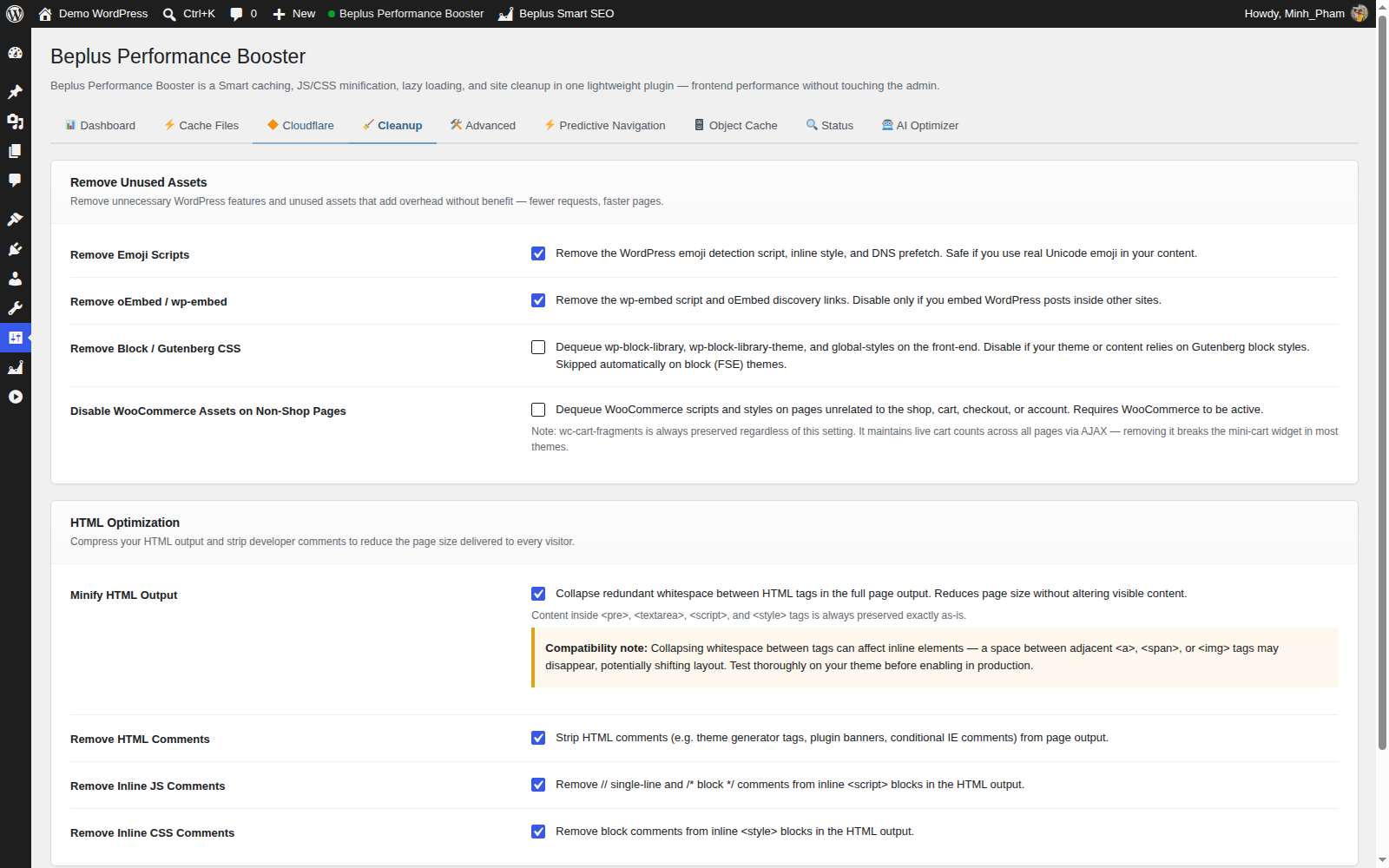
🗑️ Remove Unused Assets
Remove Emoji Scripts
Default: off
Removes the WordPress emoji detection script, its inline stylesheet, and the
s.w.org DNS prefetch hint. Safe to enable if you use real Unicode emoji in your
content — browsers display them natively without the WordPress helper.
Remove oEmbed / wp-embed
Default: off
Removes the wp-embed.js script and the oEmbed discovery links added to <head>.
Also unregisters the oEmbed REST API endpoint. Disable only if you rely on
embedding your WordPress posts inside other websites.
Remove Block / Gutenberg CSS
Default: off
Dequeues wp-block-library, wp-block-library-theme, and global-styles
stylesheets on the front-end. Disable if your theme or content depends on
Gutenberg block styles. Automatically skipped on block (full-site-editing)
themes, whose design is delivered through those stylesheets.
Disable WooCommerce Assets on Non-Shop Pages
Default: off
Requires: WooCommerce active
Dequeues WooCommerce scripts and styles on pages that are unrelated to the shop,
cart, checkout, or account. WooCommerce assets are always kept on those pages.
📄 HTML Optimization
Minify HTML Output
Default: off
Collapses redundant whitespace between HTML tags in the full page output. Content
inside <pre>, <textarea>, <script>, and <style> tags is always preserved
exactly as-is.
Remove HTML Comments
Default: off
Strips HTML comments (e.g. theme generator tags, plugin banners) from the page
output. Conditional IE comments are also removed.
Remove Inline JS Comments
Default: off
Removes // single-line and /* … */ block comments from inline <script>
blocks in the HTML output. String literals and template literals are never
modified. License comments (/*! … */) are preserved.
Remove Inline CSS Comments
Default: off
Removes /* … */ block comments from inline <style> blocks in the HTML output.
🚀 Browser Cache Headers (.htaccess)
Enable Browser Caching
Default: off
Requires: Apache with mod_expires, mod_headers, mod_deflate. .htaccess writable.
Injects the following directives into the root .htaccess file inside a clearly
labelled block that is never duplicated:
- Gzip compression (mod_deflate) for HTML, CSS, JS, JSON, SVG, and fonts.
- Brotli compression (mod_brotli, Apache 2.4.26+) for the same types.
- Expires headers (mod_expires): 1-year cache for images and fonts, 1 month
for CSS/JS; no-cache for HTML, feeds, plain text and API responses. - Cache-Control headers (mod_headers):
max-age=31536000, public, immutable
for images and fonts, and for CSS/JS requested with a version query string
(?ver=,?v=,?version=); unversioned CSS/JS get 30 days. PHP/HTML get
no-cache, must-revalidate only when the application set no Cache-Control
of its own. - Rules are written when you save settings, so re-save the Advanced tab after
updating to refresh an existing block.
Disabling this option or deactivating the plugin removes the injected block cleanly.
📦 JS File Minification & Cache
Minify JS Files
Default: off
Requires: wp-content/uploads/bepluspb-cache/ directory to be writable
Minifies every enqueued JavaScript file using a safe character-by-character comment
stripper that correctly handles string literals, template literals, and URL protocol
slashes (https://). Already-minified *.min.js files and external CDN scripts are
skipped. Cache files use a 12-character content MD5 hash for automatic cache busting.
Lines are never joined to avoid breaking JavaScript’s Automatic Semicolon Insertion
(ASI) rules.
Cache Status
Shows how many CSS and JS files are currently stored in the cache directory
(wp-content/uploads/bepluspb-cache/). Use the „Clear CSS/JS Cache” button to delete
all cached files; they are regenerated on the next page load.
The „Beplus Performance Booster” item in the WordPress admin bar (visible to administrators on
both the front-end and back-end) shows cache size and file count in a dropdown panel
and provides a one-click button to clear the cache.
☁️ CDN
Enable CDN
Default: off
Rewrites matching static-asset URLs on this site to the CDN domain configured
below — enqueued CSS/JS, media library images (including responsive srcset),
matching URLs inside post content and widgets, and any other matching URL in
the rendered page (including root-relative paths written directly into theme
or page-builder markup). External URLs and already-CDN URLs are left untouched.
Like other front-end optimisations, this is skipped for logged-in administrators.
CDN URL
Default: empty
Your CDN pull-zone domain — for example, the hostname assigned when you add
this site as a CDN zone with a provider such as QUIC.cloud
(e.g. https://xxxxxxxx.quic.cloud), BunnyCDN, or KeyCDN, or a custom domain
CNAME’d to one. This is a generic pull-zone rewriter and works with any CDN
provider — it is not an official integration with any of them.
File Types
Default: css,js,jpg,jpeg,png,gif,webp,avif,svg,ico,woff,woff2,ttf,otf,eot,mp4,webm,pdf
Comma-separated file extensions. Only URLs ending in one of these are rewritten to
the CDN; everything else (PHP endpoints, REST/AJAX requests, admin URLs) is
untouched by design since the matching is extension-based.
Exclude from CDN
Default: empty
One URL keyword per line. URLs containing any of these strings stay on your own
domain instead of being rewritten to the CDN.
Serve WebP/AVIF Images
Default: off
When enabled, JPG/PNG image URLs are swapped for a same-named .avif or
.webp file when one already exists next to it and the visitor’s browser
declares support for that format (via the Accept header). Prefers AVIF over
WebP when both are supported and both files exist. This plugin does not
generate or convert any images itself — it only rewrites the URL when a
matching file is already present on disk (e.g. created by WordPress core,
a theme build step, or another optimization/conversion tool).
🔶 Cloudflare
Keep Cloudflare’s edge cache in sync with this plugin’s own cache, and
control Cloudflare Development Mode, without leaving wp-admin. This does
not set up Cloudflare as a CDN/DNS proxy for you — it only talks to a
Cloudflare zone you have already added your domain to. All Cloudflare API
calls are admin-triggered only (nonce + capability checked, and rate
limited); nothing is called automatically on a regular front-end page load.
Enable Cloudflare Integration
Default: off
When on, …
Zrzuty ekranu




Instalacja
- Upload the
beplus-performance-boosterfolder to/wp-content/plugins/. - Activate the plugin through the Plugins menu in WordPress.
- Navigate to Settings > Beplus Performance Booster to configure each feature.
Najczęściej zadawane pytania
-
Will this plugin slow down my admin panel?
-
No. Every optimisation hook is guarded by
is_admin()and an additional check that
skips users with themanage_optionscapability on the front-end. -
I see a flash of unstyled content (FOUC) after enabling Non-Render-Blocking CSS.
-
Your theme’s own stylesheets (including those in sub-folders such as
assets/css/) are kept render-blocking automatically, but plugin and page-builder stylesheets are deferred. To remove the flash without giving up the speed, turn on Critical CSS (Cache Files tab Critical CSS): it prints the CSS the first screen needs and defers the rest. Otherwise add a URL keyword for the stylesheet that causes the flash to the Exclude CSS Files textarea; that file will be loaded normally while the rest are deferred. -
Does self-hosting Google Fonts make my server contact Google?
-
Yes, but only when you choose „Self-host”, and only your server (never your visitors’ browsers): a few requests to fonts.googleapis.com and fonts.gstatic.com download the fonts your pages already use, once. See „External services” below.
-
Why does my font still load from Google after I chose Self-host?
-
The first time a logged-out visitor opens a page, the plugin only notes which Google Fonts it uses; a background WP-Cron job downloads them a few seconds later. Open one page in a private window and press „Download now” in the Google Fonts card to do it at once. If a download fails, the page keeps the Google link and the card shows the reason.
-
The Browser Cache option says my .htaccess is not writable.
-
Your server’s file permissions do not allow PHP to write to
.htaccess. Set the
file to 644 (or ask your host) and try again, or add the rules manually. -
Where are the minified CSS/JS cache files stored?
-
In
wp-content/uploads/bepluspb-cache/— inside yourwp-contentdirectory. The directory
is created automatically with anindex.phpstub (to prevent directory listing) and
a.htaccessstub (to block direct PHP execution). -
Is WooCommerce required?
-
No. The WooCommerce asset-removal option is only applied when WooCommerce is active.
All other features work independently. -
Can I use this plugin alongside a caching plugin?
-
Yes. The .htaccess browser-caching rules complement full-page caches (LiteSpeed
Cache, W3 Total Cache, WP Super Cache, etc.). The JS/CSS optimisations operate at
the PHP output level and work with most caching setups. -
What happens to my settings when I delete the plugin?
-
The
uninstall.phpscript removes all plugin data: thebepluspb_settingsoption, the
injected.htaccessrules, every file inuploads/bepluspb-cache/, and the
_bepluspb_disable_cache post meta from every post. -
Who develops this plugin?
-
This plugin is developed and maintained by BePlus, a WordPress and Shopify development studio. You can learn more about our work at beplusthemes.com.
Recenzje
Wtyczka nie ma jeszcze żadnej recenzji.
Kontrybutorzy i deweloperzy
„Beplus Performance Booster” jest oprogramowaniem open source. Poniższe osoby miały wkład w rozwój wtyczki.
Zaangażowani

Przetłumacz wtyczkę “Beplus Performance Booster” na swój język.
Interesuje cię rozwój wtyczki?
Przeglądaj kod, sprawdź repozytorium SVN lub czytaj dziennik rozwoju przez RSS.
Rejestr zmian
1.3.2
- Fix: the Critical CSS Generator no longer saves the admin toolbar’s page offset (an empty 32px band above the page for visitors). If you generated Critical CSS with 1.3.0 or 1.3.1, generate it again and save.
1.3.1
- Change: Critical CSS now works on its own. A page with saved Critical CSS prints it and loads every stylesheet after the first paint whether or not „Non-Render-Blocking CSS” is on; pages without an entry behave as before.
- New: the Critical CSS Generator analyses four screen sizes (phone, tablet, desktop, large screen) and, by default, also the area just below the first screen, so big monitors, tablets and a small scroll no longer show unstyled elements. After updating, generate your Critical CSS again.
- Fix: the Critical CSS Generator now says why an analysis failed (slow page, blocked frame, redirect, script error), works on slow connections and on pages where the footer script is delayed, and offers „Analyse this window only” as a fallback and a copyable technical report.
- Fix: the Critical CSS Generator and LCP Analyzer panels no longer scramble text on right-to-left sites.
- Fix: Google Fonts settings: the note about Self-host is no longer red and the font-display labels are no longer cut off.
1.3.0
- New: Critical CSS. Print the CSS the first screen needs in the page head and load every stylesheet after the first paint, with no flash of unstyled content. Generate it from the admin bar („Generate Critical CSS”): the page is analysed in your browser on a phone-sized and a desktop-sized copy and saved per page type (front page, posts, pages, archives…; right-to-left pages separately). Or paste CSS by hand. Off by default; needs Non-Render-Blocking CSS.
- New: Priority Images (LCP). Tell the browser which image is the Largest Contentful Paint of a page: it is preloaded with high priority and no longer lazy-loaded. The new „Analyze LCP” tool in the admin bar finds the LCP element for mobile and desktop, explains what is wrong with it and fills Priority Images for you.
- New: Google Fonts. „Optimize” adds font-display and preconnect to Google Fonts links. „Self-host” downloads the fonts once to your own site (background download, or „Download now”) so visitors’ browsers no longer contact Google; until a font is downloaded the page keeps the Google link. Off by default. See „External services”.
- New: with a CDN, the plugin now opens the connection to the CDN host early (preconnect).
- Fix: Non-Render-Blocking CSS no longer makes themes flash unstyled. All stylesheets inside your theme and parent theme folders (not only style.css) stay render-blocking unless Critical CSS covers the first paint.
- Fix: the Page Cache stayed off on multilingual sites that use one domain or subdomain per language (WPML, Polylang): it kept saying the site address had changed and cached nothing. After updating, press Save once on the Page Cache settings.
- Change: the readme now lists the external services (Google Fonts self-hosting, Cloudflare).
1.2.2
- New: Recommended Settings now recognises Elementor and recommends keeping its stylesheets render-blocking and leaving Remove Unused CSS, Inline All CSS and Delay JS off, because Elementor optimises its own CSS/JS. It is layered on top of your site profile (an Elementor shop keeps the WooCommerce plan).
- Fix: Remove Unused CSS no longer breaks pages as easily. Classes that scripts add later (open menus, sliders, pop-ups, cookie banners, WooCommerce notices) are kept automatically, and the stylesheet is built from everything seen on a page over several visits instead of only the first one. Fonts and images referenced by relative paths keep working, and nothing is built from error, maintenance or incomplete pages.
- Fix: Minify CSS and Inline All CSS now rewrite relative url() and @import paths, so fonts and background images no longer break after the file moves to the cache folder.
- Fix: the Page Cache no longer stores a page that still links the full stylesheets while Remove Unused CSS is building its trimmed copy, so the lighter CSS is actually used.
- Fix: Non-Render-Blocking CSS keeps your theme’s main stylesheet blocking even with Minify or Remove Unused CSS on, leaves print/conditional-media and already-async stylesheets alone, and switches itself off when a Content-Security-Policy would block it.
- New: Inline All CSS skips Elementor stylesheets by default („Skip Elementor CSS” option), because Elementor caches and optimises its own CSS. Inlined stylesheets also keep their original id.
1.2.1
- Fix: a site could crash completely (including wp-admin, „Cannot redeclare wp_cache_init()”) after you turned Object Cache off and saved, or when its hidden settings file was missing. The Object Cache drop-in now steps aside and WordPress uses its normal cache. If you use Object Cache, open the Object Cache tab and press „Install Drop-in” once to update it.
- Fix: saving settings with Object Cache off now removes an outdated drop-in first, and uninstalling no longer deletes the Object Cache settings while a drop-in is still installed.
- Fix: Delay JS – a form submitted while delayed scripts are still loading is held and sent once they have run (no double submit), and scripts that other scripts depend on through inline „after” code are no longer moved out of order by Delay JS or Defer.
1.2.0
- New: optional Page Cache Preload (off by default, Cache Files tab Page Cache). After the cache is cleared, WordPress cron visits your home page and up to 500 recently updated public pages in the background, a few at a time, so the first visitors get fast cached pages. Only your own site is contacted; it stops by itself if requests fail, runs at most once every 10 minutes, and rebuilds expired pages automatically.
- Change: the Page Cache lifespan is now limited to 1–24 hours (was 72). Longer lifespans could leave forms on cached pages with expired security tokens. Higher saved values are lowered to 24.
1.1.14
- New: optional Page Cache (off by default, Cache Files tab). Visitors who are not logged in get a stored HTML copy of public pages, served before WordPress loads the theme. Automatically skipped for logged-in users, carts/checkouts, forms and personalised pages; cleared when you edit content, menus, widgets, themes or these settings. Separate mobile copies are kept only for pages that need them. „Purge ALL Cache” now empties it too.
- New: admin bar „Purge ALL Cache” is a one-click button (with a confirmation) that returns you to the page you were on and shows the result on screen. The admin bar Object Cache purge button now also asks for confirmation on every screen.
- Fix: the admin bar „Purge ALL Cache” link could open the wrong settings tab and hide the button.
- Fix: Remove Unused CSS cache was not cleared when you saved a post or switched theme; deleted CSS/JS files no longer leave cached pages pointing at missing files.
- Fix: administrators now see the original CSS/JS (like the other optimisers) while other logged-in users get the minified files. The „Enable Cache for Logged-In Users” option was removed because it never affected anything else.
- Fix: .htaccess browser-cache rules no longer override an app’s own Cache-Control, only mark versioned CSS/JS as immutable, and no longer cover feeds or robots.txt (re-save settings to refresh the rules).
- Fix: Delay JS no longer breaks inline scripts; HTML/CSS/CDN transforms fall back to the untouched page instead of a blank page on very large pages; defer JS skips scripts with inline code that must run after them; page-builder editors, AMP and the Customizer preview are left alone.
- Fix: Object Cache drop-in handles atomic add, increment/decrement, cached false values and a failed pipeline correctly, and uses fewer round trips (batched reads and writes).
- Improvement: faster CSS/JS minify cache lookups, cached inline CSS and a lighter CDN WebP/AVIF check.
1.1.13
- Security: block web access to the object-cache drop-in backup folder (backups of another plugin’s drop-in can contain cache passwords) and use unguessable backup names.
- Security: stop a stylesheet/script symlink from exposing wp-config.php through the minified-file cache.
- Security: never save an Object Cache config containing a password unless the file’s access protection is confirmed; show a clear error otherwise.
- Fix: replacing or restoring an object-cache drop-in now works on PHP-FPM hosts (a real PHP CLI is used for validation) and explains clearly when it cannot run.
- Fix: clearing the Object Cache no longer wipes other sites or apps sharing the same Redis/Memcached server; only this site’s entries are removed.
- Fix: CSS minification no longer changes selectors such as „.a :hover” or text inside quoted strings.
- Improvement: admin code reorganized into smaller files for easier maintenance (no change in behavior), plus broader automated tests and real WordPress + Redis checks.
1.1.12
- Display boolean values in the Recommended Settings preview as Active and Inactive instead of raw 1 and 0, without changing stored values or behavior.
- Use one exact machine-readable identity across the shipped Object Cache drop-in, ownership checks, and health probes; reject foreign or mismatched drop-ins.
- Harden object-cache replacement and restoration with path/symlink checks, non-executable verified backups, authenticated restore manifests, transaction locking, retention protection, metadata restoration, isolated health checks, and automatic rollback.
-
Write Object Cache configuration before installation and correct replacement/settings-tab interactions.
-
Merge Fonts, CDN, and Cache Exclusions into one Advanced tab without changing saved settings. Existing deep links continue to work; Cloudflare, Predictive Navigation, and Object Cache remain separate tabs.
-
Add administrator-only preflight, checksum-verified backup-and-replace, and rollback-capable restore for conflicting object-cache drop-ins.
-
Reorganize Dashboard Cache Actions into clearer optimization, generated-cache, and object-cache groups with disk metrics, availability status, compact actions, and responsive layout.
-
Move the shared, POST-only Object Cache purge control to the Dashboard and Admin Bar, removing the duplicate Object Cache tab action while retaining settings and health tools.
-
Add POST-only Purge ALL Cache with structured disk and Cloudflare results.
- Add separately confirmed, fail-closed Object Cache purge controls. Object Cache remains excluded from Purge ALL.
-
Add an integration hook for third-party page-cache purges.
-
Harden Font Preload v2 origin deduplication with effective ports and render-time revalidation of filtered entries, and correct the related admin guidance.
-
Add fail-closed Font Preload v2 URL validation, diagnostics, registry/filter support, and conservative CDN handling.
-
Correct Lazy Load compatibility: configurable Core attribute policy starts on WordPress 6.4; WordPress 5.5–6.3 retains native Core behavior.
-
Add deterministic WordPress 6.3/6.4 compatibility coverage and automatic CI execution of every standalone test.
-
Replace regex image rewriting and its JavaScript fallback with WordPress Core-managed loading optimization, targeted exclusions, safe thresholds, request gates, and fail-open compatibility behavior.
-
Add local-only, site-aware Recommended Settings with exact preview, safe atomic apply/disable, and one-time restore.
-
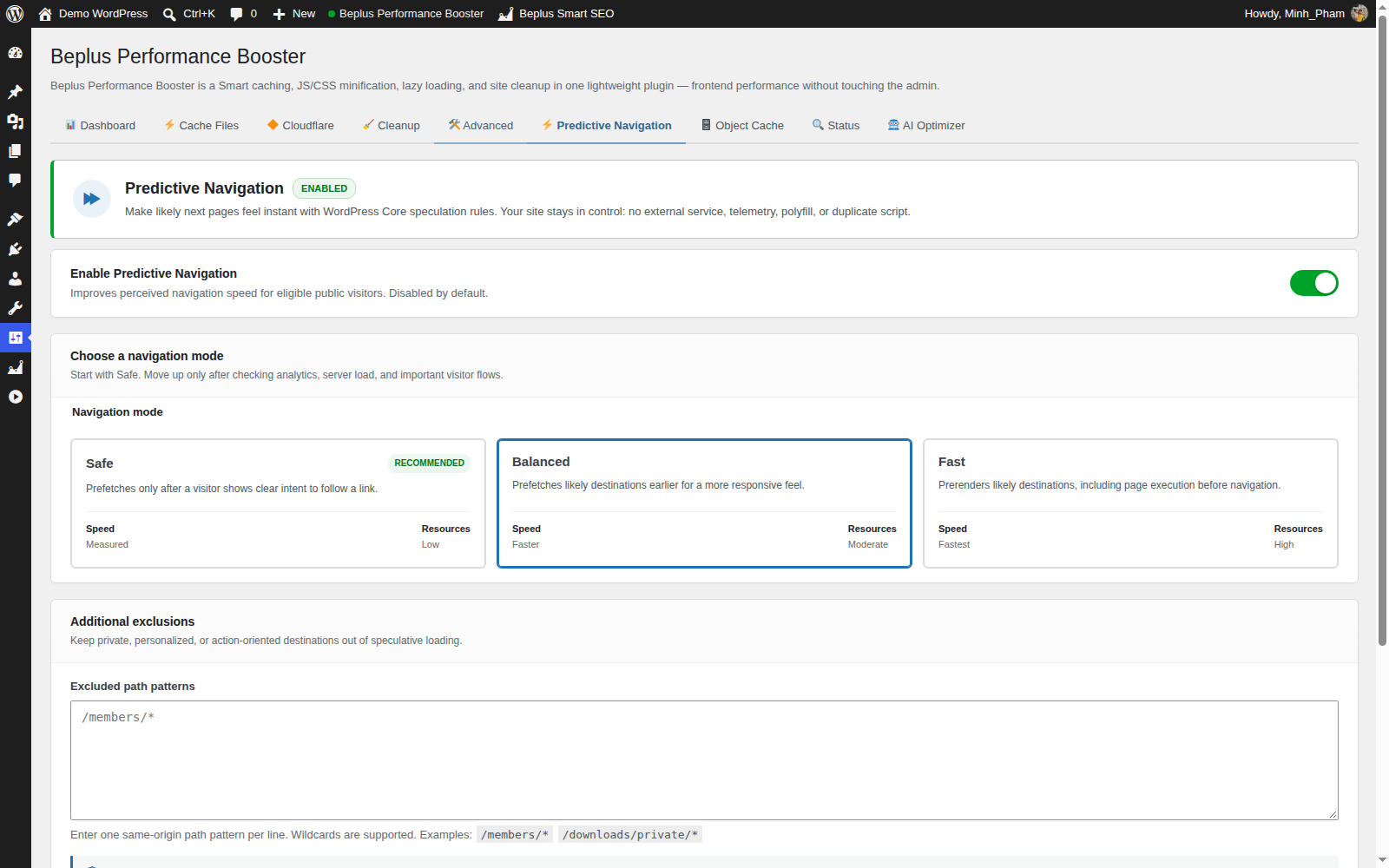
Redesign Predictive Navigation settings with clearer status, accessible mode cards, exclusions, compatibility/privacy guidance, responsive styling, and unchanged saved settings and behavior.
-
Add Predictive Navigation for WordPress 6.8+ through Core Speculation Rules, with safe/balanced/fast modes, commerce and sensitive-path exclusions, sanitized custom paths, and no telemetry or external calls. Disabled by default.
-
Fix: an internal diagnostic log message related to the 1.0.10 buffer-order
fix could write to the PHP error log even when debug logging was not
enabled. It now only logs when the site owner has explicitly turned on
WordPress debug logging (WP_DEBUG_LOG). No visible behavior change for
normal site operation.
1.0.10
- Fix: Delay JS (Advanced mode) could silently do nothing when Remove
Unused CSS was also enabled. Both features open a nested PHP output
buffer; Remove Unused CSS’s shutdown handler used a weak check that
could close Delay JS’s still-open inner buffer first and discard its
rewritten output before the real page content was delivered — sites
received the original, un-delayed scripts even though the setting was
on. Both buffers now close in the correct order and Remove Unused CSS
verifies it is closing exactly its own buffer before doing so. - Fix: Delay JS (Simple mode) now preserves a script’s original
type
(e.g.module) plusintegrity,crossorigin,nonce, and
referrerpolicy attributes when the script is restored after user
interaction. Previously these were dropped, which could break ES
module scripts and scripts protected by Subresource Integrity or a
nonce-based Content-Security-Policy.
1.0.9
- New: „Cloudflare” settings tab — connect a Cloudflare zone with an API
Token (auto-detects the matching zone for this site’s domain via „Test
Connection”), purge the Cloudflare edge cache with one click (optionally
in sync with the plugin’s own Clear Cache button), and turn Cloudflare
Development Mode on/off/check status without leaving wp-admin. All calls
are admin-triggered only and rate-limited; nothing runs on a normal
front-end page load. - New: optional „Serve WebP/AVIF Images” toggle in the CDN tab. When
enabled, JPG/PNG image URLs are swapped for a same-named .avif or .webp
file when one already exists next to it and the visitor’s browser
declares support for that format. Prefers AVIF over WebP when both are
supported and both files exist. This plugin does not generate or convert
any images itself — it only rewrites the URL when a matching file is
already present on disk (e.g. created by WordPress core, a theme build
step, or another optimization tool). Off by default. - Fixed: Object Cache (Redis) reported „connected” in the settings page
but was silently never actually being used — a scoping bug meant the
saved config never reached the connection code. Object Cache now
actually connects and caches. - Fixed: two crashes that could bring down wp-admin (white screen) on
sites using the Object Cache: caching the logged-in user (usersgroup)
or the update-count indicator (site-transientgroup) through Redis
could corrupt on read-back. Both groups are now kept out of the
persistent Redis cache. If you already had Object Cache enabled,
clear/flush your Redis cache once after updating to remove any
already-corrupted entries. - Fixed:
install_dropin()no longer installs the Object Cache drop-in
on a site with no valid saved configuration, which could previously
crash the entire site.
1.0.8
- Maintenance:
Requires PHPraised to 8.1 (7.4 reached end-of-life in
November 2022 and no longer receives security patches). No functional
changes.
1.0.7
- Security (hardening): the internal URL-to-path resolver used by CSS/JS
minification and Remove Unused CSS now canonicalizes candidate paths with
realpath() and verifies they stay insidewp-content/site root, and only
ever resolves genuine.css/.jsasset URLs. Previously a crafted asset
URL containing../could point the resolver at files outside the intended
directory, or at a non-asset file inside the site root (e.g.wp-config.php)
that could then be read and cached. Defence-in-depth: asset URLs come from
registered themes/plugins, so exploitation required elevated access, but the
resolver is now strict regardless. - Reliability: the root
.htaccessfile is now backed up once
(.htaccess.bepluspb-bak) before this plugin first inserts its
browser-cache/compression rules, so the original can be restored if a write
is ever interrupted.
1.0.6
- Fixed: Remove Unused CSS cache was not invalidated when a page’s content
changed (e.g. editing a post to add a shortcode/block whose CSS class was
previously stripped out of the cached stylesheet). The cache only checked
whether the source stylesheet file had changed, not whether the page
content had — so a stale, over-trimmed CSS file could keep being served
after a content edit until someone noticed broken styling and manually
clicked „Clear Cache”. Now automatically purged on: saving/publishing a
post, a scheduled post going live, switching themes, and saving Customizer
changes.
1.0.5
- Security: the Object Cache config file (
wp-content/.bepluspb_oc.json), which
can contain a plaintext Redis/Memcached AUTH password, is now blocked from
direct HTTP access via an auto-generated.htaccessrule inwp-content/
(Apache/LiteSpeed). Previously this file was served directly if requested.
Sites on nginx should add an equivalentlocation ~ /\.bepluspb_oc\.json { deny all; }
rule manually, since nginx does not read.htaccessfiles. - Security: the Object Cache drop-in now unserializes cached values with
allowed_classes => false, preventing PHP Object Injection if a cache
value is ever read back in a tampered or unexpected state.
1.0.4
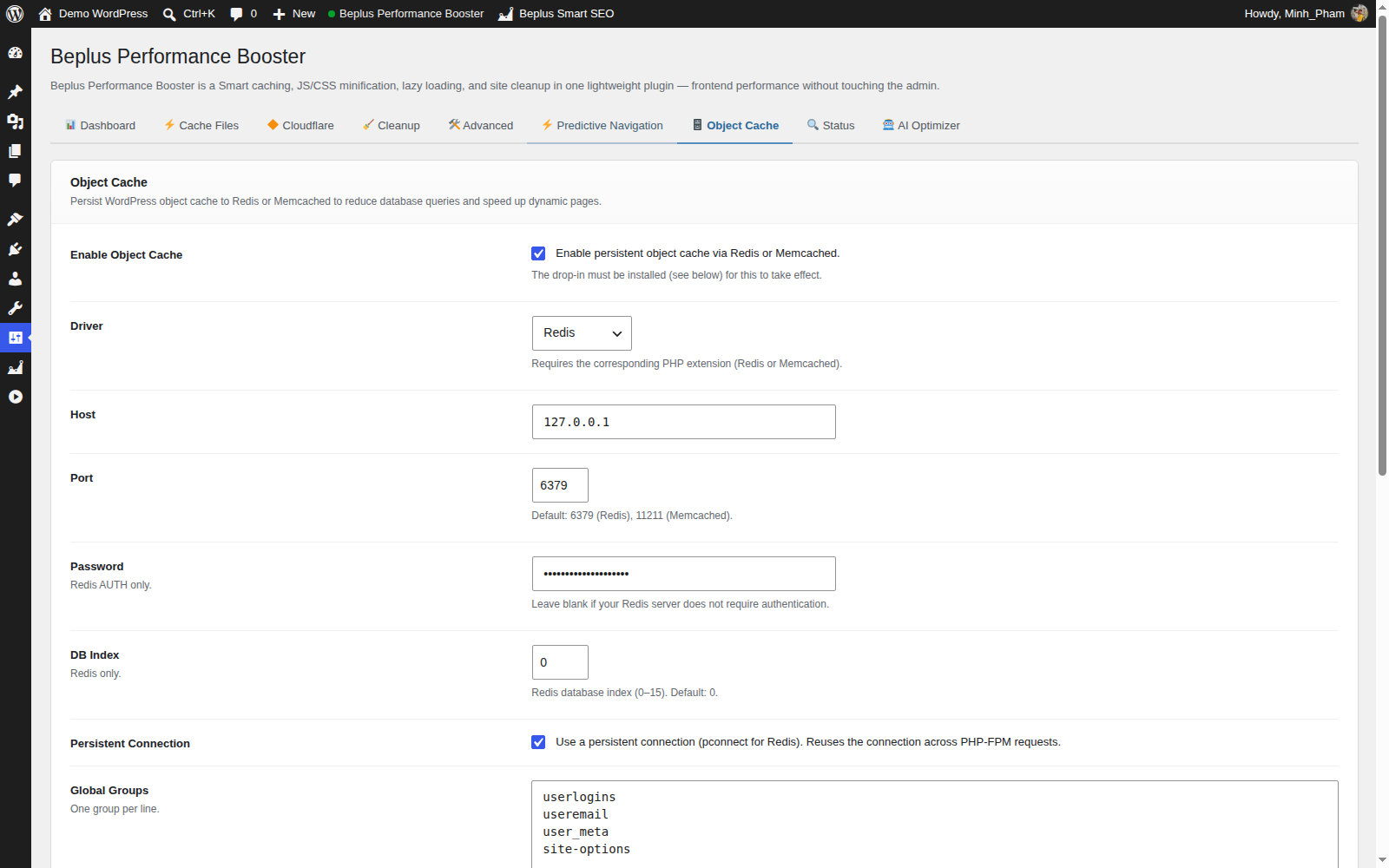
- Added Object Cache support: persistent caching via Redis or Memcached with a WP drop-in (wp-content/object-cache.php).
- New „Object Cache” settings tab: driver selection (Redis/Memcached), host/port, Redis AUTH password, Redis DB index, persistent connection, global groups, non-persistent groups.
- Connection test button with live AJAX result.
- Install/Remove drop-in buttons directly from the settings page.
- Config file (.bepluspb_oc.json) written to wp-content for zero-overhead bootstrap by the drop-in.
- Uninstall script now removes the object-cache drop-in and config file.
- Added „⚡ Enable All Recommended” button to the Dashboard tab — activates all recommended settings in one click (skips settings that require manual prerequisites, e.g. htaccess not writable).
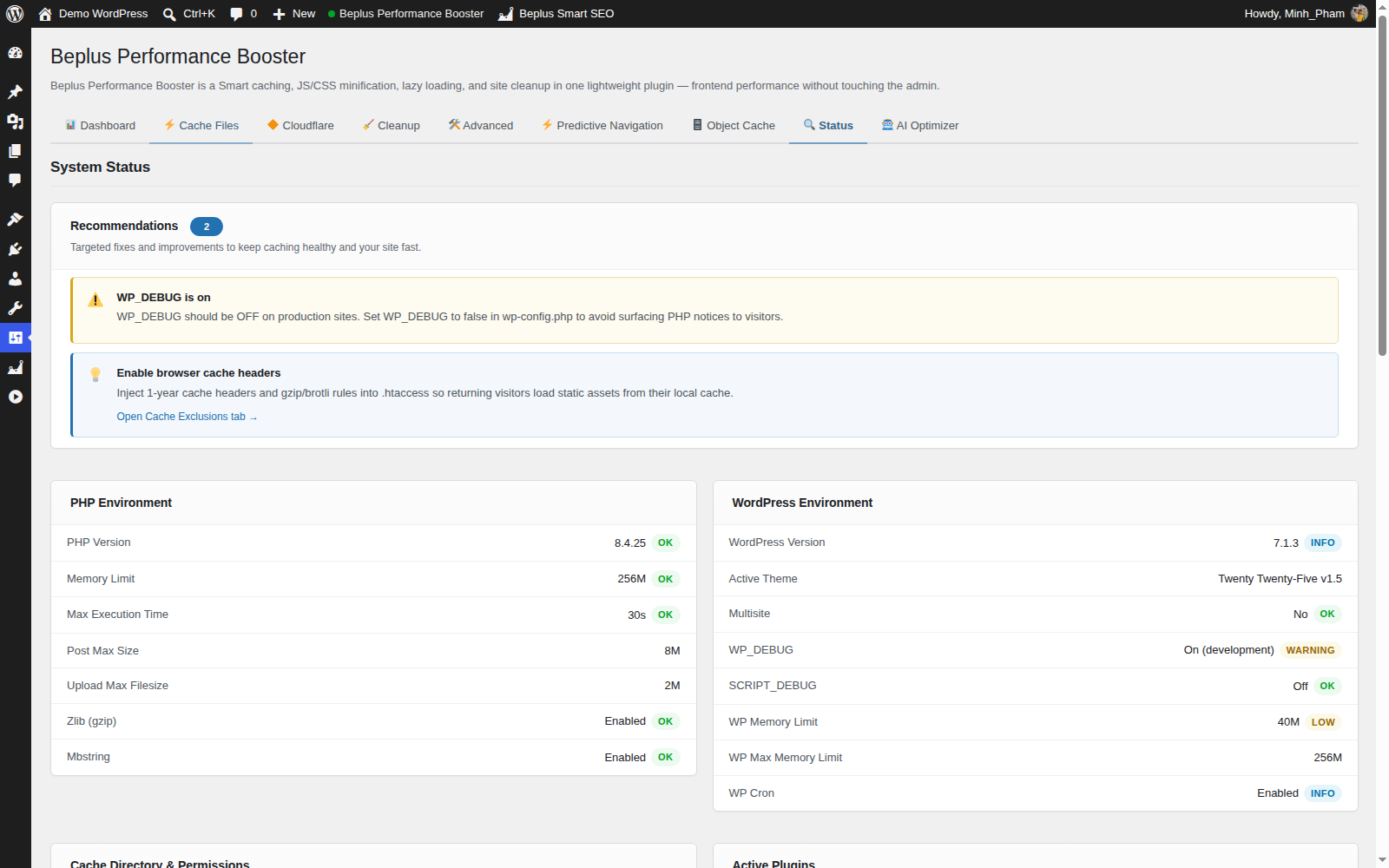
- Status tab now includes a „PHP Extensions” panel showing availability of Redis, Memcached, OPcache, cURL, GD/ImageMagick, mbstring, OpenSSL, zlib, and intl.
1.0.3
- Added QUIC.cloud (or any pull-zone) CDN support: new „CDN” settings tab rewrites enqueued CSS/JS, media library images (incl. srcset), and matching content/widget URLs to a configured CDN domain.
- New options: Enable CDN, CDN URL, File Types, Exclude from CDN.
1.0.2
- Added Remove Unused CSS: per-URL cached stripping of unused CSS rules, with Unused CSS Selector Safelist and Unused CSS URL Excludes options.
1.0.1
- Added Delay Mode option (Simple / Advanced) for JS delay.
- Added JS Release Delay (ms): fallback timer that releases delayed scripts after above-fold images and fonts load; 0 = user interaction only.
- JS delay now applies to all users including logged-in administrators.
- Renamed „Image-Load Wait” setting to „JS Release Delay (ms)” for accuracy.
1.0.0
- Initial release.
- JavaScript delay (Simple / Advanced mode) and defer with per-script exclude list.
- JS Release Delay: fallback timer that releases delayed scripts after above-fold images and fonts load;
0= user interaction only. - CSS inline minification and non-render-blocking preload swap.
- CSS file minification with content-hash disk cache.
- JS file minification with safe comment stripper (respects string literals, ASI).
- Native lazy loading for
<img>and<picture>elements. - IntersectionObserver polyfill for lazy load in older browsers.
- Skip first N images (LCP protection), exclude by class / ID / filename.
- Remove emoji, wp-embed, Gutenberg block CSS, WooCommerce assets on non-shop pages.
- HTML minification and comment/JS-comment/CSS-comment stripping.
- Browser cache and gzip/brotli rules injected into .htaccess via insert_with_markers().
- Admin bar „Beplus Performance Booster” menu with cache size/file count panel and one-click clear.
- Per-page cache-disable meta box on all public post type edit screens.
- Uninstall script cleans up all options, rules, cache files, and post meta.