
Opis
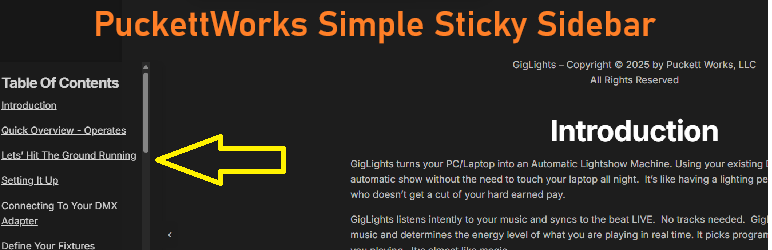
Puckettwork’s Super Simple Sticky Sidebar adds a fixed-position panel to the left or right edge of your site. It stays visible as visitors scroll, making it ideal for calls to action, contact info, announcements, or navigation links. Very Simple but effective for anything that needs a static menu or text links (or ads) attached to the left or right of the screen. I was creating an online manual and wanted the table of contents with section links to stay on the left side of the screen as the user scrolled through the manual. This plugin allows the links to remain on the screen at all times so the user can jump to a particular section in the manual. I thought it may be useful since I couldn’t find anything like it so I created a plugin to do the job.
Puckettwork’s Super Simple Sticky Sidebar has a good selection of configurable settings like color, position, transparency, size and offsets. That should be enough to customize it to your needs. Settings can be found under the menu Settings–>puckettworks simple sticky sidebar.
Features
Visual editor (TinyMCE) for rich content bold, italic, lists, links, images, and raw HTML
Left or right side positioning
Background color picker
Adjustable width (px or %), vertical position, padding, title font size, and opacity
Collapsible toggle button with state remembered in local Storage
Page visibility rules show on all pages, only specific pages, or exclude specific pages
Target by page/post ID or content type (front page, blog, single posts, pages, archives)
Zrzuty ekranu
screenshot-1.png 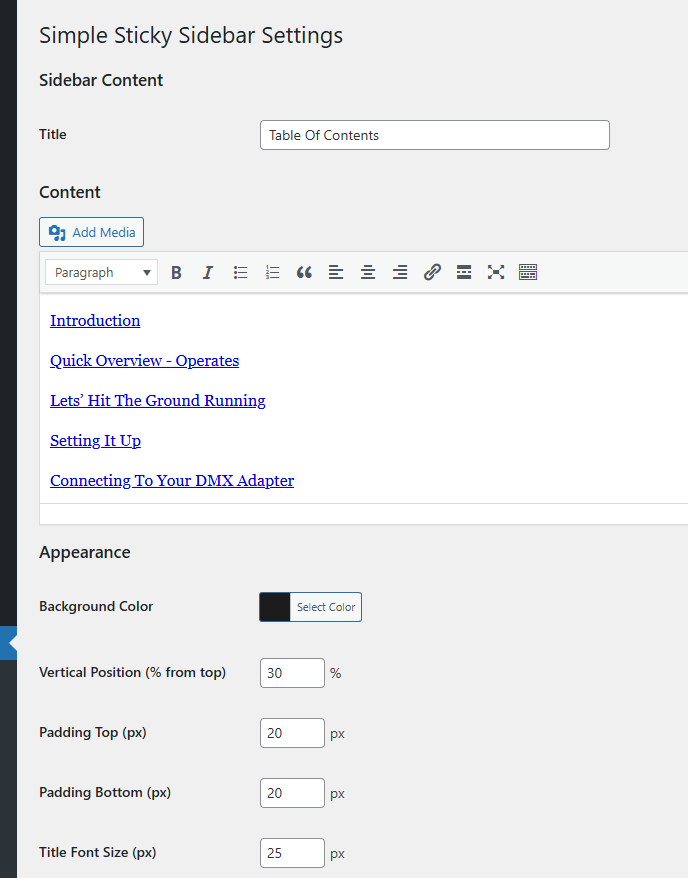
screenshot-2.png 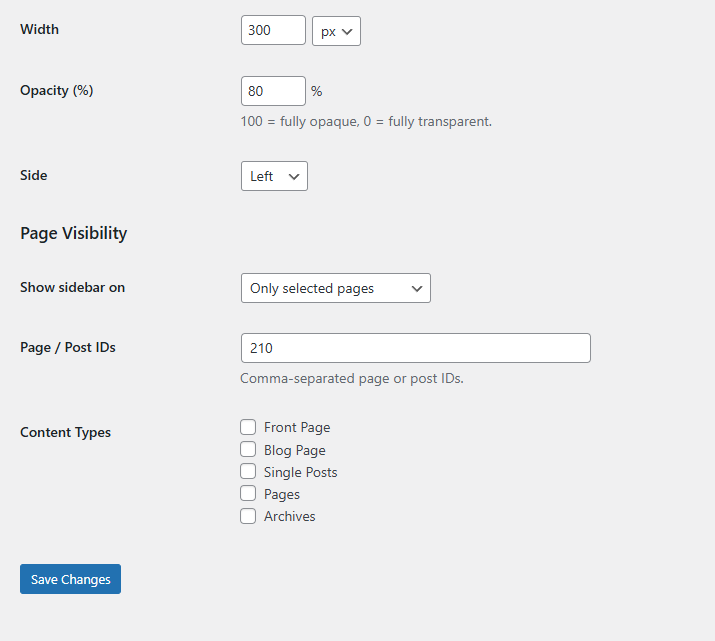
screenshot-3.png 
screenshot-4.png
Instalacja
- Upload the
puckettworks-super-simple-sticky-sidebarfolder to/wp-content/plugins/. - Activate the plugin through the
Pluginsmenu in WordPress. - Go to
Settings -> Puckettworks Super Simple Sticky Sidebarto configure your content and appearance.
Najczęściej zadawane pytania
-
Where do I configure the widget?
-
Go to Settings -> Puckettworks Super Simple Sticky Sidebar in your WordPress admin dashboard.
-
Can I use HTML in the content?
-
Yes. The visual editor supports rich formatting, and you can switch to the Text tab to enter raw HTML.
-
Yes. Under „Page Visibility” you can choose to show the widget on all pages, only selected pages, or all pages except selected ones. You can target by page/post IDs or by content type.
-
Can visitors hide the widget?
-
Yes. A small toggle button lets visitors collapse and expand the panel. The collapsed state is remembered across page loads using local Storage.
Recenzje
Wtyczka nie ma jeszcze żadnej recenzji.
Kontrybutorzy i deweloperzy
„Puckettworks Super Simple Sticky Sidebar” jest oprogramowaniem open source. Poniższe osoby miały wkład w rozwój wtyczki.
Zaangażowani
Przetłumacz wtyczkę “Puckettworks Super Simple Sticky Sidebar” na swój język.
Interesuje cię rozwój wtyczki?
Przeglądaj kod, sprawdź repozytorium SVN lub czytaj dziennik rozwoju przez RSS.
Rejestr zmian
1.0.1
- Fixed right-side positioning not applying correctly.
- Fixed bottom padding not rendering on content.
- Added opacity setting.
- Upgraded content field from plain text area to WordPress visual editor.
- Improved output escaping for WordPress Plugin Check compliance.
1.0.0
- Initial release.
1.0.1
- Fixes right-side positioning, adds opacity control and visual editor for content.
= 1.0.2=
* Updated readme.txt description