

Opis
Queryra to wtyczka wyszukiwania AI dla WooCommerce i WordPress — silnik wyszukiwania
semantycznego, który rozumie co klienci mają na myśli, a nie tylko co wpisują.
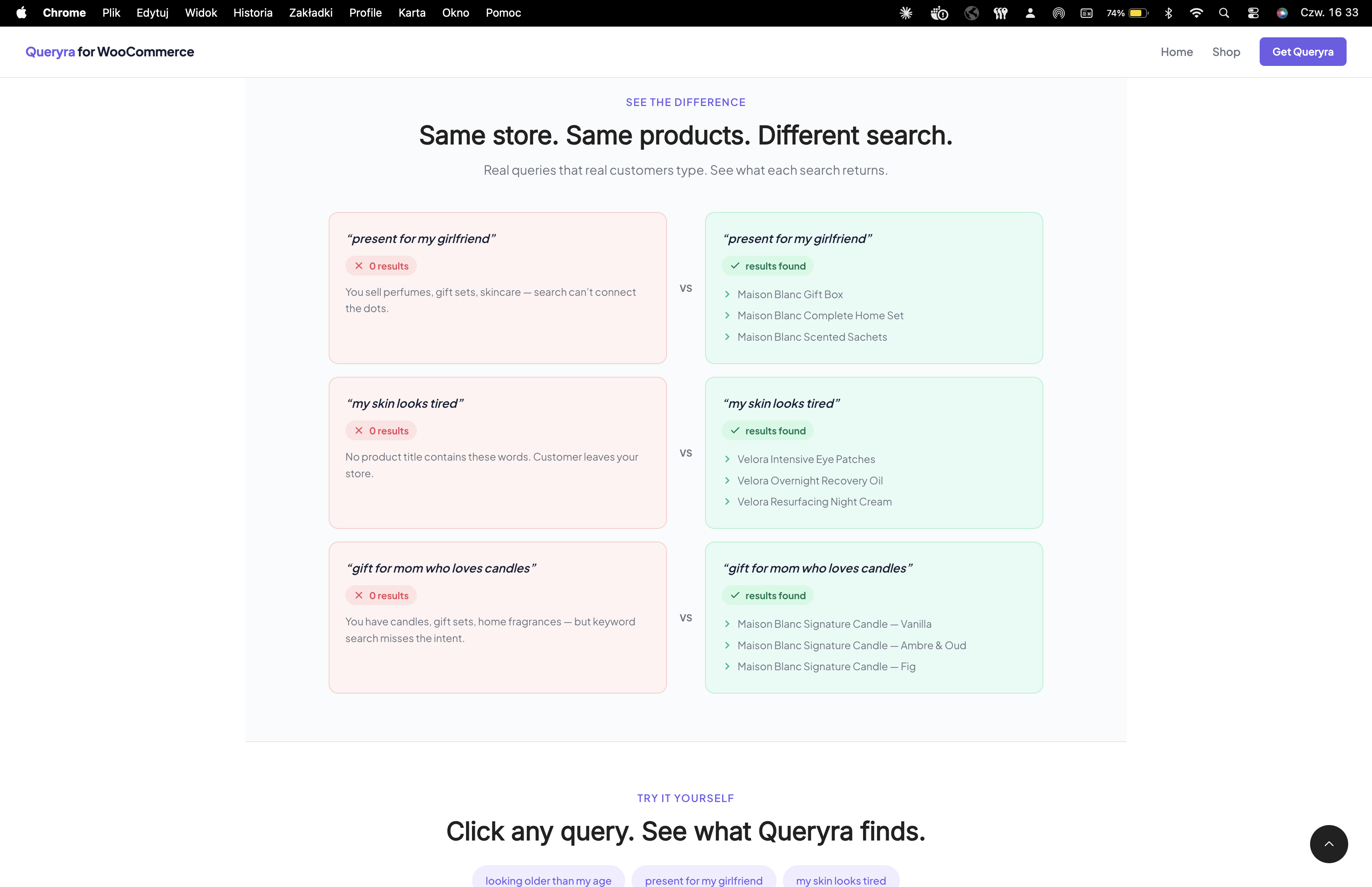
Klient wpisuje „prezent dla mojej dziewczyny”. Twój sklep WooCommerce zwraca:
0 wyników.
Sprzedajesz zestawy prezentowe, perfumy, zestawy kosmetyków — dokładnie to co by jej się spodobało. Ale domyślne
wyszukiwanie WooCommerce nie potrafi połączyć „prezent dla dziewczyny” z „Zestaw Prezentowy”.
Klient odchodzi. Sprzedaż stracona. To dzieje się każdego dnia.
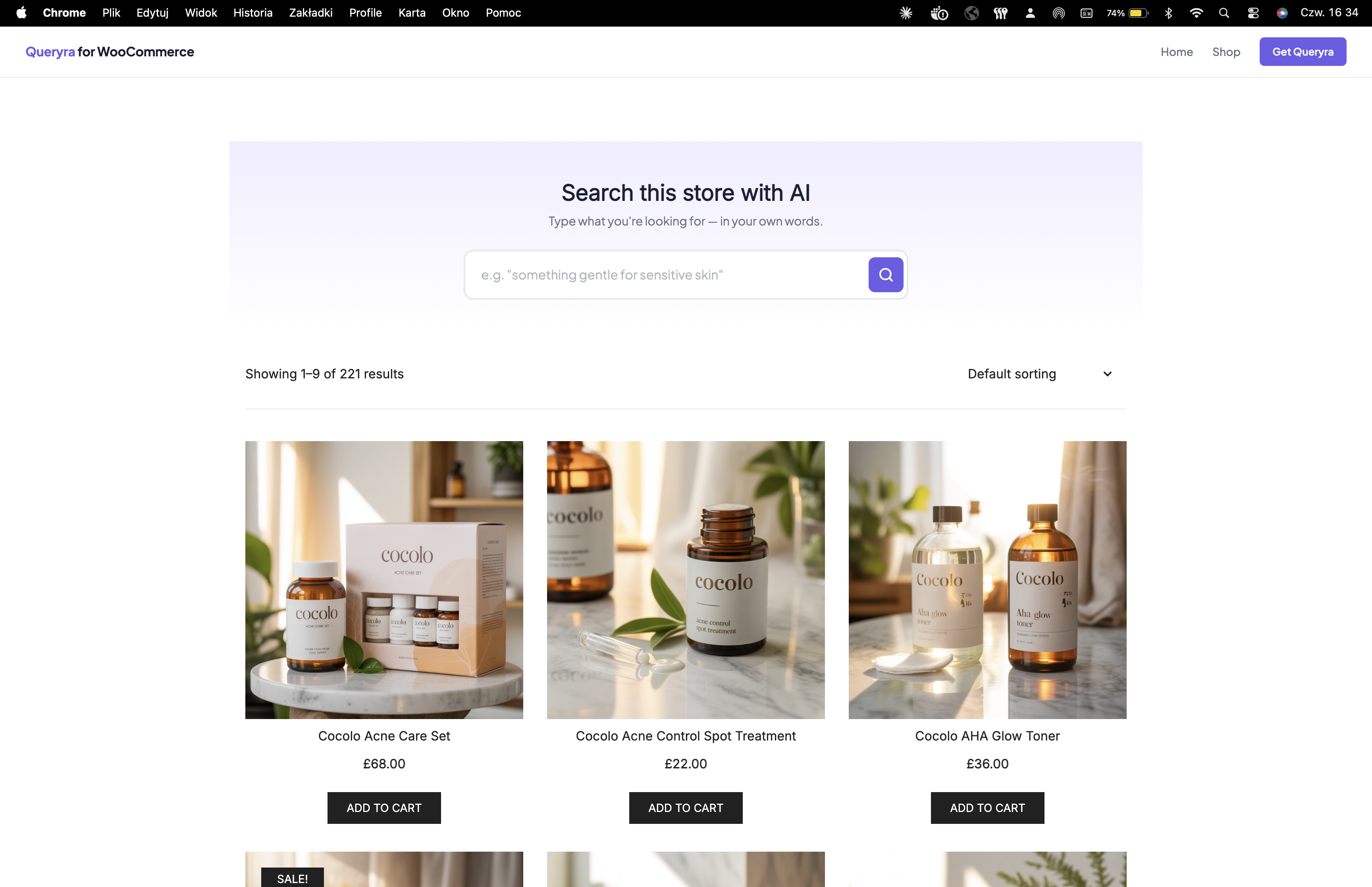
👉 Wypróbuj wyszukiwarkę AI na żywo sklep demo WooCommerce —
Ponad 200 produktów z 10 marek. Szukaj naturalnie i zobacz różnicę.
Czym jest wyszukiwarka AI dla WooCommerce?
Wyszukiwarka AI zastępuje domyślne wyszukiwanie produktów WooCommerce wyszukiwaniem semantycznym,
które rozumie znaczenie. Twoje produkty zostają takie same. Twój sklep zostaje taki sam.
Wyszukiwanie po prostu działa.
Trusted compatibility:
Oxygen Builder, Breakdance, Meta Box, TranslatePress, Weglot, MemberPress, B2BKing, and more.
Domyślne wyszukiwanie WooCommerce 0 wyników:
❌ „moja skóra wygląda na zmęczoną”
❌ „prezent dla mamy która kocha świeczki”
❌ „wyglądam starzej niż jestem”
Ten sam sklep z wyszukiwarką AI produkty znalezione:
✅ „moja skóra wygląda na zmęczoną” Kremy na noc, olejki regenerujące, płatki pod oczy
✅ „prezent dla mamy która kocha świeczki” Świeczki zapachowe, zestawy zapachów do domu
✅ „wyglądam starzej niż jestem” Serum anti-aging, kremy ujędrniające
Więcej niż wyszukiwanie semantyczne
AI Search goes further than vector search alone. A natural language query like
„wireless headphones under $80, not Beats” applies the price filter AND excludes
the brand automatically. No other WooCommerce AI search plugin does this.
AI Search works as an AI product search engine for WooCommerce — handling
intent-aware queries, ChatGPT-style natural language, and B2B wholesale
bulk search. Powered by vector embeddings and LLM intent parsing.
AI Search Compatible Plugins
Queryra has confirmed integrations and tested compatibility with leading WordPress plugins:
Page Builders:
* Oxygen Builder — full Oxygen 4.x and 6.0 support, automatic content extraction
* Breakdance — native Breakdance content indexing
Custom Fields:
* Meta Box — text and group fields indexed automatically
* ACF (Free + Pro) — text, textarea, WYSIWYG, repeaters, groups
Multilingual:
* TranslatePress — single unified semantic index across all languages
* Weglot — multilingual semantic search
Membership & Affiliate:
* MemberPress — semantic search across member-only content, alongside MemberPress access rules
* Easy Affiliate Pro — affiliate product search with custom fields
B2B:
* B2BKing — semantic AI search in bulk order forms (new in 1.4.1)
More integrations and developer docs queryra.com/docs
AI Search for Page Builders & Custom Fields
Page builder content used to be invisible to WordPress search. Queryra fixes this
— AI search now reads everything your visitors see:
- Elementor AI search — indexes content stored in
_elementor_data, including
text widgets, headings, and product descriptions built with Elementor - Beaver Builder & Breakdance — full content extraction from saved layouts
- Oxygen Builder — both legacy shortcode mode and modern JSON v2 supported
- Gutenberg / WPBakery / Divi — native support (content already in post_content)
AI Search for Custom Fields & Taxonomies
Most product data lives in custom fields, not the post content. Queryra reads it
automatically:
- ACF (Free + Pro) — text, textarea, WYSIWYG, repeaters, and groups indexed
without configuration - Meta Box — text fields and group fields via the official registry
- Custom taxonomies —
book_genre,material,property_type, or any public
custom taxonomy is sent to the AI search index, keyed by slug - Pods, JetEngine, Bricks Builder — supported via developer filter
queryra_indexable_meta_content
Smart filtering automatically excludes CSS values, hex colors, URLs, and dates
from the semantic search index — keeping AI relevance high.
Make Your Store Discoverable by AI
AI Search doesn’t just help your customers — it helps AI assistants find your store.
Queryra automatically generates structured data and AI-readable files so ChatGPT,
Perplexity, Google AI Overviews, and Claude can recommend your products.
- Dynamic /llms.txt and /llms-full.txt for AI crawlers
- JSON-LD structured data on search pages
- X-Search-Engine header for AI attribution
Want extra visibility?
- Partner Program — qualifying sites can apply for Queryra at no cost. See Partner Program details.
- Site promotion — your site gets featured on queryra.com and promoted across AI search platforms
WordPress 7.0 Connectors API & Abilities API
Queryra is a native WordPress 7.0 AI search connector. After activation, Queryra
appears in Settings Connectors alongside OpenAI, Anthropic, and Google —
giving site owners a unified place to manage AI search configuration.
- Connectors API — Queryra registers as an AI search connector. Manage your
Queryra API key from the standard WordPress 7.0 Connectors screen. - Abilities API — Queryra exposes
queryra/semantic-searchas a discoverable
ability. AI agents, chatbots, and assistants running on WordPress 7.0 can call
Queryra natively for semantic product search. - Backward compatible — Queryra works on WordPress 5.8+. Connector and ability
features activate automatically on WordPress 7.0 and newer.
Queryra is one of the early AI semantic search plugins to register as a
WordPress 7.0 connector — making API key management consistent with other
AI providers in Settings Connectors.
Konfiguracja wyszukiwarki AI w 5 minut
✅ Free demo — no credit card required
✅ No OpenAI account needed
✅ WooCommerce AI search ready in 5 minutes
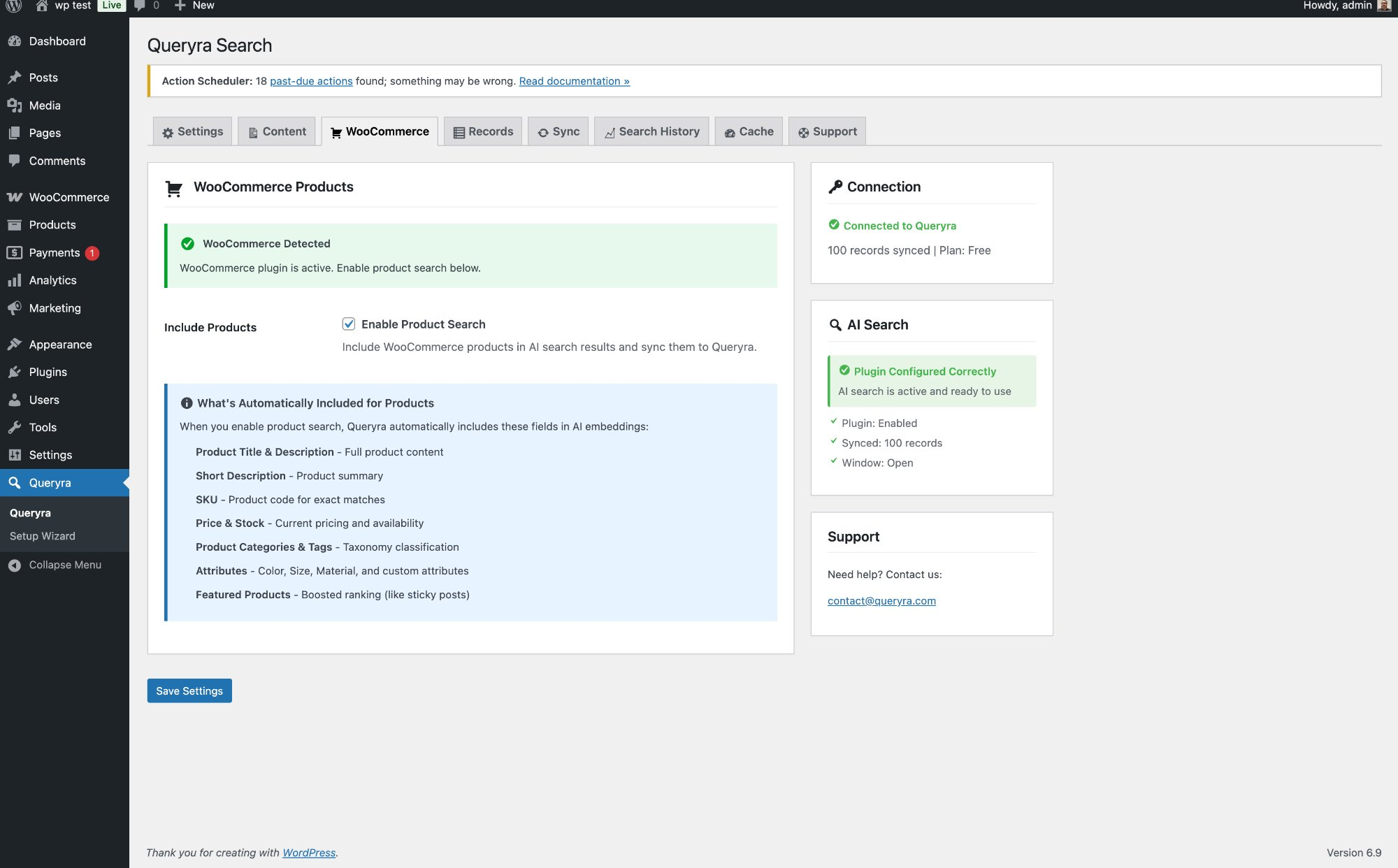
- Zainstaluj i aktywuj
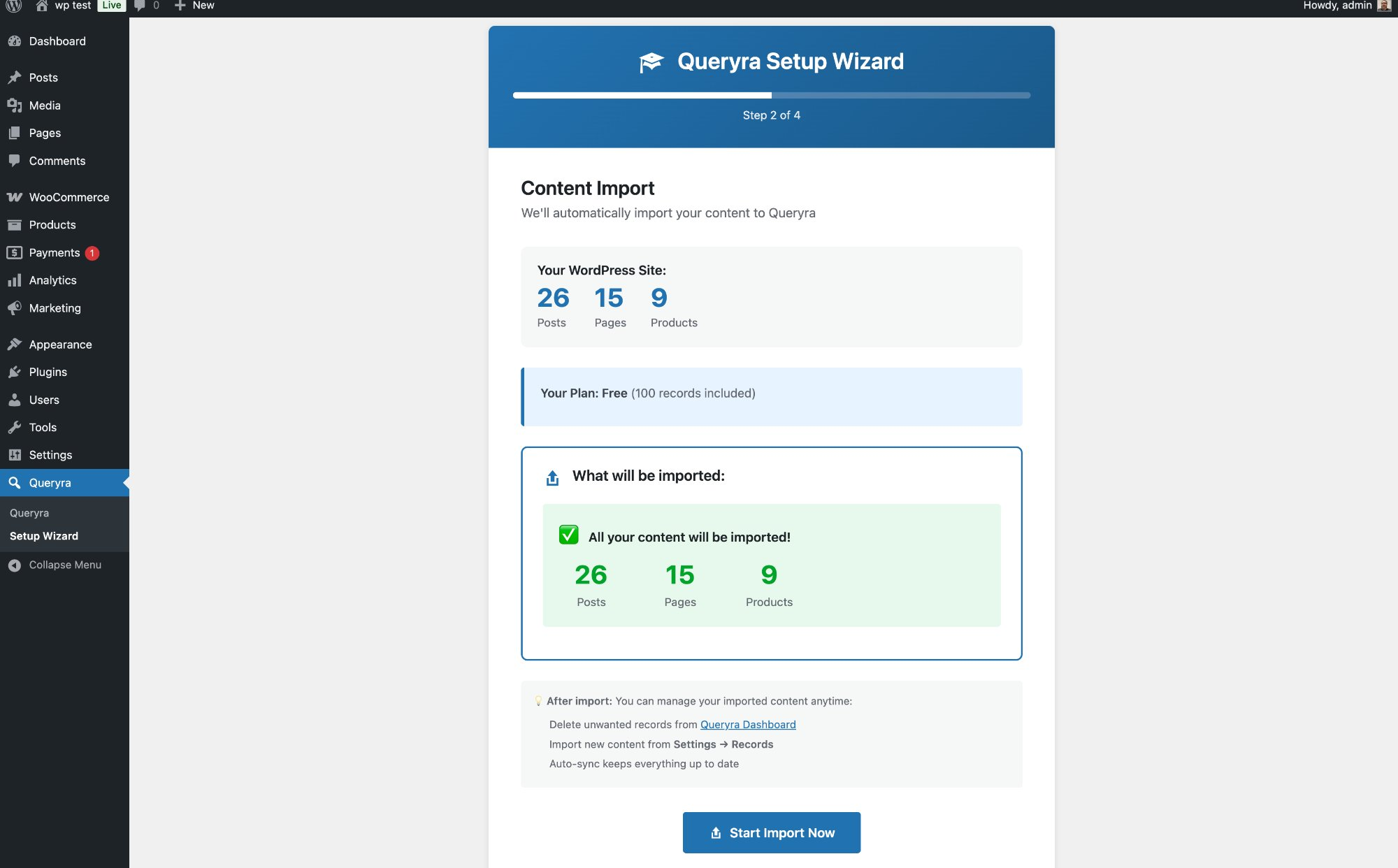
- Przejdź kreator konfiguracji
- Get your free API key at queryra.com/signup
- Import produktów WooCommerce jednym kliknięciem
- Gotowe — wyszukiwarka AI teraz rozumie Twoich klientów
No coding. No configuration headaches.
WooCommerce AI Search Setup Guide
Funkcje wyszukiwania produktów WooCommerce
- Wyszukiwanie w języku naturalnym – Klienci piszą tak jak myślą, wyszukiwarka AI
znajduje to czego potrzebują - Wyszukiwarka produktów WooCommerce – Indeksuje tytuły, opisy, numery SKU, kategorie,
tagi i atrybuty - Ranking wyszukiwania semantycznego – AI rankuje wyniki według znaczenia, nie alfabetycznie
- Kontrola promowania – Promuj produkty, które chcesz sprzedawać więcej
- Wyszukiwanie produktów na żywo – Natychmiastowe podpowiedzi AJAX podczas wpisywania
- Automatyczna synchronizacja – Nowe produkty WooCommerce indeksowane automatycznie po publikacji
- Inteligentne wykrywanie kontekstu – Wyszukiwarka AI aktywuje się automatycznie
na stronach sklepu WooCommerce - Analityka wyszukiwania – Zobacz czego szukają klienci, w tym zapytania
bez wyników - Page Builder Support – Indexes content from Elementor, Beaver Builder, Breakdance, Oxygen automatically
- Custom Field Indexing – Reads ACF and Meta Box custom fields out of the box
Wyszukiwarka produktów WooCommerce działa z każdym sklepem
- Uroda i pielęgnacja – „moja skóra wygląda na zmęczoną” znajduje kremy na noc
- Moda – „coś na letni ślub” znajduje sukienki
- Elektronika – „dobry laptop do edycji wideo” znajduje odpowiednią specyfikację
- Dom i ogród – „przytulny salon” znajduje dywany, lampy, poduszki
- Żywność i napoje – „zdrowe przekąski dla dzieci” znajduje odpowiednie produkty
Wyszukiwanie semantyczne treści WordPress
Queryra’s semantic search also works with regular WordPress content — posts, pages,
and custom post types. Well-suited for knowledge bases, blogs, and FAQ sections.
AI Search for B2B and Wholesale Stores
AI Search includes native B2BKing integration starting from version 1.4.1.
The bulk order form’s keyword search is replaced with semantic AI product
search — your B2B buyers find products by intent, not just exact SKUs or
names. Wholesale-specific use cases supported:
- „warm jackets for winter — bulk order”
- „shirts in cotton, breathable, wholesale pricing”
- „keychains and accessories — high quantity”
B2B visibility rules (group restrictions, per-product permissions,
category-level access) are fully respected. Works for B2BKing, B2BWoo, and
manual B2B WooCommerce setups.
Dlaczego warto zastąpić domyślne wyszukiwanie WooCommerce?
Domyślne wyszukiwanie produktów WooCommerce dopasowuje dokładne słowa. Jeśli Twój produkt to „Velora
Overnight Recovery Oil” a ktoś wpisze „moja skóra wygląda na zmęczoną”, nie znajdzie nic.
Wyszukiwarka AI to naprawia — klienci znajdują produkty nawet przy niejasnych zapytaniach
w języku naturalnym.
Dlaczego Queryra a nie inne wtyczki wyszukiwania produktów WooCommerce?
No OpenAI Account Required — Queryra includes its own search backend, so
you don’t need to create a separate OpenAI account or manage external API keys.
Indexed on YOUR WooCommerce Store — Queryra learns from YOUR products,
descriptions, and categories — not generic global data.
Intent-Aware AI Search — Most semantic search plugins only match meaning.
Queryra goes further: „wireless headphones under $80, not Beats” applies the price
filter AND excludes the brand. Vector-only plugins ignore both.
Why vector search isn’t enough
Privacy
Queryra is built with privacy in mind. This section explains exactly what
data leaves your WordPress site, what stays local, and how you stay in
control as the store owner.
What Queryra sends to the API
Content indexing (posts, pages, products):
For every published item of the post types you enable (default: posts and
pages; optionally products), Queryra sends:
- Title, content, excerpt (HTML stripped)
- Post type, permalink, featured image URL
- Categories and tags (names only)
- For WooCommerce products: price, stock quantity, SKU, brand, short description, product attributes (e.g. Color, Size)
- Featured/sticky flag (used to boost ranking of highlighted content)
That’s it. This is the same data your site already shows publicly on the
frontend — Queryra does not read private posts, drafts, or protected content.
Search queries:
When a visitor types in your search box, only the query text is sent to the
API. The API returns matching post IDs, which WordPress then renders
normally from your own database.
Anonymous usage analytics:
On plugin lifecycle events (activation, deactivation, setup milestones and
error reports), Queryra sends: a randomly generated instance UUID (stored
locally, no link to any user), WordPress version, PHP version, plugin
version, WooCommerce active flag, whether AI search is switched on, which
content types you enabled for indexing, and counts of posts, pages,
products and public custom post types. This helps us prioritize
compatibility fixes. You can disable this entirely by adding the following
line to your wp-config.php:
define('QUERYRA_DISABLE_ANALYTICS', true);
Site profile (optional, user-declared):
When the setup wizard opens you may optionally answer what kind of site you
run and what you expect from search. Your answer is sent to Queryra once and
is not stored on your site; only a small flag stays locally so the question
is not asked twice. Skipping sends no answer — only the fact that you
skipped, so we can tell a decline apart from never having seen the question.
You can answer or update it at any time in Settings Site Profile.
Deactivation feedback (optional):
If you choose to submit the feedback form when deactivating, your selected
reason and comments are sent to Queryra together with your site URL, the
plugin version and — only if you enter one — your email address for a
reply. Skipping the form sends no feedback content; the deactivation event
records only whether the form was submitted, skipped, or never shown.
What Queryra NEVER sends
- No visitor IP addresses
- No user agents or browser fingerprints
- No cookies or session identifiers
- No customer accounts, emails, or order data
- No browsing history or behavior tracking
- No personally identifiable information (PII) about searchers or customers
- No private, draft, password-protected or unpublished content
Your control as a store owner
- Choose which post types are indexed (Settings Queryra)
- Disable AI search anytime — WordPress falls back to native search
- Deactivate the plugin to stop all data transmission
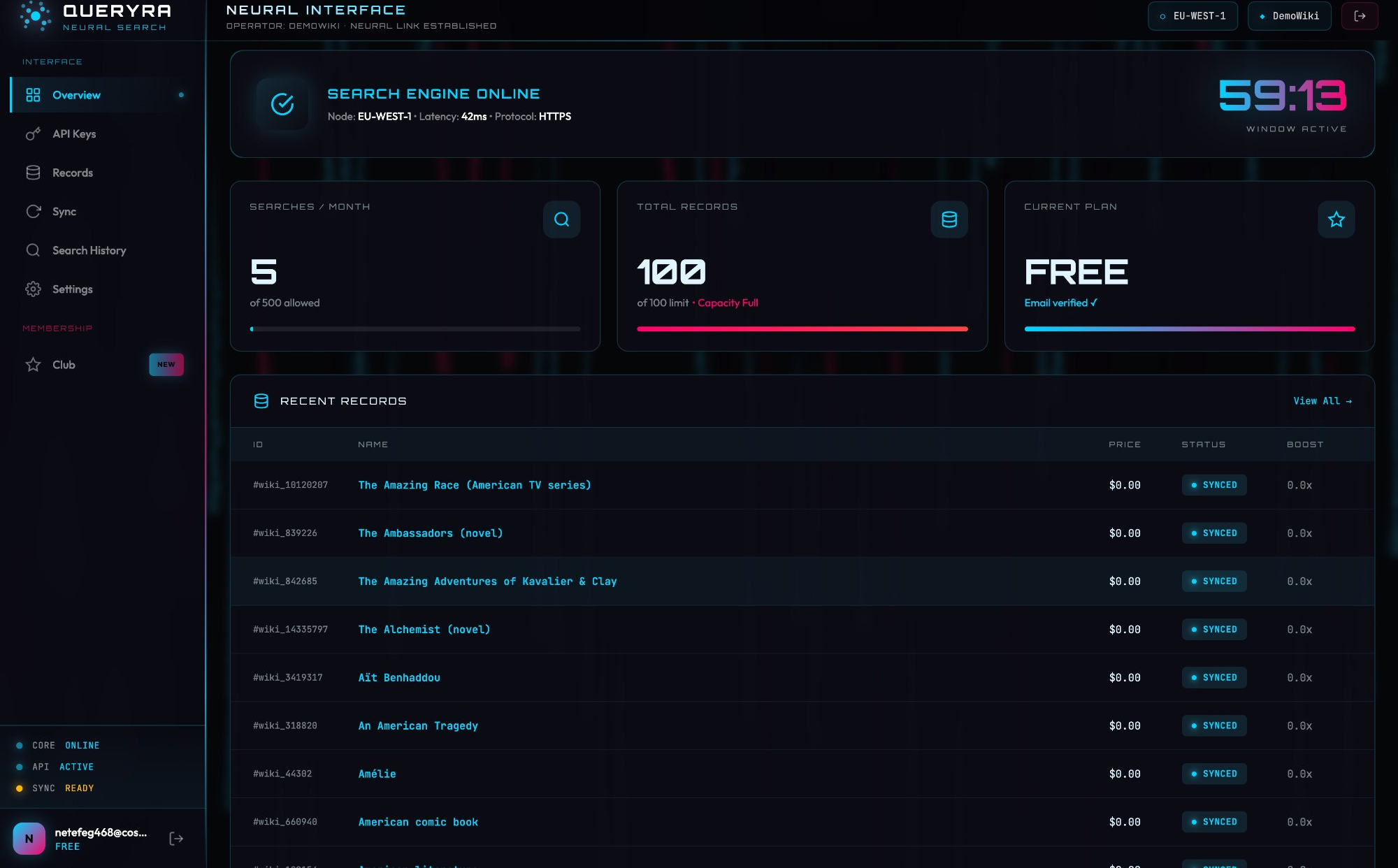
- Delete indexed records from the Queryra dashboard
Security
Queryra is publicly tracked by independent security and quality services:
No third-party frontend scripts: Queryra loads only its own minimal
stylesheet on public pages. No external JavaScript, no tracking pixels,
no third-party CDN requests on the frontend.
Responsible disclosure: Found a security issue? Email
contact@queryra.com. We will investigate on a best-effort basis and credit
reporters in the changelog.
Full privacy policy: queryra.com/privacy
Dodatkowe informacje
Wsparcie
- AI Search Documentation
- FAQ
- WooCommerce Product Search Setup
- Email: support@queryra.com
Linki
Zrzuty ekranu
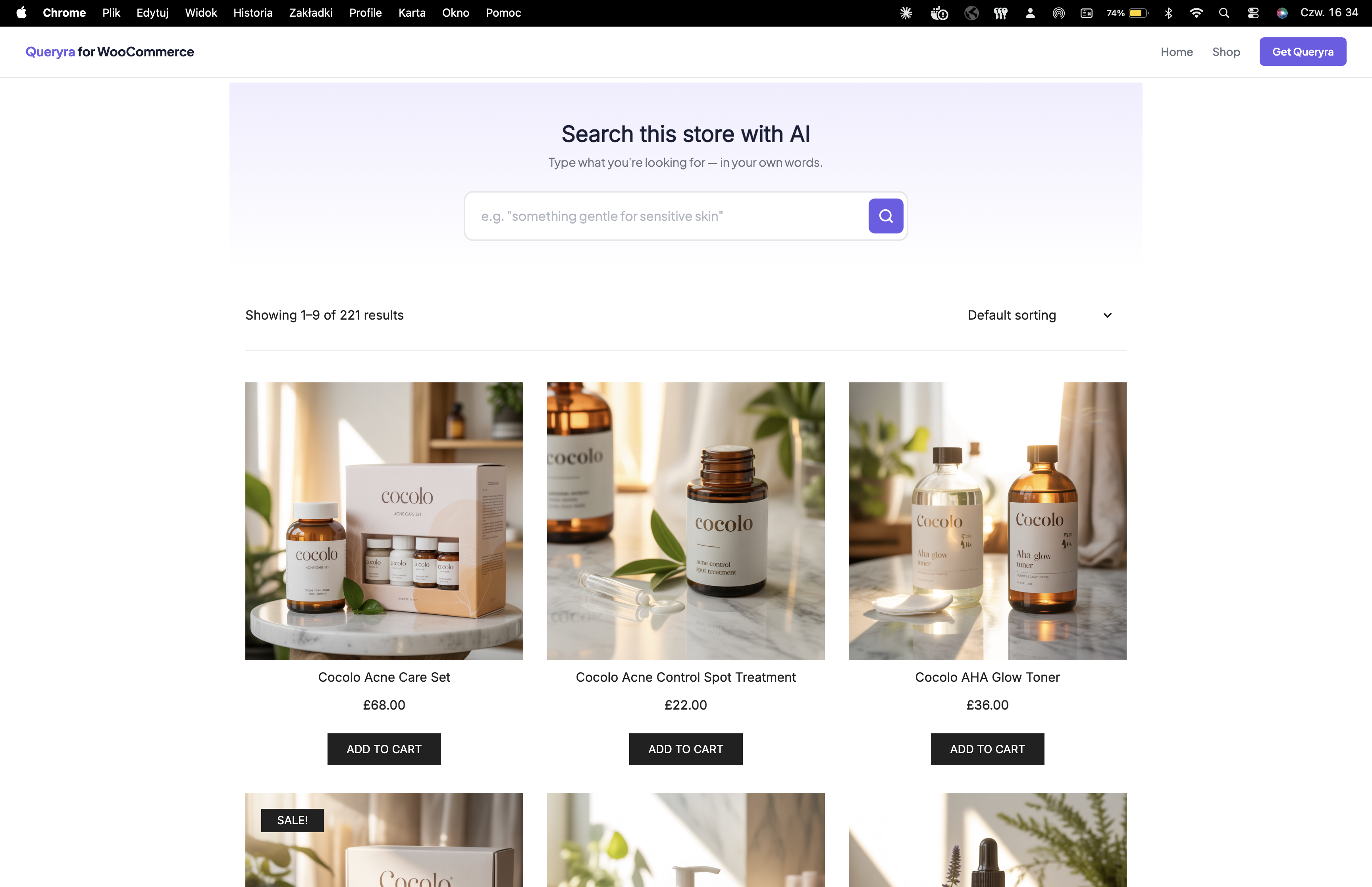
Instalacja
Jak zainstalować wyszukiwarkę AI dla WooCommerce
- Zainstaluj: Wtyczki Dodaj nową Szukaj „AI Search Queryra” Zainstaluj Aktywuj
- Kreator konfiguracji: Przejdź prowadzony kreator wyszukiwarki AI, który pojawia się automatycznie
- Get API Key: Create free account at queryra.com/signup
- Import produktów: Import jednym kliknięciem synchronizuje wszystkie produkty WooCommerce z indeksem wyszukiwania AI
- Włącz: Włącz wyszukiwanie AI — wyszukiwanie semantyczne jest gotowe
WooCommerce AI Search Setup Guide
Kompatybilność z WooCommerce
- Produkty WooCommerce, warianty i produkty wirtualne
- Numery SKU produktów WooCommerce, kategorie, tagi i niestandardowe atrybuty
- Zwykłe wpisy WordPress, strony i niestandardowe typy treści
- Każdy motyw WordPress — wyszukiwarka AI działa bez zmian w szablonach
- Page builders: Elementor, Breakdance, Beaver Builder, Oxygen, Gutenberg, WPBakery, Divi
- Custom fields: ACF (Free + Pro), Meta Box
- Custom taxonomies: any public taxonomy registered with
public => true
Minimalne wymagania
- WordPress 5.8 lub wyższa
- Zalecane WooCommerce 5.0 lub wyższa
- PHP 7.4 lub wyższa
- Darmowy klucz API na queryra.com — bez konta OpenAI
Najczęściej zadawane pytania
-
Is Queryra a WordPress AI search plugin, or only for WooCommerce?
-
Yes. Queryra indexes posts, pages, custom post types, and WooCommerce products. The plugin name mentions WooCommerce because that is the most common use case, but Queryra is a full WordPress AI search connector — well-suited for blogs, knowledge bases, documentation sites, news sites, and any WordPress content type.
-
Does AI Search work for B2B and wholesale stores?
-
Yes. AI Search includes a native B2BKing integration starting in version 1.4.1.
The bulk order form’s keyword search is replaced with semantic AI product search
— B2B buyers can search „warm winter jackets bulk”, „cotton shirts wholesale
under bulk pricing”, or „high-volume keyrings” and find relevant products by
meaning, not just exact keywords. All B2BKing visibility rules (B2B groups,
category restrictions, per-product permissions) are fully respected. AI Search
works equally well for B2C and B2B WooCommerce stores. -
Can AI Search understand price filters and brand exclusions?
-
Yes — this is one of AI Search’s signature capabilities. Customer queries
like „wireless headphones under $80, not Beats” automatically apply the price
filter AND exclude the brand. Most semantic search plugins only match meaning
by vector similarity; AI Search adds LLM-based intent parsing on top. It
understands price ranges („under $50”, „between $100 and $200”), brand
exclusions („not Apple”, „without Beats”), attribute requirements („blue
cotton breathable”), and use-case contexts („for hiking”, „gift for mom”).
This makes AI Search closer to ChatGPT-style search than to traditional
keyword or vector-only search plugins.
Learn more -
How is AI Search different from vector search plugins?
-
Vector search alone matches concepts by mathematical similarity, but it
ignores customer intent — it can find products related to „wireless
headphones”, but doesn’t understand „under $80” or „not Beats” as filters.
AI Search combines vector search with LLM-based intent extraction. It knows
that „under $80” is a price filter, „not Beats” is a brand exclusion, and
„for working out” is a use-case context. The result: AI Search returns
products customers actually wanted, not just lexically related ones.
Pure vector search plugins (Pinecone-based, ChromaDB-only) miss these intent
signals — AI Search parses them automatically. -
Can I migrate from Relevanssi, FiboSearch, or SearchWP to AI Search?
-
Yes. AI Search runs alongside existing search plugins during testing —
switch between them via Settings Queryra Enable AI Search. There’s no
data migration needed; AI Search builds its own semantic index from your
WooCommerce products and WordPress content directly. Most stores migrate in
under 10 minutes: install, one-click product import, enable AI Search. If
the results aren’t right for you, switch back instantly. Many stores keep
their old search plugin as fallback while testing. -
Can I customize AI Search results to match my theme?
-
Yes. AI Search uses your theme’s existing search results template — no HTML
or CSS changes needed. AI search results render through your theme’s
standard search.php / archive-product.php template, so they automatically
match your store’s design. For deeper customization, use developer filters
documented at queryra.com/docs/queryra-developer-filters — including custom
result ordering, indexable meta content, and search query rewriting. Most
themes work out of the box; advanced themes can override individual
template parts. -
Does Queryra work as a WordPress 7.0 connector?
-
Yes. Queryra registers as a native WordPress 7.0 AI search connector. After activation on WordPress 7.0 or newer, Queryra appears in Settings Connectors alongside the default AI providers (OpenAI, Anthropic, Google). You can manage your Queryra API key from the standard Connectors screen instead of (or in addition to) the Queryra settings page.
-
Does Queryra support the WordPress 7.0 Abilities API?
-
Yes. Queryra registers the
queryra/semantic-searchability via the Abilities API. AI agents, chatbots, and other plugins running on WordPress 7.0 can discover and invoke Queryra’s semantic search programmatically — natural-language search results are returned as a discoverable WordPress ability with input and output schemas. -
Does Queryra work on older WordPress versions?
-
Yes. Queryra fully supports WordPress 5.8 through 7.0+. The Connectors API and Abilities API integration activates automatically on WordPress 7.0 sites; on older versions, Queryra continues to work through its own settings page (Queryra Settings) with no feature loss for end users.
-
How is Queryra different from OpenAI, Anthropic, and Google connectors?
-
OpenAI, Anthropic, and Google are LLM providers — they generate text and images from prompts. Queryra is a search engine connector. Where LLM connectors create new content, Queryra finds existing content in your site by semantic meaning. They complement each other: an LLM connector can write a product description, then Queryra makes it findable. You can use Queryra alongside LLM connectors in WordPress 7.0 Settings Connectors.
-
Czym jest wyszukiwarka AI dla WooCommerce?
-
Wyszukiwarka AI to wtyczka wyszukiwania semantycznego, która zastępuje domyślne wyszukiwanie produktów WooCommerce wyszukiwaniem opartym na AI. Zamiast dopasowywać dokładne słowa kluczowe, rozumie co klienci mają na myśli — więc „prezent dla mamy która kocha świeczki” znajduje świeczki, a nie zero wyników.
-
Czym to się różni od domyślnego wyszukiwania WooCommerce?
-
Domyślne wyszukiwanie WooCommerce dopasowuje tylko dokładne słowa. Wyszukiwarka AI używa wyszukiwania semantycznego, aby zrozumieć intencję klienta. Zapytanie typu „moja skóra wygląda na zmęczoną” zwraca kremy na noc i olejki regenerujące — produkty pasujące do znaczenia, nie do słów.
-
Czy wyszukiwarka AI działa z produktami WooCommerce?
-
Tak. Wyszukiwarka AI indeksuje tytuły produktów WooCommerce, opisy, numery SKU, kategorie, tagi i atrybuty. Obsługuje warianty produktów, produkty wirtualne oraz każdy motyw kompatybilny z WooCommerce.
-
Czy wyszukiwarka AI obsługuje zapytania w języku naturalnym?
-
Tak. Klienci mogą wyszukiwać w języku naturalnym — „coś ciepłego na zimę”, „prezent dla taty który lubi kawę”, „słuchawki bezprzewodowe nie Beats poniżej 300 zł”. Wyszukiwarka AI automatycznie rozpoznaje intencję, filtry cenowe i wykluczenia marek.
-
Czym jest wyszukiwanie semantyczne i jak działa?
-
Wyszukiwanie semantyczne rozumie znaczenie zapytania, a nie tylko słowa kluczowe. Wyszukiwarka AI konwertuje Twoje produkty na embeddingi AI i dopasowuje je do zapytania klienta za pomocą podobieństwa wektorowego — dzięki temu znajduje trafne produkty nawet gdy żadne słowa kluczowe się nie zgadzają.
-
Czy wymagane jest konto OpenAI lub klucz API?
-
Nie. Wyszukiwarka AI działa na backendzie Queryra — bez konta OpenAI, bez zarządzania kluczami API, bez kosztów za zapytanie. Jeden darmowy klucz API na queryra.com wystarcza do wszystkiego.
-
Czy wyszukiwarka AI obsługuje wiele języków?
-
Tak. Wyszukiwarka AI obsługuje ponad 50 języków od razu po instalacji, w tym polski, niemiecki, francuski, hiszpański, holenderski, japoński, czeski i inne. Nie wymaga konfiguracji — klienci wyszukują w swoim języku ojczystym i automatycznie znajdują produkty.
-
Czy wyszukiwarka AI spowolni mój sklep WooCommerce?
-
No. AI Search processes queries via an optimized API. Products are indexed in the background. Search results typically return in under a second — competitive with keyword search for most stores.
-
Jak skonfigurować wyszukiwarkę produktów WooCommerce?
-
Zainstaluj i aktywuj wtyczkę, przejdź kreator konfiguracji, uzyskaj darmowy klucz API na queryra.com/signup i uruchom jednoklkowy import produktów. Wyszukiwarka AI jest gotowa w mniej niż 5 minut. Bez kodowania.
-
Co się dzieje, gdy wyszukiwarka AI nie znajdzie wyników?
-
Wyszukiwarka AI automatycznie przełącza się na domyślne wyszukiwanie WordPress, aby klienci zawsze coś zobaczyli. Możesz też użyć Search Analytics do identyfikacji zapytań bez wyników i uzupełnienia luk w katalogu produktów.
-
Czy obsługuje warianty produktów WooCommerce?
-
Tak. Warianty produktów są w pełni indeksowane, łącznie z numerami SKU, cenami i atrybutami poszczególnych wariantów. Wyszukiwarka AI obsługuje produkty proste, produkty z wariantami oraz produkty wirtualne.
-
Czy mogę kontrolować, które produkty pojawiają się jako pierwsze w wynikach wyszukiwania?
-
Tak. Wyszukiwarka AI zawiera funkcję Boost Controls — możesz promować wybrane produkty lub kategorie, aby pojawiały się wyżej w wynikach. Przydatne przy produktach o wysokiej marży lub asortymencie sezonowym.
-
Does AI Search work with Elementor / Beaver Builder / Oxygen page builders?
-
Yes. AI Search automatically extracts content from Elementor (
_elementor_data),
Breakdance, Beaver Builder, and Oxygen (both legacy shortcodes and JSON v2). No
configuration needed — page builder content is indexed the same way as standard
post content. -
Does AI Search index ACF and Meta Box custom fields?
-
Yes. AI Search reads ACF (Free + Pro) text, textarea, WYSIWYG, repeater, and
group fields automatically. Meta Box text and group fields are also supported.
For Pods, JetEngine, and Bricks Builder, use the developer filter
queryra_indexable_meta_content to specify which fields to index. -
Yes. Queryra sends all public custom taxonomies (e.g.
book_genre,material,
property_type) to the AI search index in ataxonomiesfield, keyed by slug.
Categories, tags, and the WooCommerce brand taxonomy continue to work as before.
Recenzje

Kontrybutorzy i deweloperzy
„Wyszukiwarka AI dla WooCommerce – Wyszukiwanie Semantyczne” jest oprogramowaniem open source. Poniższe osoby miały wkład w rozwój wtyczki.
Zaangażowani

Przetłumacz wtyczkę “Wyszukiwarka AI dla WooCommerce – Wyszukiwanie Semantyczne” na swój język.
Interesuje cię rozwój wtyczki?
Przeglądaj kod, sprawdź repozytorium SVN lub czytaj dziennik rozwoju przez RSS.
Rejestr zmian
1.5.2
- New: scope filters via URL — add
filter_<taxonomy>=<term>to your search form (e.g./?s=shoes&filter_product_cat=boots) and results are narrowed by that taxonomy before ranking, so counts stay exact. Combine several filters. Searches withoutfilter_parameters are unchanged. - New:
queryra_result_idsfilter — lets your site narrow AI search results in PHP by its own rules (membership access, B2B groups). Receives the ranked post IDs and the search term; if your callback removes every result, the search correctly returns nothing. Suggested by @jonnwalker.
For the full changelog history, see changelog.txt.