
Opis
View WPListCal plugin information using the JSON API plugin with this simple WordPress plugin.
After installing and activating you can use the upcomming events in your external applications.
Zrzuty ekranu
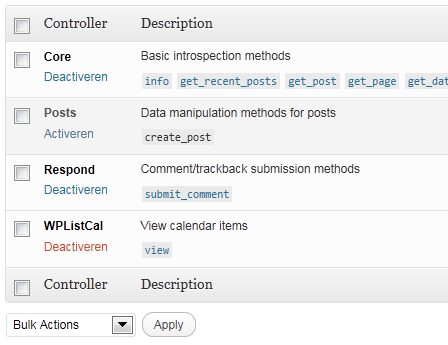
JSON API Settings: Activate WPListCal
Instalacja
The automatic plugin installer should work for most people. Manual installation is easy and takes fewer than five minutes.
- Create a wplistcal-json directory in your plugins directory. Typically that’s wp-content/plugins/wplistcal-json/.
- Into this new directory upload the plugin files (wplistcal-json.php, etc.)
- Activate the plugin through the 'Plugins’ menu in WordPress.
- Activate the 'WPListCal’ controller through the 'JSON API’ options page.
Najczęściej zadawane pytania
- Does it work with older versions of WordPress?
-
I don’t know, try it and let me know.
Recenzje
Wtyczka nie ma jeszcze żadnej recenzji.
Kontrybutorzy i deweloperzy
„WPListCal JSON” jest oprogramowaniem open source. Poniższe osoby miały wkład w rozwój wtyczki.
Zaangażowani
Przetłumacz wtyczkę “WPListCal JSON” na swój język.
Interesuje cię rozwój wtyczki?
Przeglądaj kod, sprawdź repozytorium SVN lub czytaj dziennik rozwoju przez RSS.
Rejestr zmian
1.1
- Bugfix: Sorting results
1.0
- Initial release