Opis
With this plugin you can easily add a dynamic login/logout menu item to any menu on your WordPress site. The menu item will change based on whether the current user is logged in or logged out. You can also set a specific login page url, login redirect url and a logout redirect url.
Thanks to Juliobox for his prior efforts on the BAW Login/Logout Menu plugin which this is derived from
CONFIGURE SETTINGS
After installing and activating the plugin, you can find the settings in your dashboard under: Settings > Login or Logout
Login Page URL – This should be the URL to the page where your users will login at. For most wordpress sites this will be /wp-login.php but if you’re using a membership plugin like MemberPress, it might be something like /login/ instead.
Login Redirect URL – This is the URL you would like your users to be redirected to after they’ve successfully logged in. You can set it to / to take them to the home page after logging in. If you’re using a membership plugin like MemberPress, you might want to use /account/ instead. NOTE: Some plugins may override this if they are configured to redirect your users somewhere else during login.
Logout Redirect URL – This is the URL you would like your users to be redirected to after they click the Logout link from this menu item. Use a / to redirect them to the home page, or you might want to redirect them back to the login page at /login/ or /wp-login.php etc.
ADD ITEM TO MENU
In your dashboard visit Appearance > Menus.
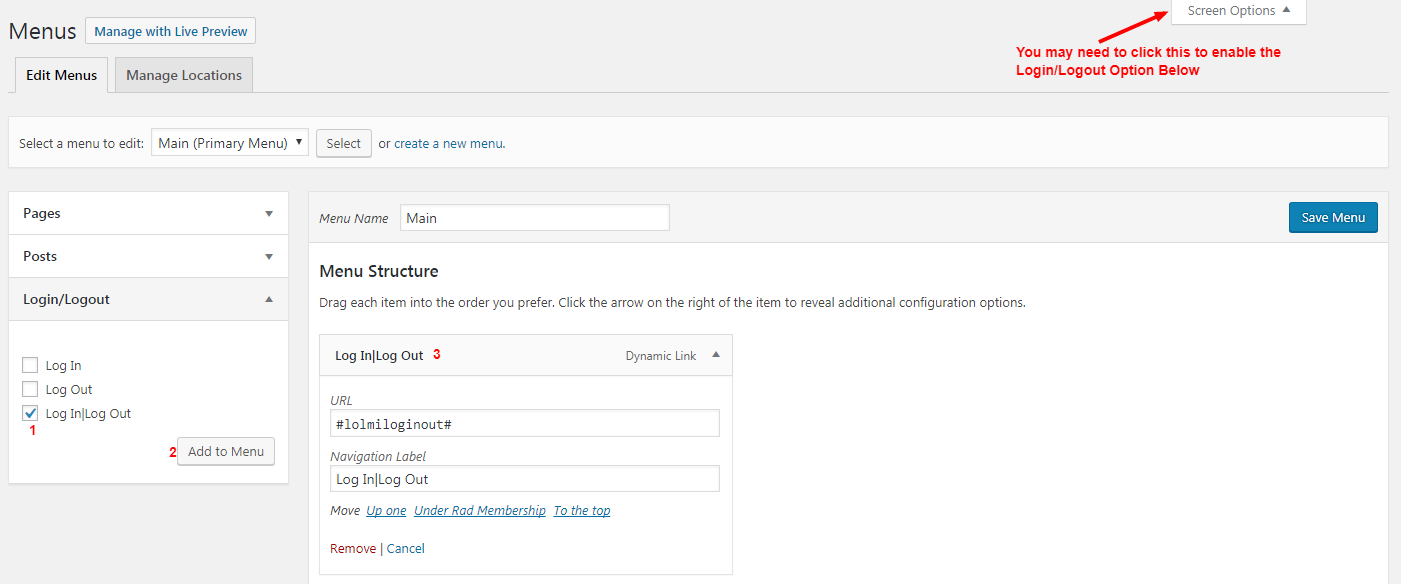
Then at the top right of that page click the Screen Options button and ensure that Login/Logout checkbox is checked.
Then select a menu to edit, or create a new menu if you don’t already have one.
In the left sidebar find Login/Logout and click the checkbox next to Login|Logout and then click Add to Menu.
You can now drag the menu item wherever you’d like it to appear in your menu. The URL in the menu settings must be left at #lolmiloginout# but you can change the Navigation Label if you’d like it to say something else. Just ensure that the | is there in the label separating the two words.
Now save your menu. That’s it!
Troubleshooting
After logging in, menu still shows „Login” or Vice-Versa – This is most commonly caused by caching. If you’re using a caching solution such as Cloudflare, WPRocket, or others, be sure that caching is disabled for logged in users, and disable browser caching options as well.
Login is redirecting users somewhere other than my settings – Many times other plugins will have their own login redirect handling which overrides this plugin’s, such as MemberPress for example. In this case, the other plugins will need to be configured to redirect the user where you’d like them to go.
Zrzuty ekranu
Login or Logout Menu Item 
Login or Logout Menu Item - Settings
Instalacja
- Download a .zip of this plugin file
- Go to your WordPress Dashboard -> Plugins page
- Click „Add New” -> „Upload”
- Upload the .zip of this plugin and activate it
- For usage instructions, see
Detailstab and screenshots
Recenzje


Kontrybutorzy i deweloperzy
„Login or Logout Menu Item” jest oprogramowaniem open source. Poniższe osoby miały wkład w rozwój wtyczki.
Zaangażowani
Przetłumacz wtyczkę “Login or Logout Menu Item” na swój język.
Interesuje cię rozwój wtyczki?
Przeglądaj kod, sprawdź repozytorium SVN lub czytaj dziennik rozwoju przez RSS.
Rejestr zmian
1.2.3
- Small tweaks to help avoid hosting blocks
- Fix nonce validation
1.2.2
- Bump WP Compatibility
1.2.1
- Fixed error when saving options on some web-host’s
1.2.0
- Fixed save options security vulnerability
1.1.1
- Fixed – Do not redirect Administrator users when logging in
1.1.0
- Added a settings page
- Added setting for login page URL
- Added setting for login redirect URL
- Added setting for logout redirect URL
1.0.0
- First Release