Title: Blog Floating Button
Author: 1meril
Published: 2020-04-14
Last modified: 2026-07-31
---
Szukaj wtyczek

# Blog Floating Button
Autor: [1meril](https://profiles.wordpress.org/1meril/)
[Pobierz](https://downloads.wordpress.org/plugin/blog-floating-button.1.4.21.zip)
* [Szczegóły](https://pl.wordpress.org/plugins/blog-floating-button/#description)
* [Recenzje](https://pl.wordpress.org/plugins/blog-floating-button/#reviews)
* [Instalacja](https://pl.wordpress.org/plugins/blog-floating-button/#installation)
* [Rozwój](https://pl.wordpress.org/plugins/blog-floating-button/#developers)
[Wsparcie](https://wordpress.org/support/plugin/blog-floating-button/)
## Opis
Blog Floating Button (BFB) makes it easy to add floating buttons to your WordPress
site. Use them to guide visitors to landing pages, such as product or contact pages,
and encourage purchases or inquiries.
From the WordPress admin area, you can change the button text and choose from four
button styles and five colors. This makes it easy to create a prominent floating
button that matches your site’s design.
### How to Use
#### General Settings
Configure the settings shared by all floating buttons.
* Development mode: Select „Show only to administrators” to display floating buttons
only to users logged in as administrators. This is useful during initial setup.
Select „Show to everyone” when you are ready to display them to all visitors.
* Desktop button design: Choose the button design shown to visitors using desktop
computers.
* Mobile button design: Choose the button design shown to visitors using mobile
devices.
* Homepage display: Choose how floating buttons appear on the homepage.
* Excluded post IDs: Floating buttons are hidden on posts and pages with the specified
IDs. Enter the IDs of pages where you do not want a button to appear, such as
a contact page.
* Auto-hide: Automatically hide floating buttons when a visitor scrolls the page.
Select „Always show” to turn off auto-hide.
* Enable click tracking: Choose whether to track button clicks.
* Exclude administrators from click tracking: Choose whether to track clicks from
users logged in as administrators. For more accurate data, excluding administrators
is recommended except during testing.
* PRO version license key: Enter a paid PRO version license key to unlock additional
features.
#### Button Settings
Configure each floating button individually.
* Button type: Choose the button shape.
* Button color: Change the button color.
* Button text: Set the text displayed on the button.
* Destination URL: Set the URL that opens when a visitor clicks the button.
* Link behavior: Choose how the link opens. Select „New tab” to open it in a separate
browser tab.
* Background color: Change the color of the bar behind the button.
This plugin bundles the Montserrat font (SIL Open Font License 1.1).
See css/fonts/
OFL.txt for the full license text.
## Zrzuty ekranu
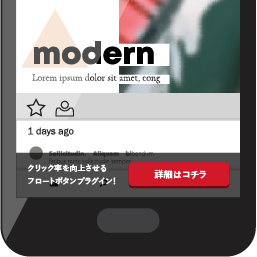
[⌊Floating button demo⌉⌊Floating button demo⌉[
Floating button demo
[⌊Button settings⌉⌊Button settings⌉[
Button settings
[⌊Access analytics report chart⌉⌊Access analytics report chart⌉[
Access analytics report chart
## Instalacja
#### Automatic Installation
1. In the WordPress admin area, go to Plugins > Add New.
2. Enter „Blog Floating Button” and click „Search Plugins.”
3. When the plugin appears, click „Install Now.”
4. After installation, activate the plugin.
#### Manual Installation
1. Download the plugin.
2. Extract `blog-floating-button-latest.zip`.
3. Upload the extracted plugin folder to `/wp-content/plugins/`.
4. In the WordPress admin area, go to Plugins > Installed Plugins and activate the
plugin.
## Recenzje

### [無料部分でもかなりすぐれものです](https://wordpress.org/support/topic/%e7%84%a1%e6%96%99%e9%83%a8%e5%88%86%e3%81%a7%e3%82%82%e3%81%8b%e3%81%aa%e3%82%8a%e3%81%99%e3%81%90%e3%82%8c%e3%82%82%e3%81%ae%e3%81%a7%e3%81%99/)
[gaoxing4649](https://profiles.wordpress.org/gaoxing4649/) 2020-04-24
cv率上げるためにフッターにボタン欲しかったのでこれが無料で利用できるとかかなりお
得だと思います。
[ Przeczytaj 1 recenzje ](https://wordpress.org/support/plugin/blog-floating-button/reviews/)
## Kontrybutorzy i deweloperzy
„Blog Floating Button” jest oprogramowaniem open source. Poniższe osoby miały wkład
w rozwój wtyczki.
Zaangażowani
* [ 1meril ](https://profiles.wordpress.org/1meril/)
[Przetłumacz wtyczkę “Blog Floating Button” na swój język.](https://translate.wordpress.org/projects/wp-plugins/blog-floating-button)
### Interesuje cię rozwój wtyczki?
[Przeglądaj kod](https://plugins.trac.wordpress.org/browser/blog-floating-button/),
sprawdź [repozytorium SVN](https://plugins.svn.wordpress.org/blog-floating-button/)
lub czytaj [dziennik rozwoju](https://plugins.trac.wordpress.org/log/blog-floating-button/)
przez [RSS](https://plugins.trac.wordpress.org/log/blog-floating-button/?limit=100&mode=stop_on_copy&format=rss).
## Rejestr zmian
#### 1.4.21
Security release.
Fixed a stored XSS vulnerability in the access analytics report
screen. Fixed a SQL injection vulnerability in the report screen’s search and filter
parameters. Fixed an error-reporting issue that could disclose server paths. Completed
a plugin-wide review of output escaping and input sanitization. Addressed Plugin
Check findings.
#### 1.4.20
Adjusted error reporting levels.
#### 1.4.19
Fixed an issue with the preview feature.
Fixed an issue with the A/B testing feature.
#### 1.4.18
Improved license activation performance.
#### 1.4.17
Allowed the `
` tag in button text.
Increased the URL character limit to 500.
Updated the conditions that control button visibility. Fixed an issue with the „
Plugin Information” tab.
#### 1.4.16
Fixed issues with the `[bfb_show]` and `[bfb_hide]` shortcodes.
Fixed issues with
the desktop and mobile button display trigger areas. Improved plugin output handling.
#### 1.4.15
Added support for PHP 8.1.x.
Added support for PHP 8.2.x. Added support for WordPress
6.5. Fixed an issue that occurred when jQuery Migrate was not loaded. Added per-
post settings for custom post types.
#### 1.4.14
Added a log deletion feature.
Added a settings export feature. Added support for
WordPress 6.3.2.
#### 1.4.13
Addressed security vulnerabilities.
Fixed minor issues.
#### 1.4.12
Updated the help content.
Added support for PHP 8.1.0. Added support for WordPress
6.1.1.
#### 1.4.11
Fixed minor issues.
#### 1.4.10
Expanded the help content.
Fixed minor issues.
#### 1.4.9
Fixed an issue that cleared the PRO version license key and other settings when
an individual post was updated.
#### 1.4.8
Fixed an issue with hidden pages in the PRO version.
Fixed an issue that prevented
some saved settings from being deleted. Updated how the chart display script is
loaded. Fixed access analytics for WordPress installations in a subdirectory.
#### 1.4.7
Fixed an issue that prevented per-post settings from being saved in some environments.
#### 1.4.6
Improved security.
Fixed minor issues.
#### 1.4.0
Added A/B testing.
Updated the live preview system. Improved data verification
and validation. Fixed minor issues.
#### 1.3.4
Changed the click-tracking report from impression count to user count.
#### 1.3.3
Added charts to the click-tracking report.
#### 1.3.1
Made minor improvements to click tracking.
#### 1.3.0
Released the click-tracking feature.
#### 1.2.3
Resolved undefined variable and undefined index errors.
Added a setting for how
long buttons remain hidden via cookies.
#### 1.2.1
Added color controls for microcopy, descriptions, and button text.
Allowed HTML
in the top text and description fields. Fixed minor issues.
#### 1.2.0
Released per-category settings for the PRO version.
Fixed script loading errors.
Added floating button spacing controls.
#### 1.1.7
Made minor improvements and added help content.
#### 1.1.6
Fixed an issue that prevented links from opening in a new tab.
#### 1.1.5
Fixed the editor screen layout.
#### 1.1.4
Initial working version.
## Meta
* Wersja **1.4.21**
* Ostatnia aktualizacja **2 miesiące temu**
* Włączone instalacje **9,000+**
* Wersja WordPressa ** 6.0 lub nowszej **
* Testowano do **7.0.6**
* Wersja PHP ** 8.2 lub nowszej **
* Język
* [English (US)](https://wordpress.org/plugins/blog-floating-button/)
* Tagi
* [announcement](https://pl.wordpress.org/plugins/tags/announcement/)[banner](https://pl.wordpress.org/plugins/tags/banner/)
[footer banner](https://pl.wordpress.org/plugins/tags/footer-banner/)
* [Widok zaawansowany](https://pl.wordpress.org/plugins/blog-floating-button/advanced/)
## Oceny
5 na 5 gwiazdek.
* [ 1 recenzja 5-gwiazdkowa ](https://wordpress.org/support/plugin/blog-floating-button/reviews/?filter=5)
* [ 0 recenzji 4-gwiazdkowych ](https://wordpress.org/support/plugin/blog-floating-button/reviews/?filter=4)
* [ 0 recenzji 3-gwiazdkowych ](https://wordpress.org/support/plugin/blog-floating-button/reviews/?filter=3)
* [ 0 recenzji 2-gwiazdkowych ](https://wordpress.org/support/plugin/blog-floating-button/reviews/?filter=2)
* [ 0 recenzji 1-gwiazdkowych ](https://wordpress.org/support/plugin/blog-floating-button/reviews/?filter=1)
[Twoja opinia](https://wordpress.org/support/plugin/blog-floating-button/reviews/#new-post)
[Zobacz wszystkierecenzje.](https://wordpress.org/support/plugin/blog-floating-button/reviews/)
## Zaangażowani
* [ 1meril ](https://profiles.wordpress.org/1meril/)
## Wsparcie
Masz coś do dodania? Potrzebujesz pomocy?
[Zobacz forum wsparcia](https://wordpress.org/support/plugin/blog-floating-button/)
## Złóż datek
Czy chcesz wesprzeć rozwój wtyczki?
[ Wspomóż wtyczkę ](https://bfb-plugin.com/)