WordPress.org

Plugin Directory

Automatic YouTube Gallery – Embed Auto-Updating YouTube Video Galleries, Feeds, Playlists & Channels

Automatic YouTube Gallery – Embed Auto-Updating YouTube Video Galleries, Feeds, Playlists & Channels

Opis

★★★★★ Rated 4.8/5 — Trusted by 9,000+ WordPress sites

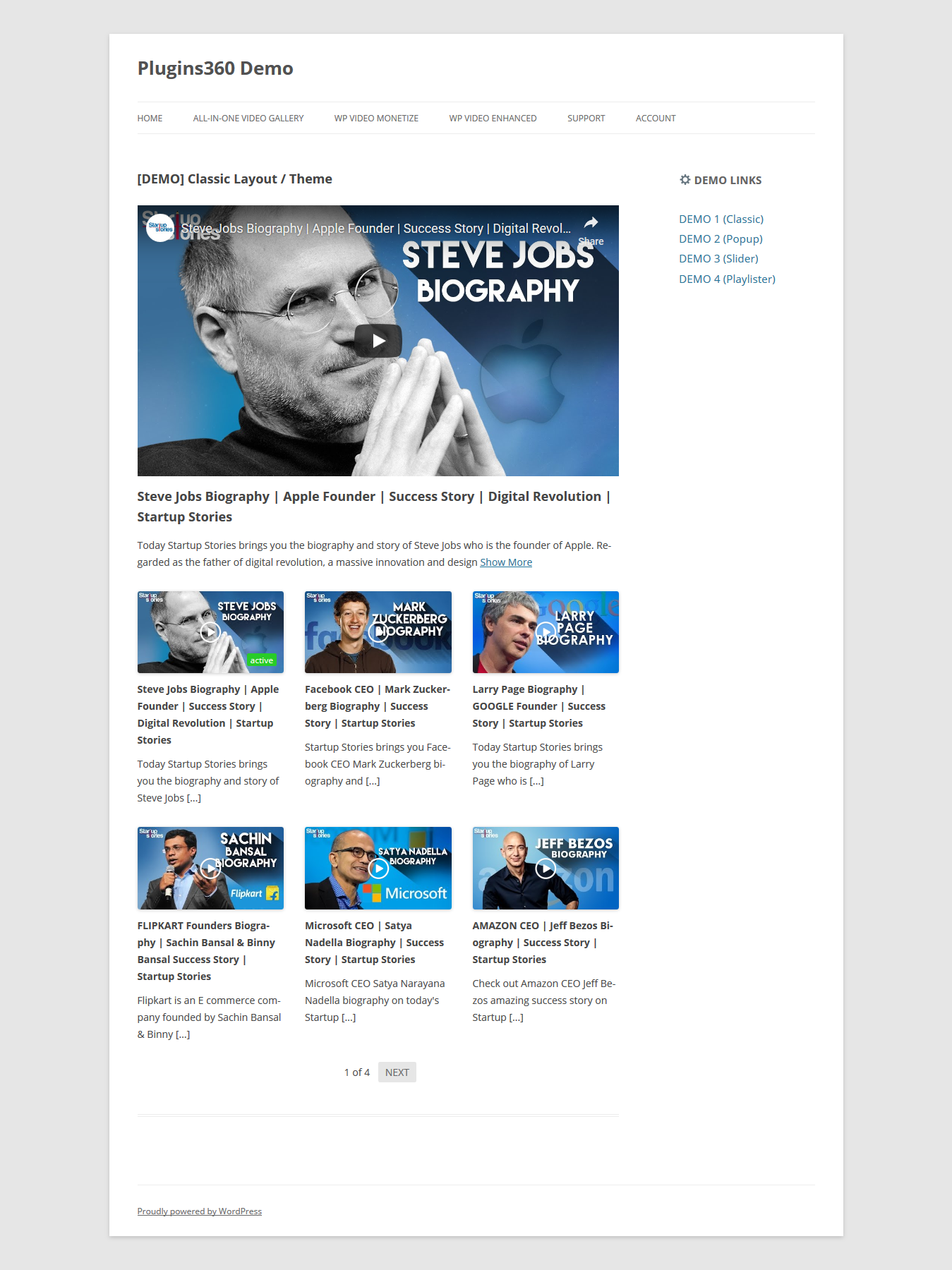
Twórz responsywne, nowoczesne i dynamiczne galerie filmów, po prostu dodając NAZWĘ UŻYTKOWNIKA YouTube, KANAŁ, LISTĘ ODTWARZANIA, SŁOWA KLUCZOWE WYSZUKIWANIA lub własną listę adresów URL filmów.

Automatic YouTube Gallery is the easiest way to embed a YouTube video gallery, feed, or playlist on your WordPress website. Connect your YouTube source once — the plugin imports your videos, builds a beautiful video gallery, and keeps it up to date automatically every time you publish a new video on YouTube. No copy-pasting embed codes, ever again.

The only dynamic YouTube gallery plugin with deeplinking capabilities — every video in your gallery can have its own shareable, search-engine-friendly URL.

EMBED FROM ANY YOUTUBE SOURCE — SET IT ONCE, IT UPDATES ITSELF

  • Channel — embed a YouTube channel gallery that grows with every upload.
  • Playlist — embed a YouTube playlist as a video gallery or feed.
  • Username — display all videos from a YouTube account.
  • Search Keywords — build a gallery from YouTube search results.
  • Livestream — auto-embed the live stream from a YouTube channel, with a custom fallback message when you’re offline.
  • Single Video — embed a single YouTube video (or a YouTube Short).
  • Custom Videos List — hand-pick any list of YouTube video URLs.

STANDARD (FREE) FEATURES

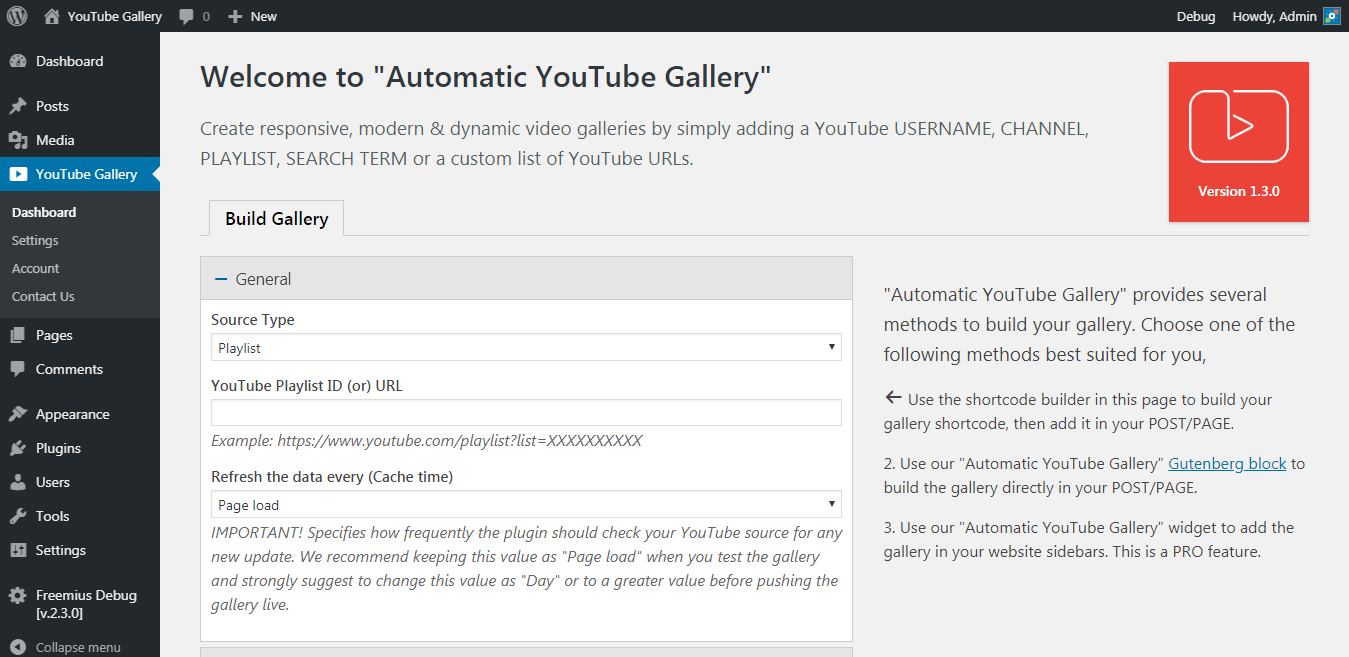
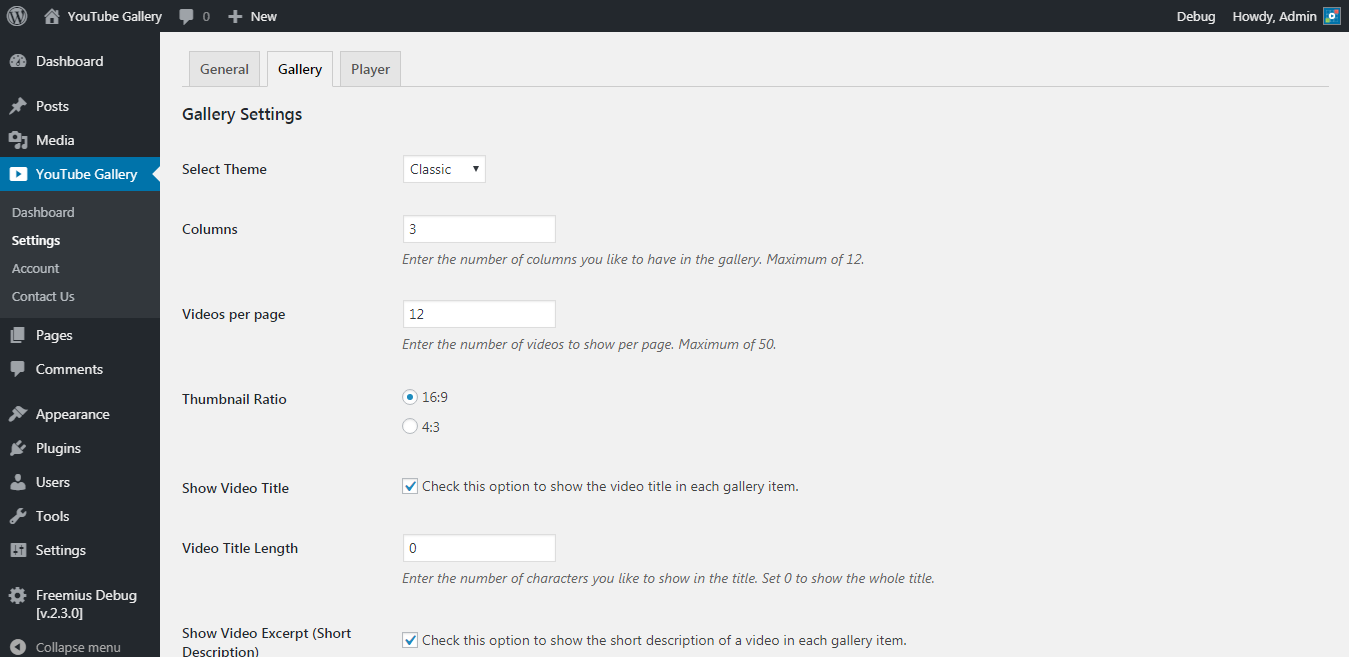
  • Gallery Builder — create unlimited galleries, each with its own reusable shortcode, e.g. [automatic_youtube_gallery id="123"].
  • Automatic sync — a scheduled background import (hourly, daily, weekly, or monthly) keeps your galleries current; click „Update Gallery” anytime for an instant refresh.
  • Video sorting — order videos by published date, title, duration, or random, ascending or descending.
  • YouTube Shorts filter — filter videos by duration to show only Shorts or hide Shorts from your gallery.
  • Exclude videos — blacklist specific videos so they are never imported.
  • Responsive grid layout — up to 12 columns, adapts to any screen size and looks great on mobile.
  • Pagination — „Load More” button or Previous/Next pager, with translatable labels.
  • Live search form — let visitors search videos inside the gallery.
  • Flexible player — native YouTube embed or a lightweight Custom Video Player; autoplay, loop, mute, auto-advance to the next video, player color, closed captions, and player language options.
  • 16:9, 4:3, and 9:16 (Shorts / vertical) aspect ratios for thumbnails and the player.
  • Fast by design — built-in API caching, videos served from your own database, lazy loading, and minified assets for quick page loads.
  • GDPR compliant — optional cookie consent before playback and YouTube’s Privacy Enhanced Mode (youtube-nocookie.com).
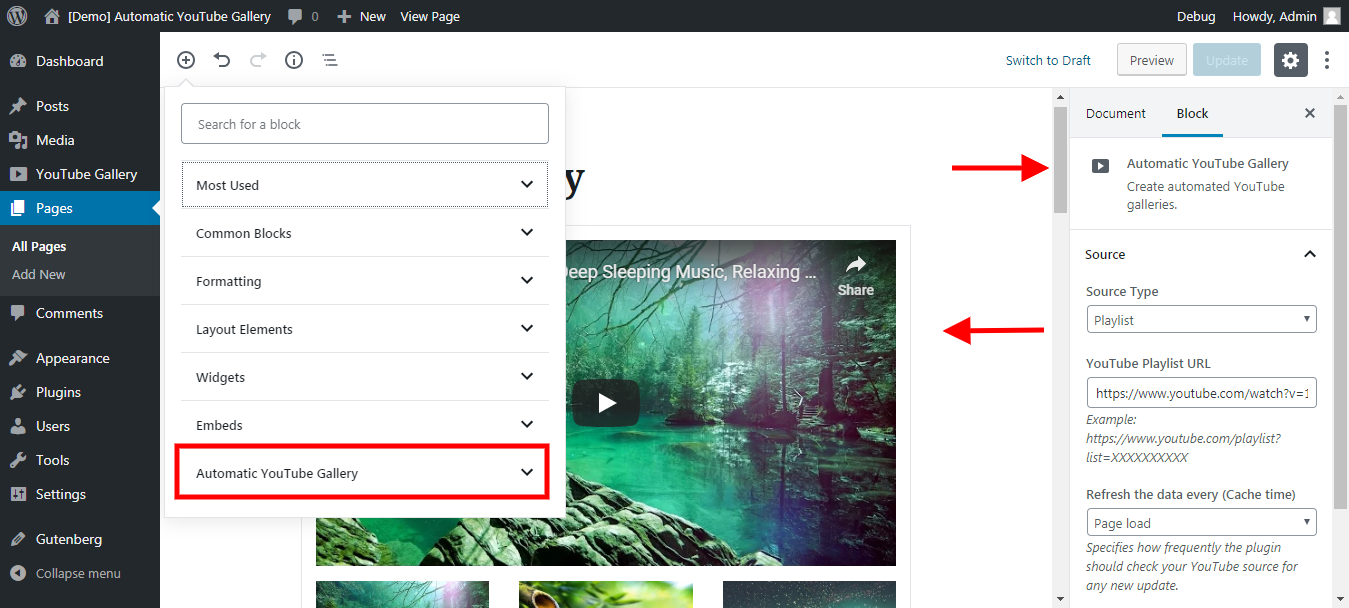
  • Gutenberg Block — embed the YouTube gallery block right in the editor.
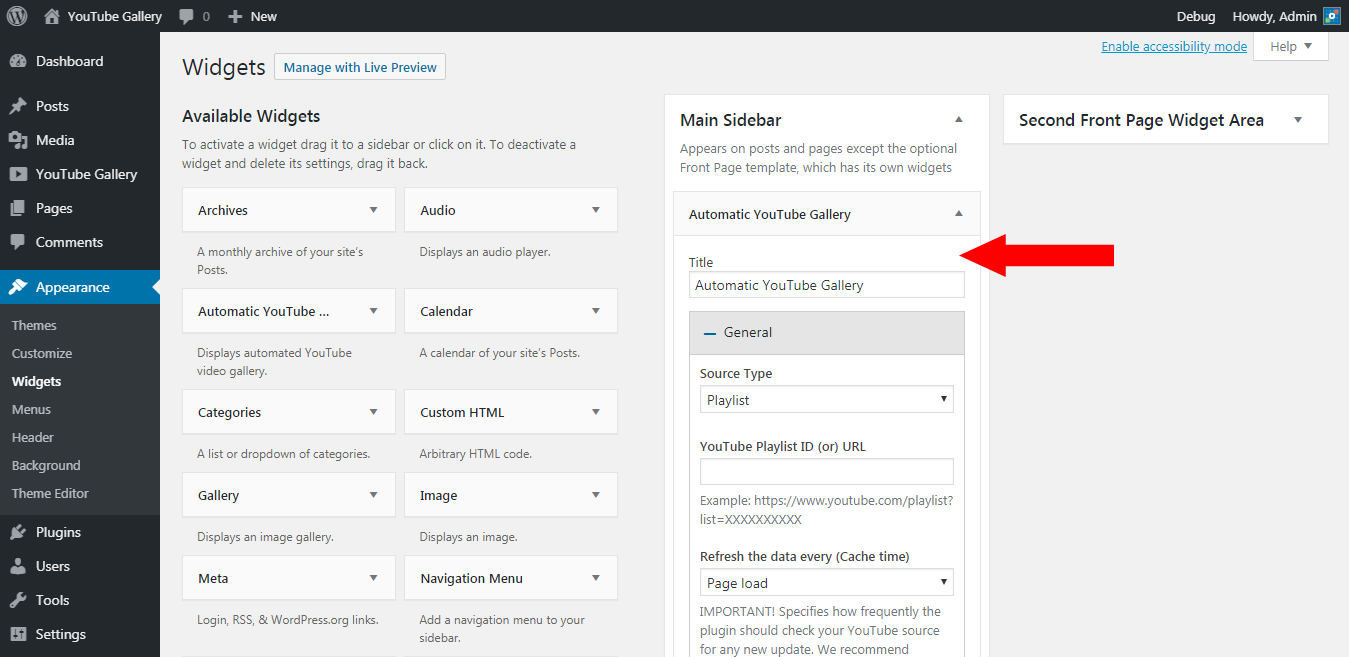
  • Sidebar Widget — works in any widget area and inside Elementor.
  • Works with every page builder — Elementor, Divi, WPBakery, Beaver Builder, Oxygen, and more via block, widget, or shortcode.
  • WPML & Polylang compatible, multisite ready.
  • Most importantly, a clear & beautiful admin interface.
  • [+] Hooks for developers to extend the plugin.

FUNKCJE PREMIUM

  • SEO Suite — deeplinking (a unique, indexable URL for every video), Open Graph tags, Twitter cards, and Schema.org VideoObject markup (JSON-LD) for rich results in Google.
  • Popup Theme — play videos in a lightbox popup.
  • Inline Theme — play videos in place of the clicked thumbnail.
  • Slider Theme — video carousel with customizable arrows, dots, and autoplay; also available as Slider + Popup and Slider + Inline combos.
  • Playlist Theme — a YouTube-style player with a scrollable playlist beside or below it.
  • Popup mode for single videos — open any single video in a lightbox from a thumbnail, custom text, or image trigger.

Try every premium feature free for 7 days — no payment details required.

PERFECT FOR

  • YouTubers & vloggers showcasing their channel on their website.
  • Churches & non-profits embedding sermons and live streams.
  • Musicians, gamers & podcasters displaying their latest episodes.
  • Online courses & tutorial libraries organized by playlist.
  • Businesses embedding product demos, testimonials, and video portfolios.
  • Magazines & news sites curating video feeds by search keywords.

GOTOWE TŁUMACZENIE

Czy mówisz w innym języku? Chcesz wnieść znaczący wkład w rozwój Automatic YouTube Gallery? Nie ma lepszego sposobu niż pomoc nam w tłumaczeniu wtyczki. Ta wtyczka jest gotowa do tłumaczenia, więc możesz tłumaczyć ją łatwo na swój język. Po zakończeniu skontaktuj się z nami tutaj, aby otrzymać dołączony plik językowy w rdzeniu.

POMOC TECHNICZNA I DOKUMENTACJA

Posiadamy dokumentację do wtyczki.

Nadal masz problemy? Dzieli nas od Ciebie tylko e-mail. Napisz do nas opisując swój problem korzystając z dostępnego w menu naszej wtyczki formularza „Kontakt”. Powinieneś otrzymać odpowiedź w ciągu 24 godzin (z wyjątkiem niedzieli).

Odpowiadamy również na wszystkie prośby o wsparcie na forum wsparcia WordPress.org.

Zrzuty ekranu

Bloki

Wtyczka dodaje 1 blok.

  • Automatic YouTube Gallery Build a dynamic YouTube gallery.

Instalacja

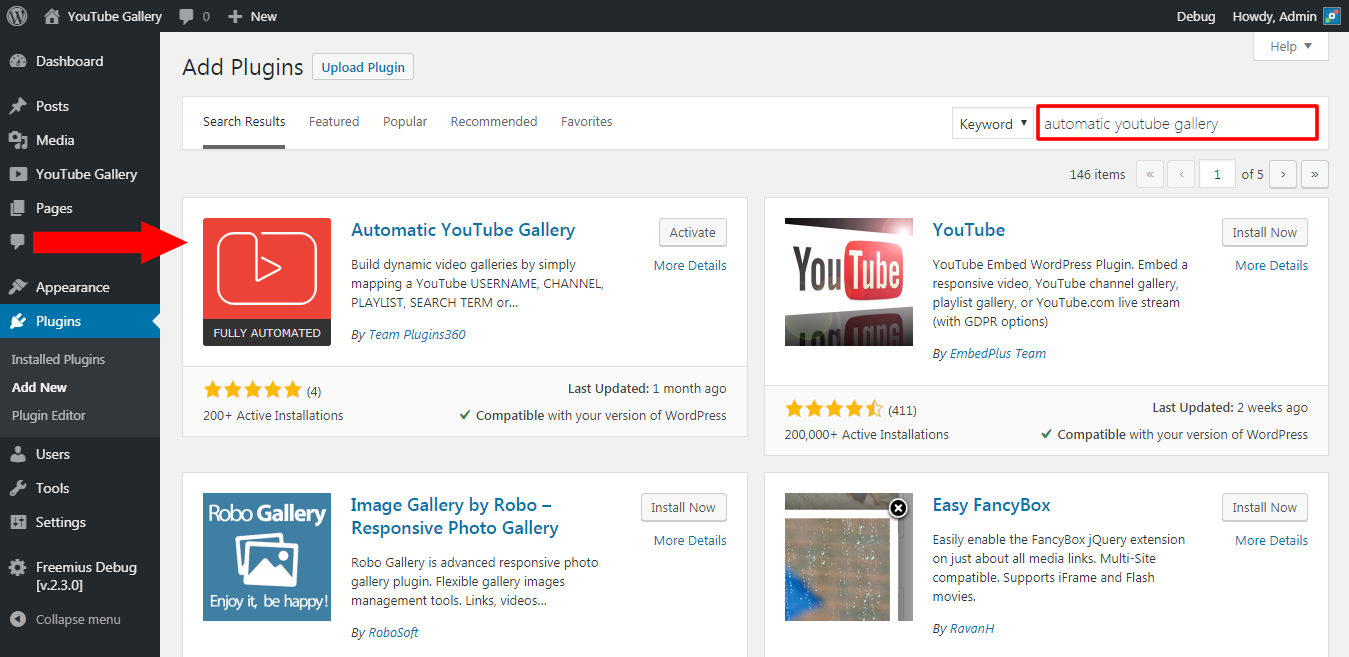
  1. Pobierz wtyczkę.
  2. W panelu Administratora, kliknij na Wtyczki => Dodaj wtyczkę..
  3. Kliknij Prześlij, aby bezpośrednio przesłać plik zip wtyczki.
  4. Użyj przycisku Przeglądaj, aby wybrać pobrany plik zip wtyczki, a następnie kliknij Zainstaluj teraz.
  5. Po zainstalowaniu kliknij „Włącz”.
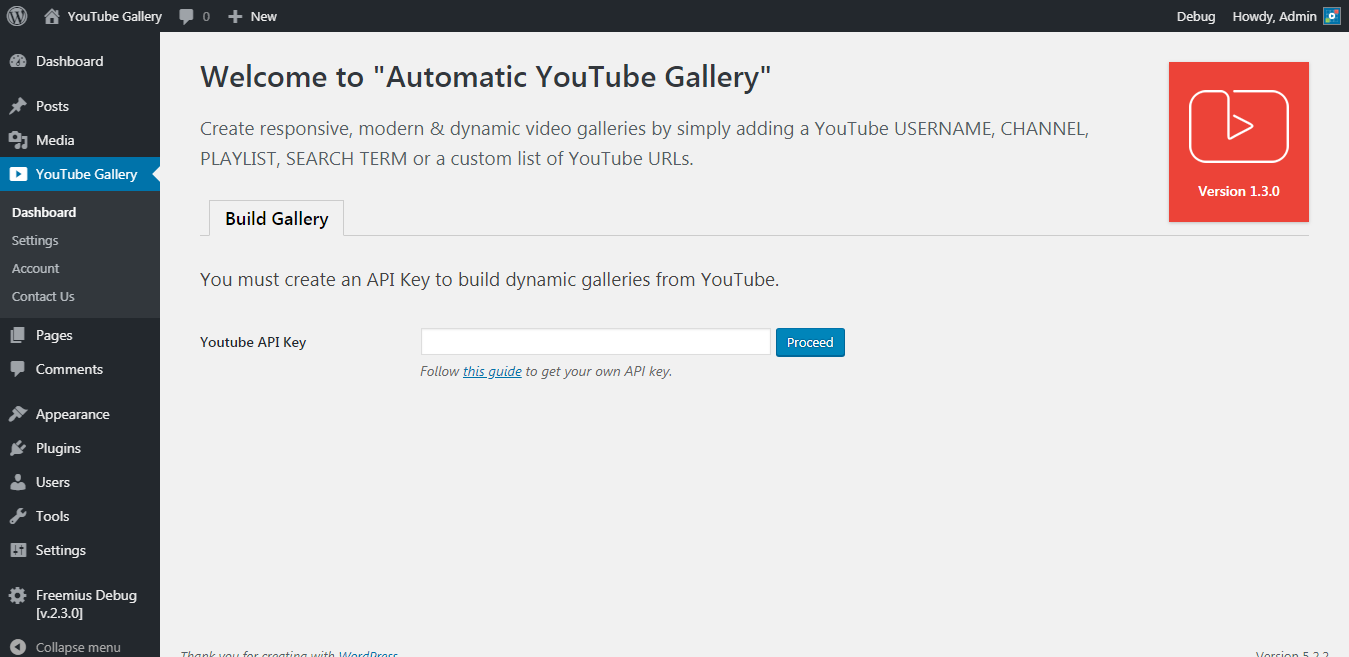
  6. Następnie przejdź do kokpitu wtyczki i skonfiguruj swój „klucz API YouTube” zgodnie z instrukcjami na stronie. Zapisz zmiany.
  7. That’s it. Now, you can start building your galleries straight away from the plugin dashboard.

Aby uzyskać więcej szczegółowych instrukcji, przejdź do dokumentacji wtyczki.

Najczęściej zadawane pytania

1. How do I embed a YouTube gallery on my website?

Create a gallery from the plugin’s Gallery Builder, then place it anywhere using its shortcode — e.g. [automatic_youtube_gallery id="123"] — the Gutenberg block, or the sidebar widget. All three methods work with posts, pages, custom post types, and page builders.

2. Do I need a YouTube API key? How do I get one?

Yes, a free YouTube Data API key is required to fetch your videos. It only takes a few minutes — please follow our get YouTube API key instructions.

3. Does my gallery update automatically when I upload new videos to YouTube?

Yes. Choose an import schedule per gallery (hourly, daily, weekly, or monthly) and a background sync keeps it up to date automatically. Need the newest videos right away? Open the gallery and click „Update Gallery” for an instant refresh.

4. Can I show or hide YouTube Shorts in my gallery?

Yes. Each gallery has a „Filter by Duration” option — set it to „Shorter Than 60 seconds” to build a Shorts-only gallery, or „Longer Than 60 seconds” to hide Shorts. There is also a 9:16 vertical aspect ratio for Shorts thumbnails and the player.

5. Can I embed a YouTube live stream?

Yes. Select the „Livestream” source type to auto-embed the currently live video from any YouTube channel. When the channel is not streaming, the plugin displays a customizable fallback message instead.

6. Will the plugin slow down my website?

No. Videos are imported into your own database and served from there, API responses are cached, images and iframes are lazy-loaded, and all CSS/JS files are minified and loaded only where a gallery is present.

7. Is the plugin GDPR compliant?

Yes. You can require cookie consent before any video is played, show a custom consent message, and enable YouTube’s Privacy Enhanced Mode (youtube-nocookie.com) so no tracking cookies are set until the visitor actually plays a video.

8. Does the plugin support third-party page builders like „Elementor”, „WPBakery”, „Divi”, etc.?

Tak, wtyczka jest w pełni kompatybilna z popularnymi kreatorami stron, takimi jak Elementor, WPBakery, Divi i innymi.

  • For Elementor, the plugin provides a dedicated WordPress widget. You can find it under the „WordPress” tab in the Elementor editor. Simply drag and drop the widget into your design to embed your video gallery seamlessly.
  • Alternatively, for Elementor and other page builders, you can add your gallery shortcode — e.g. [automatic_youtube_gallery id="123"] — to any section or module of your favorite page builder.

Taka elastyczność gwarantuje, że bez problemu zintegrujesz swoją galerię filmową, niezależnie od preferowanego kreatora stron.

9. Help! My video gallery doesn’t look right!

Przede wszystkim, nie martw się! Obiecuję, że uda nam się to naprawić. Przyczyn może być wiele, więc wypróbuj poniższe (w kolejności pojawiania się):

  • Sprawdź konsolę JavaScript w swojej przeglądarce, aby upewnić się, czy nie ma błędów, które mogą być przyczyną tego problemu.
  • Try enabling the „Force Load Plugin Assets” option under the plugin settings — this resolves most conflicts caused by themes, page builders, or optimization plugins.
  • Spróbuj wyłączyć inne wtyczki używane do galerii zdjęć, minimalizujące skrypty, widżety lub zmieniające wygląd witryny – jedną po drugiej – i zastanów się, czy naprawdę tego potrzebujesz.

Jeśli nic nie pomoże, opisz swój problem i wyślij zgłoszenie na naszym forum wsparcia wtyczki. Odpowiedź powinna zostać udzielona w ciągu 24 godzin (oprócz niedzieli).

10. Is the plugin compatible with WordPress Multisite?

Yes, it is. However, do not „network-activate” the plugin. Activate it only on the subsites on which you need the gallery. This can be done under „Plugins => Add New” as the Administrator user.

Recenzje

2026-05-02
Works very nice and exactly what we needed, an easy plugin that shows the latest videos from a youtube channel or playlist. Seems fast and clean.
2026-02-23
I am using this plugin for a client site, and it's very important to him that his YouTube views are counted in the native YouTube analytics, even when viewed from the website. I reached out to the development team about this, and they replied within a matter of hours and addressed our needs with a plugin update and code snippet within a day or two. They were very friendly throughout the process. Super appreciative!
2026-02-20 2 odpowiedzi
Bummer ! It appears that this plugin does not update according the playlist on youtube. It takes a snapshot of the list when the plugin is configured but when new vids are added to the playlist in youtube, it does not see them on the website.
2025-12-02 1 odpowiedź
It does everything you would think of. You want just one video, it's done. You wand multiple videos selectable by multiple rules, it's also done.I only had one small issue: on one of my pages I wanted to display just one video w/o title/description. I wanted to use your plugin because it proved to be lighter than the normal embed :). But without a title and description, a bottom margin still appeard. After doing some research, I discovered that the div that was supposed to contain them still exists but only contains spaces. However, due to the flex gap, this creates a visible bottom margin. I managed to make the margin disappear by using small CSS and JavaScript snippets. Here is the proposed solution: could you make it so that the bottom div is not generated at all if it has no content to show?
2025-07-15
The free version works great. Easy setup. Going to support this developer by having clients buy pro version of this and other of their plugins!!
Przeczytaj 31 recenzji

Kontrybutorzy i deweloperzy

„Automatic YouTube Gallery – Embed Auto-Updating YouTube Video Galleries, Feeds, Playlists & Channels” jest oprogramowaniem open source. Poniższe osoby miały wkład w rozwój wtyczki.

Zaangażowani

Wtyczka „Automatic YouTube Gallery – Embed Auto-Updating YouTube Video Galleries, Feeds, Playlists & Channels” została przetłumaczona na 7 języków. Podziękuj tłumaczom za ich wkład.

Przetłumacz wtyczkę “Automatic YouTube Gallery – Embed Auto-Updating YouTube Video Galleries, Feeds, Playlists & Channels” na swój język.

Interesuje cię rozwój wtyczki?

Przeglądaj kod, sprawdź repozytorium SVN lub czytaj dziennik rozwoju przez RSS.

Rejestr zmian

2.9.1

  • Compatibility: Tested with WordPress 7.1.

2.9.0

  • Security Fix: Fixed a vulnerability that allowed an unauthenticated visitor to add YouTube videos of their choosing to any gallery on the site through the gallery pagination endpoint. The endpoint now identifies the gallery from the site’s own saved data instead of trusting the request, and will not fetch from the YouTube Data API for a gallery that does not exist on the site.
  • Security Fix: A gallery’s cache duration can no longer be altered by the request, so the cache can no longer be bypassed to force repeated YouTube Data API calls against your quota. Your „Cache Duration” setting continues to work exactly as configured, including „No Caching”. Added the ayg_ajax_cache_duration filter hook for sites that need to change it.
  • Security Fix: Pagination tokens for galleries that read from the YouTube Data API are now signed, so only page requests your own site issued are acted on. This closes the remaining way an unauthenticated visitor could run down your daily API quota.
  • Security Fix: Search keywords are now fully URL encoded before the request is sent to the YouTube Data API, so extra parameters can no longer be appended to the outgoing request.
  • Security Fix: Hardened reading of stored video thumbnail data so it can only ever produce plain data.

All of the security issues above were discovered and reported responsibly to us by Mohammed Abd Alrahman.

  • New: Introduced ayg_ajax_cache_duration filter hook.
  • New: Introduced ayg_get_gallery_source(), ayg_db_gallery_has_videos(), ayg_sign_page_token() and ayg_verify_page_token() helper functions.

2.8.1

  • New: Introduced the Gallery Builder, which replaces the classic Shortcode Builder. Every gallery now has its own saved shortcode with a single unique ID — e.g. [automatic_youtube_gallery id="123"] — that you can reuse anywhere and manage from one place.
  • New: Galleries now store their videos in the plugin’s own tables, unlocking new per-gallery options: order videos by published date, title, duration, or random; filter by duration to show only Shorts or hide Shorts; and exclude specific videos from the import.
  • New: Galleries are kept up to date automatically by a scheduled background sync — choose hourly, daily, weekly, or monthly per gallery, or pause it entirely. If you ever need the newest videos right away, just open the gallery and click „Update Gallery” for an instant refresh.
  • New: Gallery Builder galleries are no longer limited to 50 videos per page — set „Videos per Page” to 0 to show all videos on a single page.
  • Tweak: Your existing shortcodes, Gutenberg blocks, and widgets are fully backward compatible and continue to work exactly as before — nothing on your live site changes or needs to be rebuilt.
  • Tweak: Removed the „Show Annotations” (iv_load_policy) player option, as YouTube retired video annotations and the parameter no longer has any effect.
  • Tweak: Refreshed the plugin logo and admin branding.
  • Tweak: Updated Freemius SDK to version 2.13.4.
  • Naprawiono: Różne drobne poprawki błędów i udoskonalenia wydajności.

2.7.2

  • New: Added „Slider Autoplay” and „Autoplay Speed” settings for the Slider + Popup theme.
  • New: Introduced ayg_theme_classic_params, ayg_theme_inline_params, ayg_theme_playlist_params, ayg_theme_slider_params, ayg_theme_slider_inline_params, and ayg_theme_slider_popup_params filter hooks for customizing player parameters per theme.
  • New: Introduced ayg_theme_slider_slick_options filter hook for customizing Slick carousel options across all slider themes.
  • New: Introduced ayg_search_form_params filter hook for customizing search form parameters. The previous ayg_search_form_args hook is deprecated but retained for backward compatibility.
  • New: Introduced ayg_autoflush_rewrite_rules_in_admin filter hook to optionally enable rewrite rule checks in admin contexts (runs on public pages only by default).
  • Poprawka: Zaktualizowano Freemius SDK do wersji 2.13.1.
  • Tweak: Improved performance of video storage by replacing per-video database queries with a single bulk INSERT per API response, reducing database load on cache-miss pagination requests.
  • Tweak: Disabled autoloading for the ayg_transient_keys, ayg_channel_ids, and ayg_playlist_ids options to prevent lookup caches from being loaded on every page request site-wide.
  • Tweak: Switched rewrite rule flush from hard (.htaccess rewrite) to soft (database only), avoiding unnecessary file I/O on the front end.
  • Naprawiono: problemy zgodności z WordPress 7.0.

2.7.1

  • New: Added options to force-load the plugin’s CSS and JavaScript across all front-end pages. This helps resolve layout or functionality issues caused by themes, page builders, or optimization plugins.
  • Nowość: Dodano opcję „Krótkie / Pionowe (9:16)” do ustawienia „Wysokość obrazka (proporcje)”.
  • Nowość: Dodano opcję „Krótkie / Pionowe (9:16)” do ustawienia „Wysokość odtwarzacza (proporcje)”.
  • Tweak: Improved popup player behavior — the player now always fits within the viewport. Previously, it could extend beyond the visible area.
  • Tweak: Enhanced slider dots behavior by limiting the maximum number of dots to 5 and automatically enabling dots during navigation when using the slider template.
  • Tweak: Introduced a new wrapper function, ayg_get_option(), for the WordPress get_option() function to prevent issues when plugin settings are missing.
  • Fix: Resolved an issue where deeplinking did not work correctly on the site home/front page.
  • Fix: Registered custom query variables to prevent conflicts with SEO and optimization plugins that may strip unrecognized query vars.
  • Naprawiono: Różne drobne poprawki błędów i udoskonalenia wydajności.

2.6.5

  • Poprawiono: Zaktualizowano Freemius SDK do wersji 2.13.0.
  • Naprawiono: problemy ze zgodnością z WordPress 6.9.

2.6.4

  • Nowość: Dodano obsługę wyświetlania pojedynczych filmów w wyskakującym oknie.
  • Poprawiono: udoskonalono obsługę strukturalnych danych Schema.org (JSON-LD) dla wszystkich pojedynczych układów filmów.
  • Poprawiono: Zaktualizowano Freemius SDK do wersji 2.12.2.
  • Naprawiono: Rozwiązano problem, w wyniku którego przycisk trybu pełnoekranowego zatrzymywał odtwarzanie w trybie pełnoekranowym.
  • Naprawiono: Ulepszona zgodność z kreatorem stron Divi.
  • Naprawiono: Różne drobne poprawki błędów i udoskonalenia wydajności.

2.6.1

  • Security Fix: Addressed multiple security issues to enhance overall plugin security.
  • Poprawiono: Zaktualizowano Freemius SDK do wersji 2.12.1.
  • Naprawiono: Naprawiono problemy zgodności z kreatorem stron Oxygen.
  • Naprawiono: Różne drobne poprawki błędów i udoskonalono wydajność.

2.6.0

  • New: Added support for disabling automatic page scroll to the video player by setting the „Page Scroll Top Offset” to -1, giving users more control over layout behavior.
  • Fix: Resolved various minor bugs and applied performance improvements for a smoother experience.

2.5.9

  • New: Introduced a search form to filter videos within the gallery for easier navigation.
  • New: Added a dedicated settings page to manage all button labels used by the plugin in one place.
  • Tweak: „Development Mode” is now disabled by default, as some users were unknowingly using it on production websites, leading to YouTube quota exceeded errors.
  • Tweak: Added an option to disable caching on a per-gallery basis for greater flexibility.
  • Fix: Addressed several minor bugs and implemented performance enhancements.

2.5.6

  • Aktualizacja: Zaktualizowano do najnowszej wersji Freemius SDK w celu zapewnienia lepszej kompatybilności.
  • Naprawiono: Naprawiono wiele drobnych błędów, aby zapewnić większą płynność i doznania użytkownika.

2.5.5

  • Poprawiono: Zaktualizowano „Freemius SDK” do wersji 2.10.1.
  • Naprawiono: Problemy ze zgodnością z kreatorem stron Elementor.

2.5.2

  • Nowość: Wprowadzono „Własny odtwarzacz wideo” jako alternatywę dla domyślnego, natywnego osadzania treści z YouTube. Użytkownicy mogą to skonfigurować za pomocą opcji „Typ odtwarzacza”.
  • New: Added „Lazy Loading” for images and videos, enhancing page load times and overall performance.
  • New: Introduced a new „Page Scroll Top Offset” option, enabling users to define a custom top offset (in pixels) when the page scrolls to the video player after clicking on a thumbnail.
  • Tweak: Completely rewrote the plugin’s JavaScript files using the latest „Custom Elements” technology, ensuring better integration and improved performance.
  • Poprawiono: Zaktualizowano „Freemius SDK” do wersji 2.9.0.
  • Naprawiono: Rozwiązano różne drobne błędy w celu zwiększenia stabilności i funkcjonalności.

2.4.3

  • Nowość: Wprowadzono nową opcję „Szerokość odtwarzacza”.
  • Poprawiono: Zaktualizowano Freemius SDK (2.7.4).
  • Naprawiono: Problem z wyświetlaniem obrazu plakatu po użyciu pojedynczego krótkiego kodu filmu.
  • Naprawiono: [+] kilka drobnych poprawek błędów.

2.3.9

  • Poprawiono: Zaktualizowano Freemius SDK (2.7.0).
  • Naprawiono: problem z buforowaniem interfejsu API transmisji na żywo.
  • Naprawiono: Problem konfliktu z wtyczką Google Site Kit.
  • Naprawiono: [+] kilka drobnych poprawek błędów.

2.3.8

  • Poprawiono: Zoptymalizowano wczytywanie JavaScript.
  • Poprawiono: Zaktualizowanno Freemius SDK (2.6.2).
  • Naprawiono: problemy zgodności z RODO.
  • Naprawiono: Funkcja transmisji na żywo w YouTube przestała działać z powodu niedawnej aktualizacji API YouTube.
  • Naprawiono: [+] kilka drobnych poprawek błędów.

2.3.6

  • Poprawiono: Zaktualizowano Freemius SDK (2.6.1).
  • Naprawiono: problemy zgodności z WordPress 6.4.
  • Naprawiono: [+] kilka drobnych poprawek błędów.

2.3.5

  • Naprawiono: Poprawka bezpieczeństwa: Zepsuta kontrola dostępu. Podziękowania dla Rafshanzani Suhada z Patchstack.
  • Naprawiono: [+] kilka drobnych poprawek błędów.

2.3.3

  • Poprawiono: Zaktualizowano Freemius SDK (2.5.10).
  • Poprawiono: Poprawka bezpieczeństwa.
  • Naprawiono: [+] kilka drobnych poprawek błędów.

2.3.2

  • Nowość: zgodność z wtyczką WPML.
  • Nowość: zgodność z wtyczką POLYLANG.
  • Nowość: Obsługa opcji „Wyciszony” w odtwarzaczu.
  • Nowość: „Tryb rozszerzonej prywatności” dla odtwarzacza.
  • Nowość: obsługa parametru YouTube „Origin”, który zapewnia dodatkowe zabezpieczenie odtwarzacza.
  • Nowość: Opcje zmiany etykiet przycisków stronicowania „Wczytaj więcej”, „Poprzedni” i „Następny”.
  • Poprawiono: Aktualizacja API Gutenberg do v2.
  • Poprawiono: Zaktualizowano Freemius SDK (2.5.7).
  • Poprawiono: wszystkie pliki CSS i JS dodawane przez wtyczkę są minimalizowane dla lepszej wydajności.
  • Naprawiono: [+] kilka drobnych poprawek błędów.

2.2.0

  • Poprawiono: Zaktualizowano Freemius SDK (2.5.2).
  • Naprawiono: Problemy z wydajnością, które wystąpiły po aktualizacji do wersji 2.1.0.

2.1.0

  • Nowość: Widżet panelu bocznego
  • Nowość: hak filtra „ayg_pagination_args” umożliwiający programistom nadpisanie argumentów stronicowania.
  • Poprawiono: Zmieniono inicjalizację odtwarzacza z „Iframe” na „Javascript” w celu uzyskania lepszej wydajności.
  • Poprawiono: Zaktualizowano Freemius SDK (2.4.5).
  • Naprawiono: [+] kilka drobnych poprawek błędów.

2.0.0

  • Nowość: zgoda RODO przed odtwarzaniem.
  • Tweak: The plugin front-end has been completely rewritten.
  • Naprawiono: [+] kilka drobnych poprawek błędów.

1.6.5

  • Poprawka bezpieczeństwa.

1.6.4

  • Nowość: automatyczne osadzanie transmisji na żywo z kanału YouTube.
  • Naprawiono: [+] kilka drobnych poprawek błędów.

1.6.3

  • Fix: Videos with the „Unlisted” status on the YouTube website are not showing.
  • Fix: The „Single Video” source type is broken when the default theme is „Popup” in the plugin’s global settings page.

1.6.2

  • Naprawiono: problemy zgodności z WordPress 5.8.

1.6.1

  • Poprawiono: Pliki skryptów odtwarzacza i galerii zostały całkowicie przepisane w celu zapewnienia większej wydajności i elastyczności.
  • Poprawiono: Wyłączono powiązane filmy na końcu filmu.
  • Poprawiono: Wykluczono prywatne filmy z galerii.
  • Tweak: Automatic advancing to the next video when the video is the last on the page. The „Pagination Type” should be „Load More”.
  • Poprawiono: Zaktualizowano Freemius SDK (2.4.2).
  • Naprawiono: [+] kilka drobnych poprawek błędów.

1.6.0

  • Poprawiono: Zaktualizowano Freemius SDK (2.4.1).
  • Naprawiono: problemy zgodności z WordPress 5.6.

1.5.0

  • New: A filter hook „ayg_script_args” for developers to override the gallery JS args.
  • Naprawiono: problemy zgodności z WordPress 5.5.
  • Naprawiono: błąd 403 – zabroniony dostęp do klucza API YouTube.
  • Fix: SMUSH plugin conflict issues.
  • Naprawiono: [+] kilka drobnych poprawek błędów.

1.4.0

  • Tweak: Make URLs as clickable links in the video description.
  • Poprawiono: Zaktualizowano Freemius SDK (2.4.0).
  • Naprawiono: [+] kilka drobnych poprawek błędów.

1.3.0

  • Nowość: Zaktualizowano kokpit wtyczki z kreatorem krótkich kodów.
  • Naprawiono; Konflikt z wtyczką fitvids.js

1.2.0

  • Poprawiono: Zaktualizowano Freemius SDK (2.3.0).
  • Poprawiono: Poprawka bezpieczeństwa.

1.1.0

  • Poprawiono: Poprawka bezpieczeństwa.

1.0.0

  • Pierwsze wydanie.